Documentation Index

Fetch the complete documentation index at: https://docs.canton.network/llms.txt

Use this file to discover all available pages before exploring further.

This section was copied from existing reviewed documentation. Source: docs/replicated/quickstart/3.4/sdk/quickstart/observe/observability-troubleshooting-overview.rst Reviewers: Skip this section. Remove markers after final approval.

Canton Network Quickstart observability & troubleshooting overview

The screenshots in this guide are taken from multiple sessions and are inconsistent with each other. This will be rectified once some of the updates are committed.
Contents Overview of observability
The LocalNet configuration Observability overview Daml Shell Grafana Direct Postgres access Interactive debugger
Observability and tracing
Correlation identifiers Direct Ledger inspection using correlation identifiers Correlated Logs and traces using correlation identifiers
It’s assumed that you have read the quickstart getting started guide and explore the demo. If you haven’t, we strongly encourage those documents to establish a baseline understanding of observability.

Overview of observability

The Canton Network quickstart deployment configuration includes a full observability suite. Tools preconfigured for monitoring and troubleshooting distributed Canton applications—both in development and production. The observability suite provides three key types of monitoring data:
  • consolidated structured logs for application and system events
  • distributed traces that visualize end-to-end transaction flows; and
  • metrics for monitoring key performance indicators.
The suite allows data types to be correlated with each other to provide insights for root cause analysis. In addition, the Canton Ledger also provides a variety of correlation and tracing ids that permit tracking transaction provenance across multiple organizations and environments.

The LocalNet configuration

The Quickstart runtime configuration is defined in .env.local, which allows the option to bring up a local deployment of the Observability Stack. This file can be created using $ make setup, which wraps the command $ ./gradlew configureProfiles --no-daemon --console=plain --quiet, or can be edited manually to set environment variables LOCALNET_ENABLED and OBSERVABILITY_ENABLED to true or false as desired. The LocalNet runtime configuration is handled by docker-compose configured in compose.yaml using environment variables from .env in the quickstart/ project root directory. The usual Docker commands and tooling applies. Immediately useful commands you probably already know:
  • $ docker ps lists the running containers.
  • $ docker logs [-f] <container> fetches the logs of a container, and follow the logs with the -f option.
    • If the system is not working well to the extent you do not trust the observability stack (discussed later), docker logs backend-service is a good place to start looking for errors that might provide an insight into what has gone wrong.
  • $ docker restart <container> for those instances where a container seems to have become stuck.

Observability overview

The Quickstart application provides a foundational production Daml application. It includes a full observability configuration which is helpful to troubleshoot or debug an application. As a working demo, Quickstart is opinionated regarding its technology stack. However, the platform itself is agnostic. Individual components can be replaced as required. The current troubleshooting and debugging services include:

Daml Shell

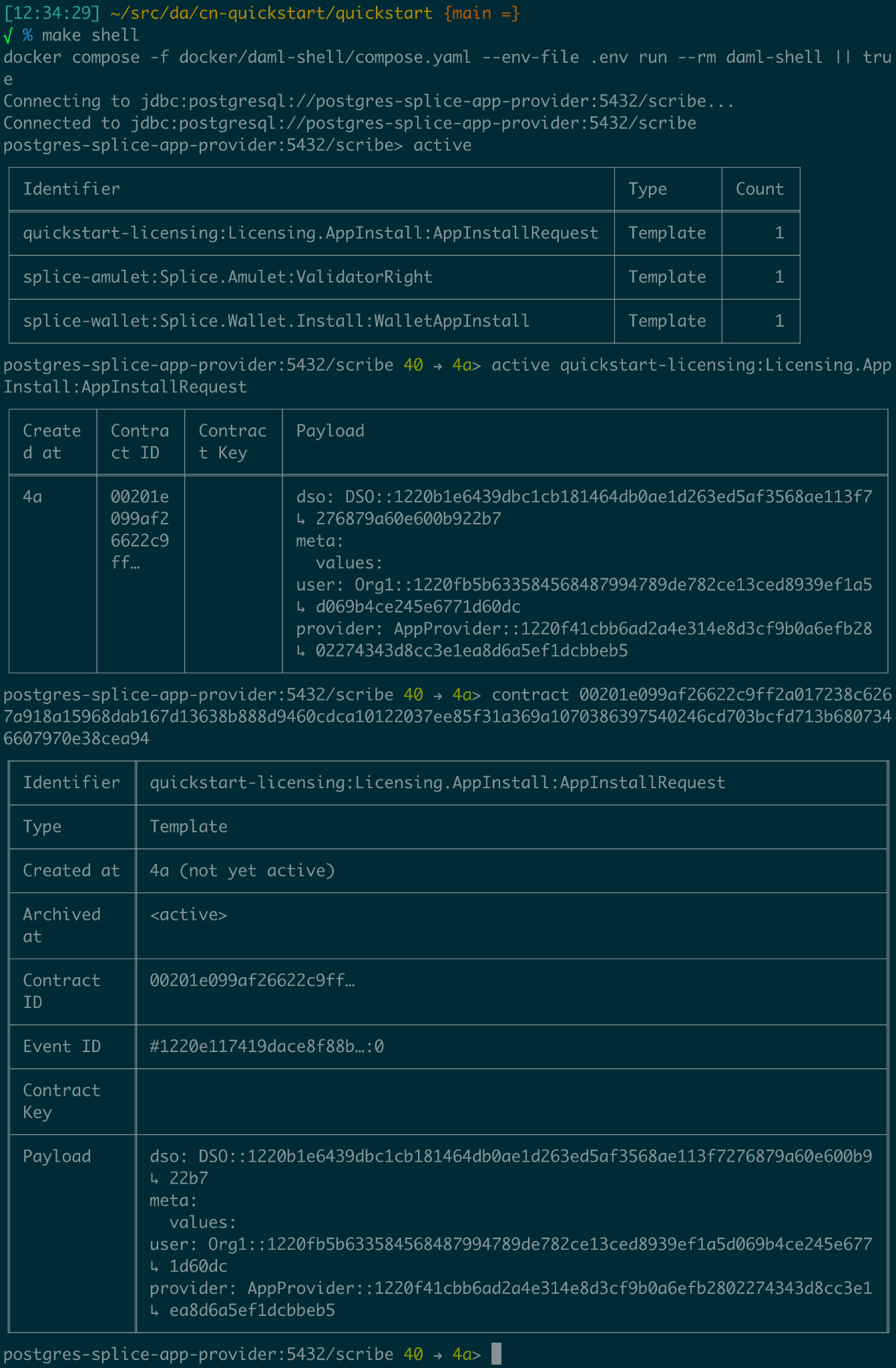
Daml Shell is a terminal application that provides interactive local ledger inspection on top of PQS. Quickstart is configured to launch Daml Shell in a Docker container and is configured to connect to the included application provider’s PQS instance. This is easiest to access via the top-level project scripts accessed via make from quickstart/. To see this in action, build and start the quickstart app then: Run $ make create-app-install-request to use curl to submit the create AppInstallRequest ... command to the ledger1 to initiate user onboarding2. Then you can use the following Daml Shell commands: > active to see a summary of the contracts you created; and, > active quickstart-licensing:Licensing.AppInstall:AppInstallRequest to see the contract details for any Asset contracts on the ledger; finally, > contract [contract-id from the previous command]3 to see the full detail of the AppInstallRequest contract on the ledger. > help [command] provides context help for daml shell commands.4

Grafana

Grafana is accessible via its web interface, which is port-mapped to http://localhost:3030/, and can be opened in the current browser from the command line using make open-observe. Your debugging should focus on using Grafana’s trace and log facilities, as well as ledger inspection via Daml Shell. If you make sure that your exported logs and traces are sufficient to support debugging during development, they are more likely to support diagnostics in production, as well. There is additional access configured into the Quickstart that can assist with debugging on LocalNet. Use the same diagnostic tools for development as you will for production. If you add a log line that allows you to identify and fix a bug in development, then keeping it around at trace or debug log levels increases your operational readiness. Using tools that won’t be available in production to debug in development reduces operational readiness.

Direct Postgres access

All persistent state in the example application is stored in one or more postgres databases. You can use the postgres configuration in .env to connect directly to these instances.
   $ docker exec -it <postgres container> psql -v --username <.env username> --dbname <.env dbname> --password

For example: if you connect to the postgres-splice-app-provider container (default username cnadmin, dbname scribe, and password supersafe; then you can use the SQL interface to PQS to examine the app-provider’s participant’s local ledger. The SQL API to PQS is documented in the daml documentation.

Interactive debugger

If you review the compose.yaml file and examine the configuration for backend-service you will see the lines:
   backend-service:
     environment:
       ...
       JAVA_TOOL_OPTIONS: "-javaagent:/otel-agent.jar
       -agentlib:jdwp=transport=dt_socket,server=y,suspend=n,address=*:5005"

    ports:

      - "${BACKEND_PORT}:8080"
      - "5055:5005"


This enables remote debugging of the Java component backend in the user application (backend-service). You can use this to connect an IDE Debugger to the service at runtime if required. We recommend Grafana as your first resort, along with the consolidated logs in Loki. This keeps the system debuggable in production.

Observability and tracing

Faulty distributed systems can be notoriously hard to diagnose. From the start of a project, Quickstart provides the sort of observability and diagnostics facilities that are otherwise often only developed toward the end. Simplifying diagnostics for new Canton Network Applications from the outset of each project is one of the motivations behind the development of Quickstart. The links in the overview include the official user and reference documentation for the various tools included in Quickstart. While there is no substitute for the official documentation, it is hoped the following tour of the capabilities configured into Quickstart can provide a starting point for your own experimentation.

Correlation identifiers

Inspecting Canton begins by correlating identifiers, much like inspecting any other distributed system. Canton can accept and/or generate a number of identifiers suitable for correlating across both time, various nodes, and the evolving state of the ledger. A few of the key identifiers to be aware of are:
IdentifierSpecified byScope
ApplicationIdThe Ledger ClientIdentifies the ledger client during command submission and processing.
WorkflowIdThe Ledger ClientIdentifies the business process. Persisted to the ledger.
CommandIdThe Ledger ClientIdentifies the business “act” associated with a ledger command. Persisted to the ledger. Visible only to the submitting party. Common across retries.
SubmissionIdThe Ledger ClientIdentifies an individual ledger submission to a participant node.
TransactionIdDaml LedgerGlobal identifier for a committed transaction to the ledger. Only visible to participant nodes that witness or are informed of the transaction.5
LedgerEventIdDaml LedgerGlobal identifier for a node within a committed transaction tree corresponding to a ledger event.
Trace/SpanId6Ledger Client (or upstream)Accepted by GRPC/HTTP ledger interfaces and honoured throughout the Canton Network code. Where one is not provided may sometimes be generated internally to provide tracing support within the network.
LedgerOffsetParticipant NodeThe height of a transaction within the local linearization of the ledger by a participant node.7
ContractIdDaml LedgerGlobal identifier for a contract that was created successfully on the ledger at some point. If the contract has been subsequently archived the id remains a stable and valid way to refer to it even though the associated contract can no longer be used.
TemplateIdDaml ApplicationCombined with a PackageId this provides a global identifier for a Daml smart contract.
PartyIdParticipant NodeIdentifier of the Party on the Canton ledger.8
Useful Correlation Identifiers The goal of the observability configuration is to make it easier to navigate through the provenance of any state or event in the wider system. Any or all of these identifiers can be used to correlate a combination of logs, metrics, and state. Three of these in particular are intended to be set to corresponding business identifiers derived from your specific business domain: application-id, workflow-id, and command-id. Navigation is enabled by the use of structured logs from as many components as possible9. It is recommended that your custom components likewise emit structured logs for more accurate consumption by OpenTelemetery.

Direct Ledger inspection using correlation identifiers

Starting from $ make stop clean-all && make build start, we proceed with initiating the example application app-user onboarding:
   $ make create-app-install-request | cat -n

   docker compose -f docker/app-user-shell/compose.yaml --env-file .env run --rm create-app-install-request || true
   get_token ledger-api-user AppProvider
   get_user_party AppProvider participant-app-provider
   http://participant-app-provider:7575/v2/users/AppProvider
   get_token ledger-api-user Org1
   get_user_party Org1 participant-app-user
   http://participant-app-user:7575/v2/users/Org1
   get_token administrator Org1
   http://validator-app-user:5003/api/validator/v0/scan-proxy/dso-party-id
   http://participant-app-user:7575/v2/commands/submit-and-wait
   --data-raw {
     "commands" : [
        {
           "CreateCommand" : {
             "template_id":
             "#quickstart-licensing:Licensing.AppInstall:AppInstallRequest",
             "create_arguments": {
                "dso":
                "DSO::1220015e721c8ec5c1a5868b418442f064530e367c2587a9b43bd66f58c7bfddfec4",
                "provider":
                "AppProvider::12202fe7b2bf950dca3858b880d9ee0dd58249af8821ff2330ea1b80420852e816ff",
                "user":
                "Org1::122072b20a515d939910f9412f915cff8c1a7a427ddde76c6d0b7646d0022d4d4551",
                "meta": {"values": []}
             }
           }
        }
     ],
     "workflow_id" : "create-app-install-request",
     "application_id": "ledger-api-user",
     "command_id": "create-app-install-request",
     "deduplication_period": { "Empty": {} },
     "act_as":
     ["Org1::122072b20a515d939910f9412f915cff8c1a7a427ddde76c6d0b7646d0022d4d4551"],
     "read_as":
     ["Org1::122072b20a515d939910f9412f915cff8c1a7a427ddde76c6d0b7646d0022d4d4551"],
     "submission_id": "create-app-install-request",
     "disclosed_contracts": [],
     "domain_id": "",
     "package_id_selection_preference": []
   }
   {"update_id":
   "1220e48d6d59af99a1b61eca414fe25766c342bb4e7d8d485e049a11a7f2267ed5c0",
    "completion_offset":73}

This is the output of a script submitting a create command to the app-user’s participant node, it already contains number of the correlation ids mentioned above:
14TemplateId#quickstar t-licensing:Licensing.AppInstall:AppInstallRequest
16 -18Party IdsDSO::1220015e721c8ec5c1a5868b…ddfec4 AppProvider::12202fe7b2bf950d…e816ff Org1::122072b20a515d939910f94…4d4551
25Workflow Idcreate-app-install-request
26Application Idledger-api-user
27Command Idcreate-app-install-request
31Submission Idcreate-app-install-request
36Transaction Id1220e48d6d59af99a1b61eca414fe…7ed5c0
We can immediately use the transaction id in Daml Shell to view the associated ledger transaction:
   $ make shell
    docker compose -f docker/daml-shell/compose.yaml --env-file .env run --rm daml-shell || true
    Connecting to jdbc:postgresql://postgres-splice-app-provider:5432/scribe...
    Connected to jdbc:postgresql://postgres-splice-app-provider:5432/scribe
    postgres-splice-app-provider:5432/scribe> transaction 1220e48d6d59af99a1b61eca414fe25766c342bb4e7d8d485e049a11a7f2267ed5c0
    transactionId: 1220e48d6d59af99a1b61eca414fe25766c342bb4e7d8d485e049a11a7f2267ed5c0, offset: 48, workflowId: create-app-install-request - Feb 17, 2025, 5:26:09 AM
    + #1220e48d6d59af99a1b61eca414fe25766c342bb4e7d8d485e049a11a7f2267ed5c0:0
    quickstart-licensing:Licensing.AppInstall:AppInstallRequest (005c17f89b7fd1d5fde9c548740c32924edeeddacc6320256892636b4e3b7d66aaca1)
    {"dso": "DSO::1220015e721c8ec5c1a5868b418442f064530e367c2587a9b43bd66f58c7bfddfec4", "meta": {"values": []}, "user": "Org1::122072b20a515d939910f9412f915cff8c1a7a427ddde76c6d0b7646d0022d4d4551", "provider": "AppProvider::12202fe7b2bf950dca3858b880d9ee0dd58249af8821ff2330ea1b80420852e816ff"}
    postgres-splice-app-provider:5432/scribe 3f → 48>

From here we can get more identifiers:
Ledger Offset48
Ledger Event Id#122026e55e3f82e27542…:0
Contract Id00cb53139ff0eb7ec57b…
The Workflow Id, Template Id, and Party Ids are also visible here. The ledger offset can be very useful if you are going to query PQS or the Ledger API directly for more information. The Contract Id can be used to immediately display the contract in Daml Shell:
   postgres-splice-app-provider:5432/scribe 3f → 48> contract 005c17f89b7fd1d5fde9c548740c32924edeeddacc6320256892636b4e3b7d66aaca101220777c5420863adb012c4f38847049346014c44eba7cd54bf58950dd6a18679053
   ╓───────────────────────────────────────────────────────────────────────────╖
   | identifier: quickstart-licensing:Licensing.AppInstall:AppInstallRequest   |
   | Type: Template                                                            |
   | Created at: 48 (not yet active)                                           |
   | Archived at: <active>                                                     |
   | Contract ID: 005c17f89b7fd1d5fde9c548740c32924edeeddacc6320256892636b...  |
   | Event ID: #1220e48d6d59af99a1b61eca414fe25766c342bb4e7d8d485e049a11a7...  |
   | Contract Key:                                                             |
   | Payload: dso:1220015e721c8ec5c1a5868b418442f064530e367c2587a9b43bd66f5... |
   | meta:                                                                     |
   |    values: []                                                             |
   | user: Org1:122072b20a515d939910f9412f915cff8c1a7a427ddde76c6d0b7646d00... |
   | provider: AppProvider:12202fe7b2bf950dca3858b880d9ee0dd58249af8821ff23... |
   ╙───────────────────────────────────────────────────────────────────────────╜
   postgres-splice-app-provider:5432/scribe 3f → 48>

If the problem is a bug in your smart contract, then exploring the transaction and related provenance within Daml Shell and using the Daml IDE to synthesize and rerun the relevant transactions will normally identify the issue. However, if only due to the comparative lines of code, the root cause of most issues will be off ledger. Consequently, significant value in these identifiers derives from correlating these identifiers with the consolidated logs and other information collected through Open Telemetry.

Correlated Logs and Traces using Correlation Identifiers

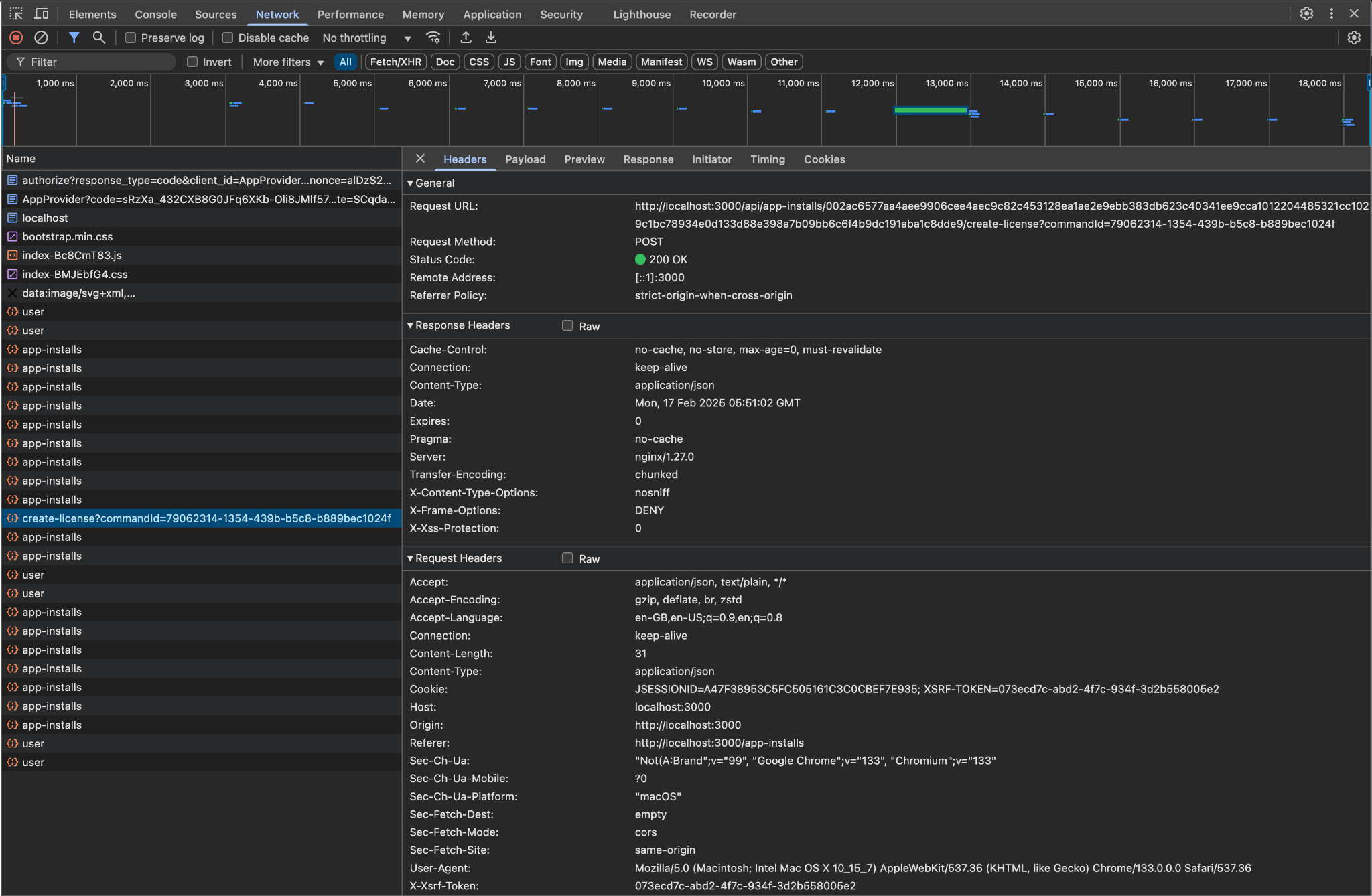
To advance the example, we log in as the AppProvider and accept the AppInstallRequest, resulting in: AppProvider accepting AppInstallRequest The usual browser-based developer inspection tools can extract the relevant correlation ids: Browser developer tools showing correlating ids We can also see the HTTP call to the Backend-Service when we issue a new license, and again the response to the call provides additional identifiers. Browser developer tools showing HTTP call to Backend-Service Browser tool showing payload of HTTP call to Backend-Service Browser tool showing HTTP response from Backend-Service

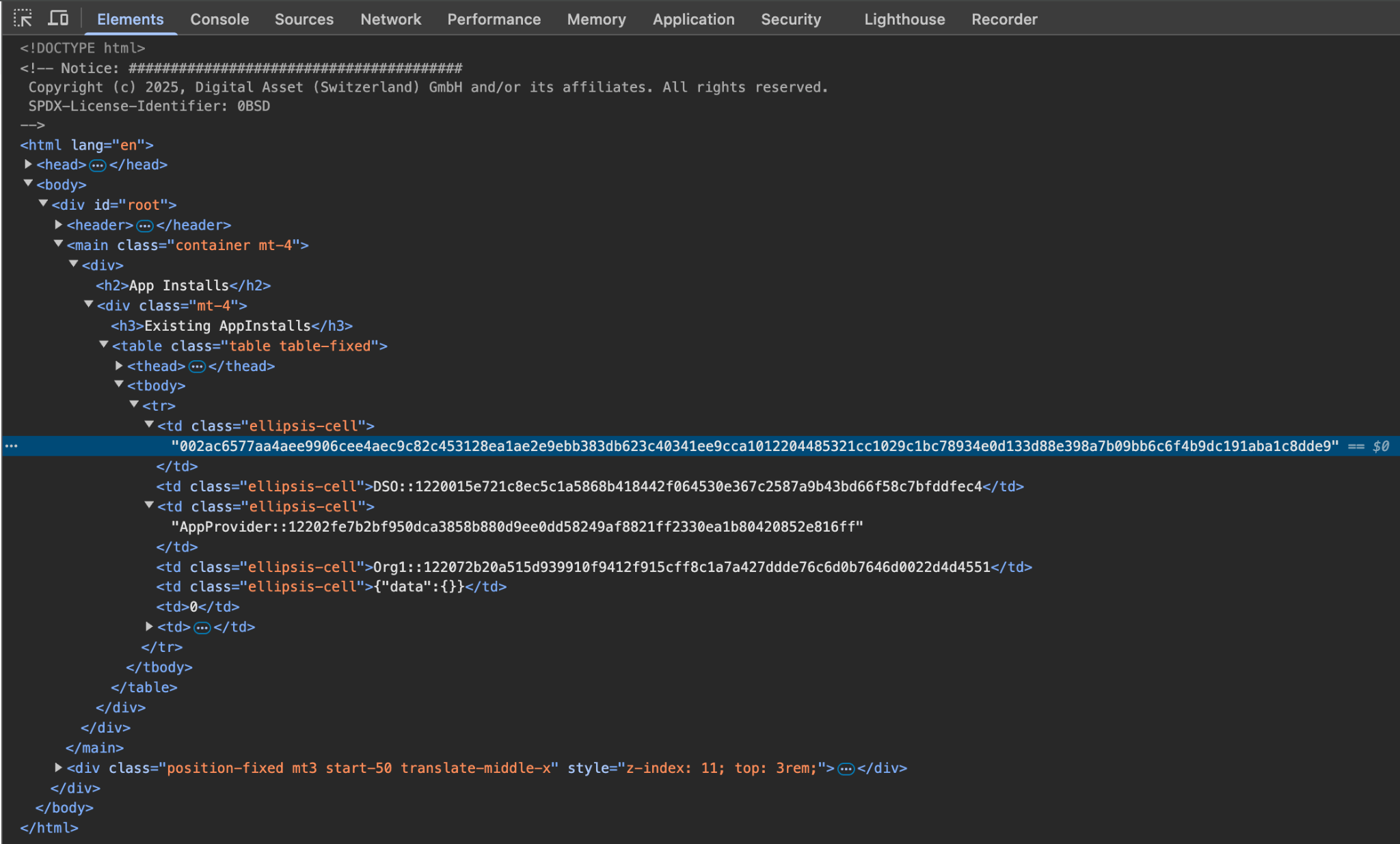
Id TypeDescriptionID
Command Id79062314-1354-439b-b5c8-b889bec1024f
Contract IdAppInstall002ac6577aa4aee9906cee4aec9c82c45312...
Contract IdLicense79062314-1354-439b-b5c8-b889bec1024f
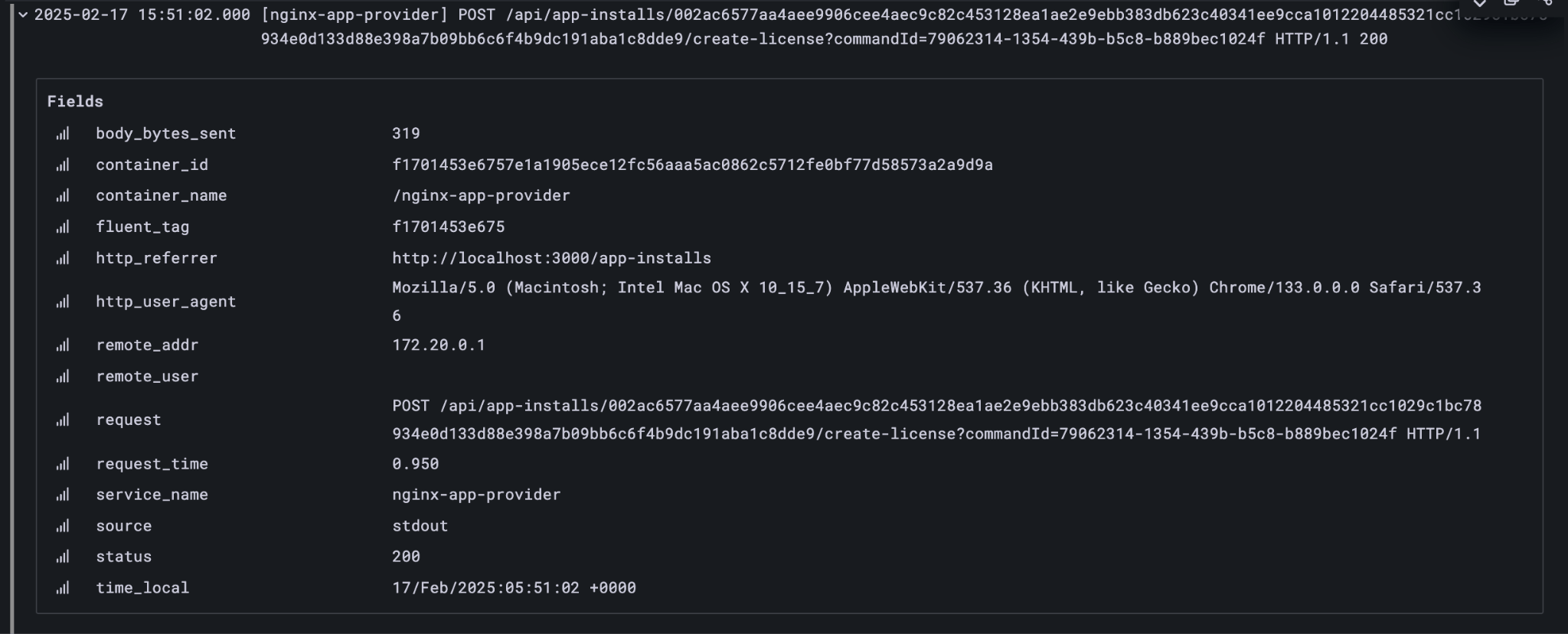
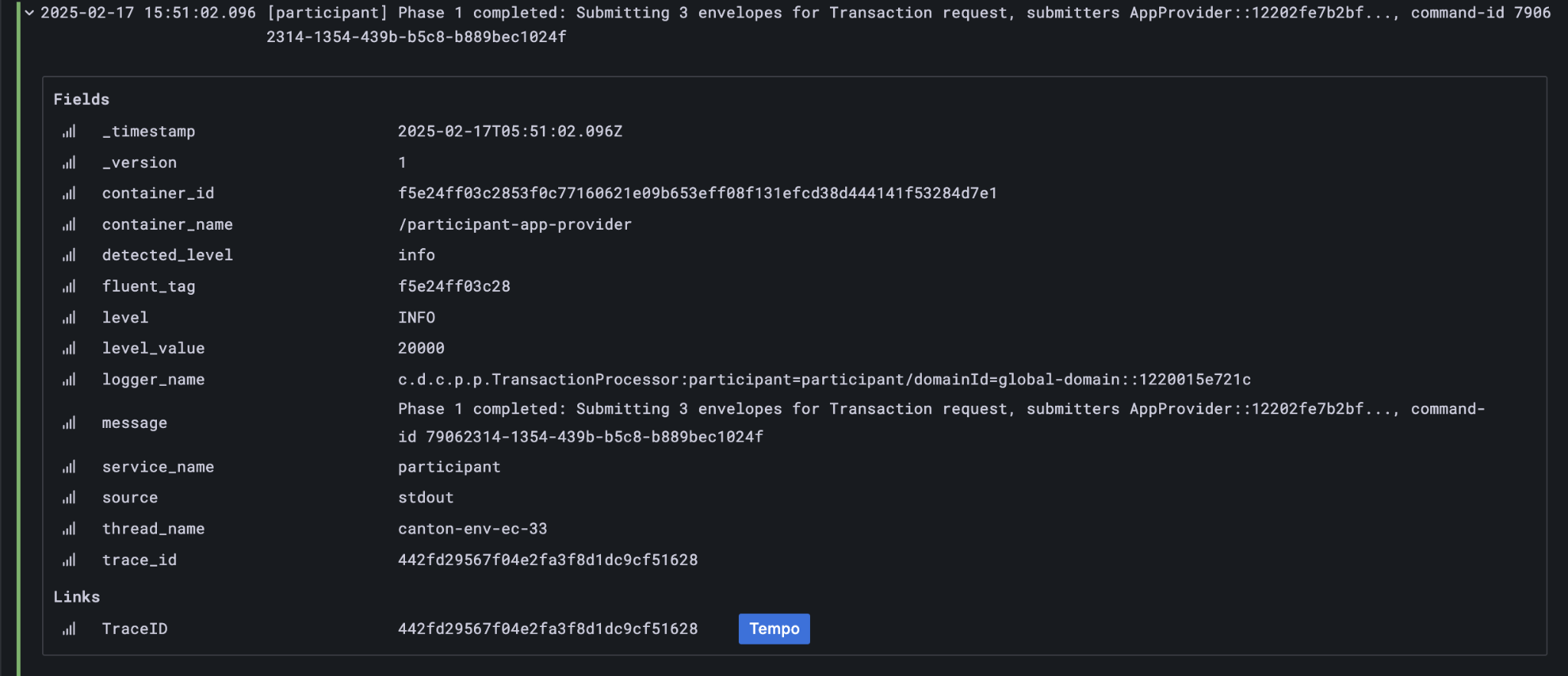
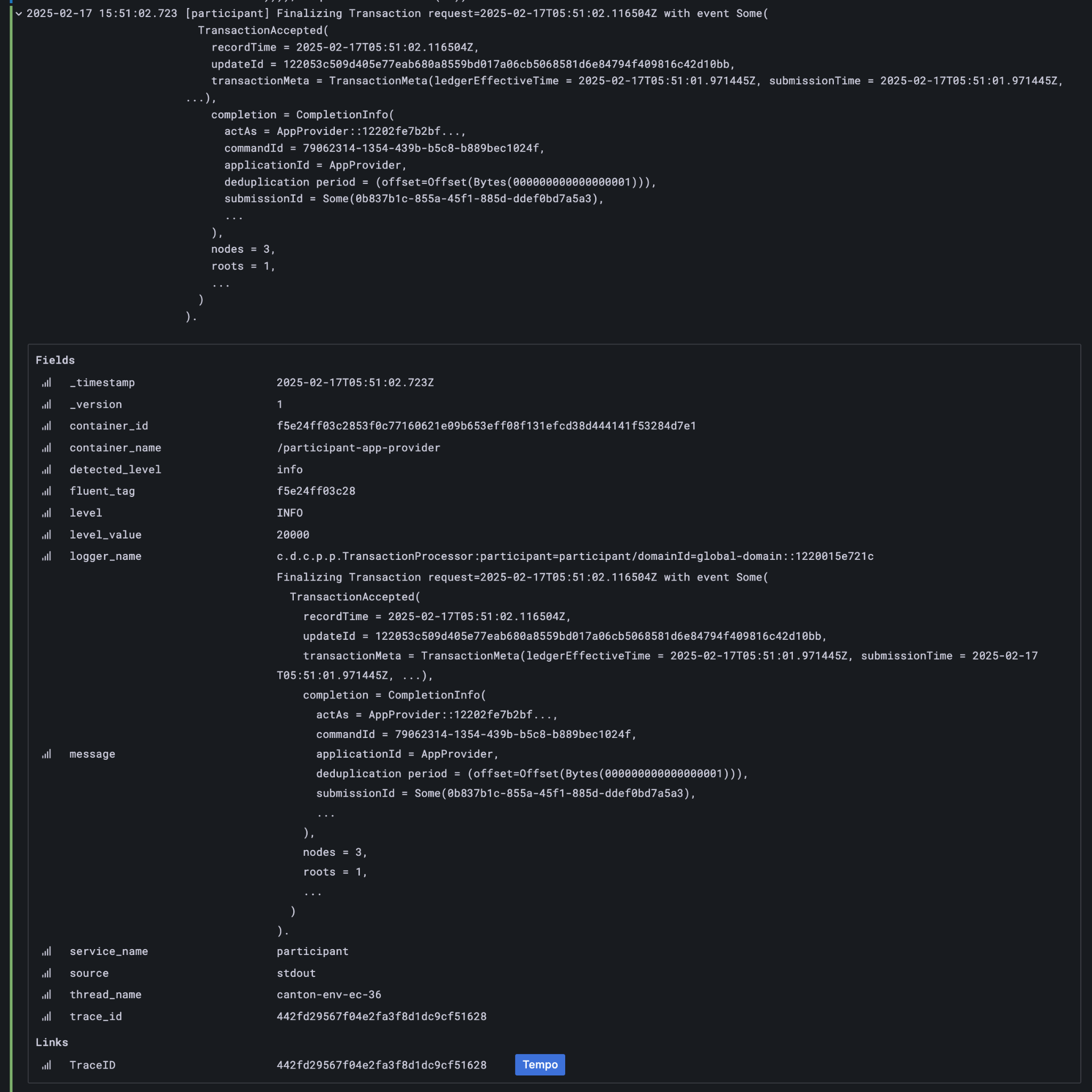
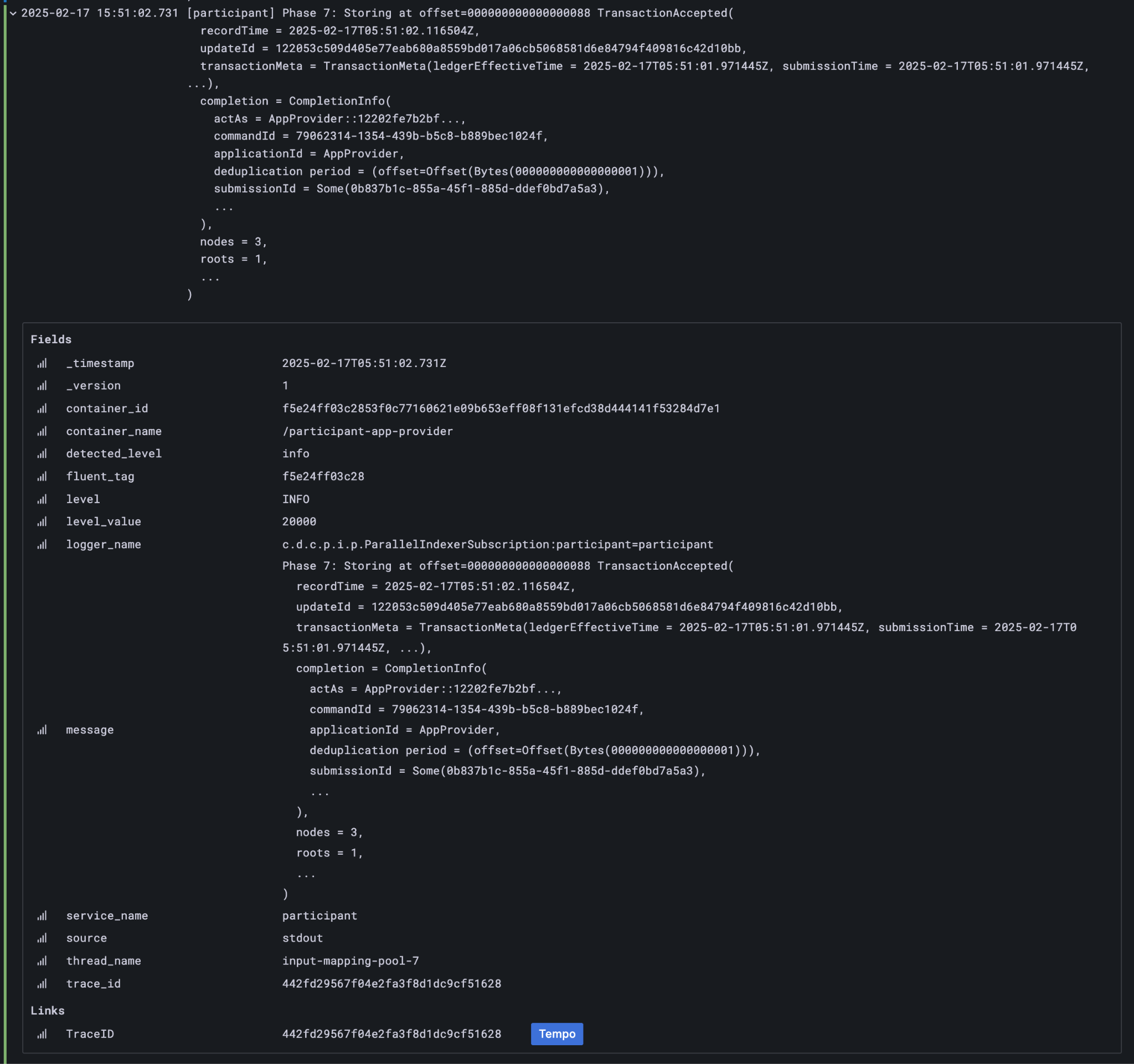
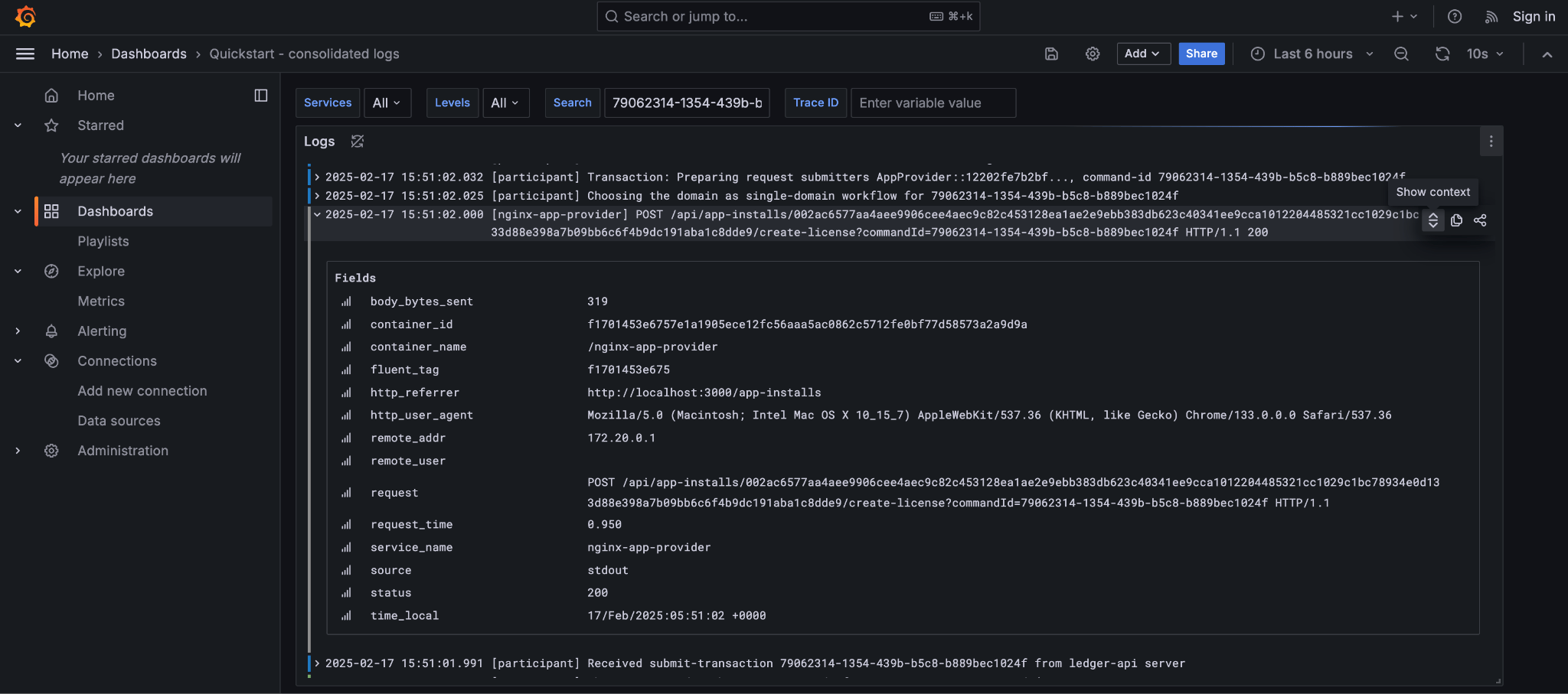
As we have already seen, contract ids can be used in Daml Shell to inspect the contracts directly. In addition, due to the way the OpenAPI interface for the Backend has been designed, the Command Id is visible as a query parameter to the POST. We can use this to query the consolidated logs in Grafana: Grafana consolidated logs query for command-id The command-id has provided logs from the App-Provider’s Nginx reverse proxy in front of the backend and their Participant Node. We can verify the Nginx log matches the request we saw from the browser: Nginx log entry for command-id Critically, we can also see in the same aggregated log the entries that indicate the Participant Node submitting the transaction to the Canton Synchronization Domain: Participant Node log entry for command-id Was notified that the transaction was successfully committed to the Canton Ledger: Participant Node log entry for transaction commit And finally added to the App-Provider’s local ledger:10 Participant Node log entry for transaction added to ledger Note that from these we can obtain additional correlation ids, any of which could have been used to find these log lines:
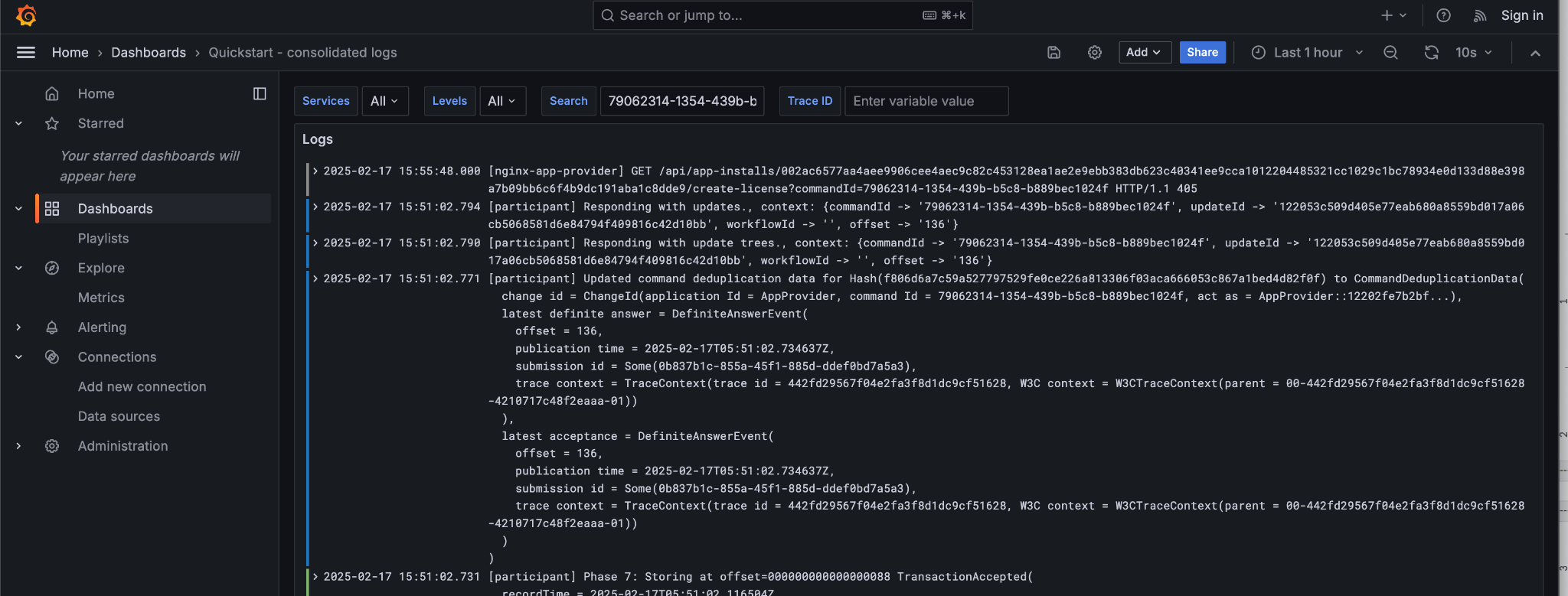
Ledger Offset000000000000000088
T ransaction Id122053c509d405e77eab680a855…2d10bb
Submission Id0b837b1c-855a-45f1-885d-ddef0bd7a5a3
Trace Id442fd29567f04e2fa3f8d1dc9cf51628
In particular the Trace Id is invaluable because it can link us directly into Tempo to see the distributed operation spans: Trace Id Here we can see the flow of the create license operation behind the backend reverse proxy:
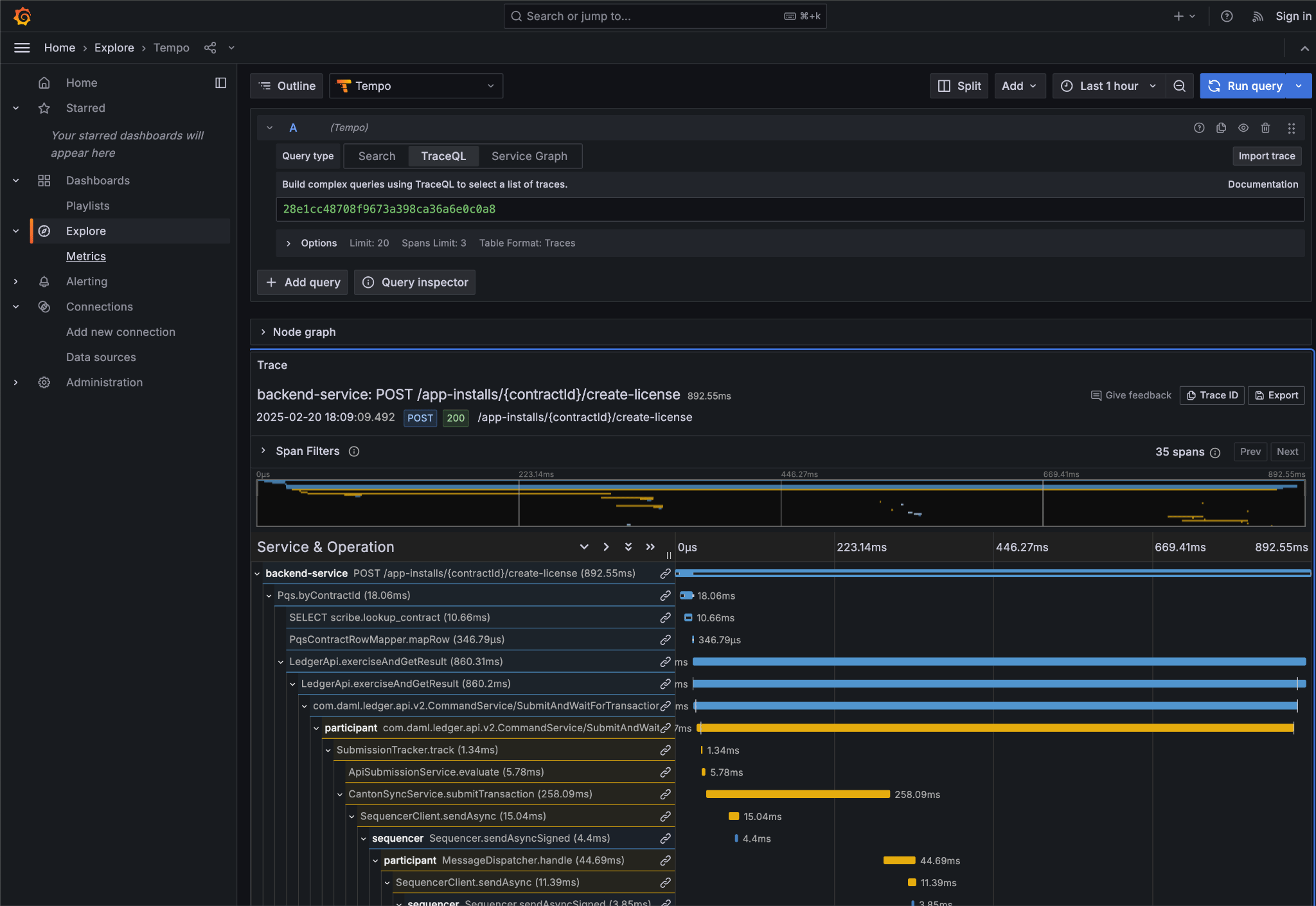
  • Initial POST handler in the Backend Service
  • Backend query against PQS to retrieve the AppInstall contract
  • Call to the App-Provider Ledger API from the Backend Service
  • Preparation of the Transaction by the Participant Node and submission to the Canton Network
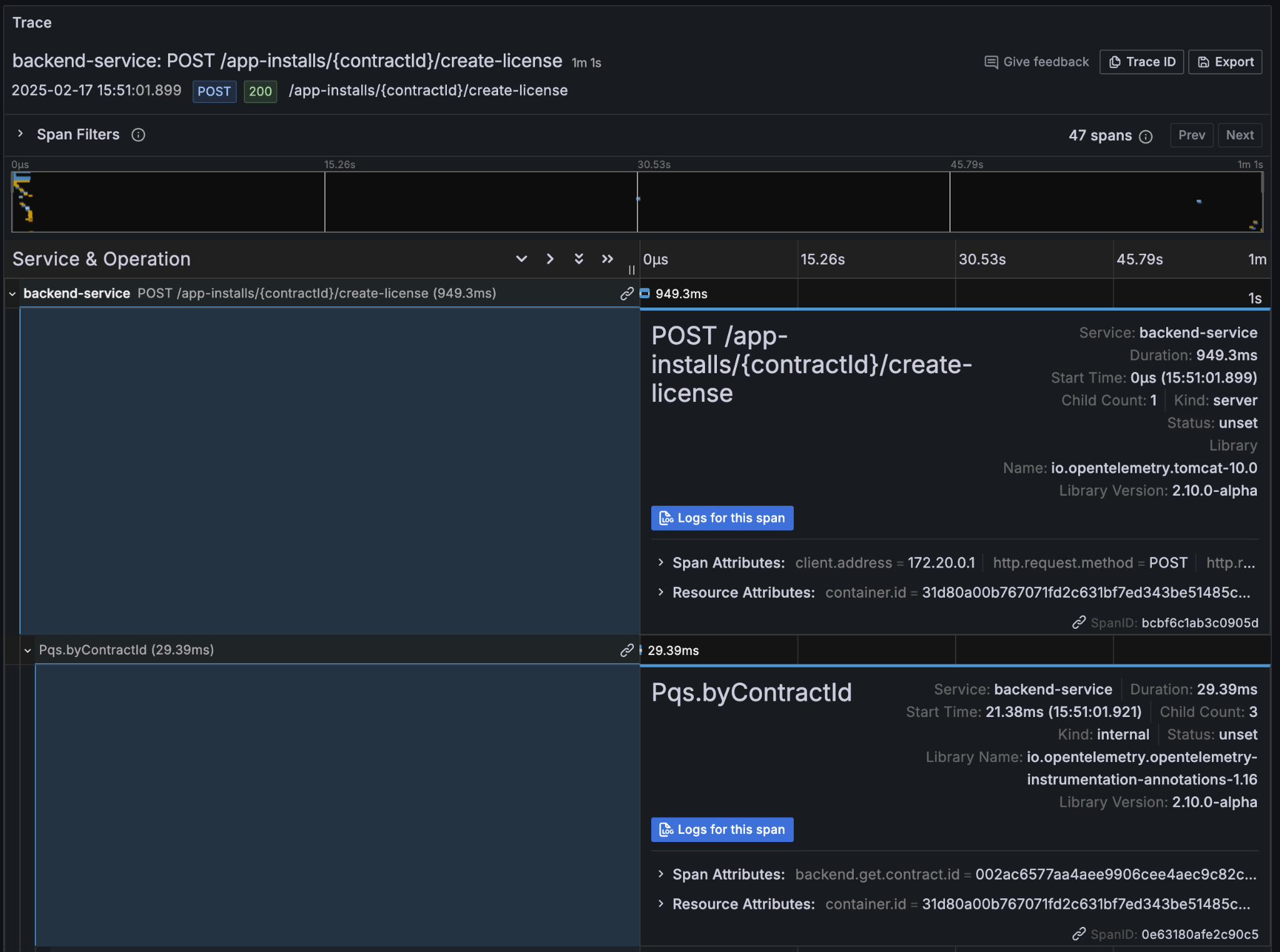
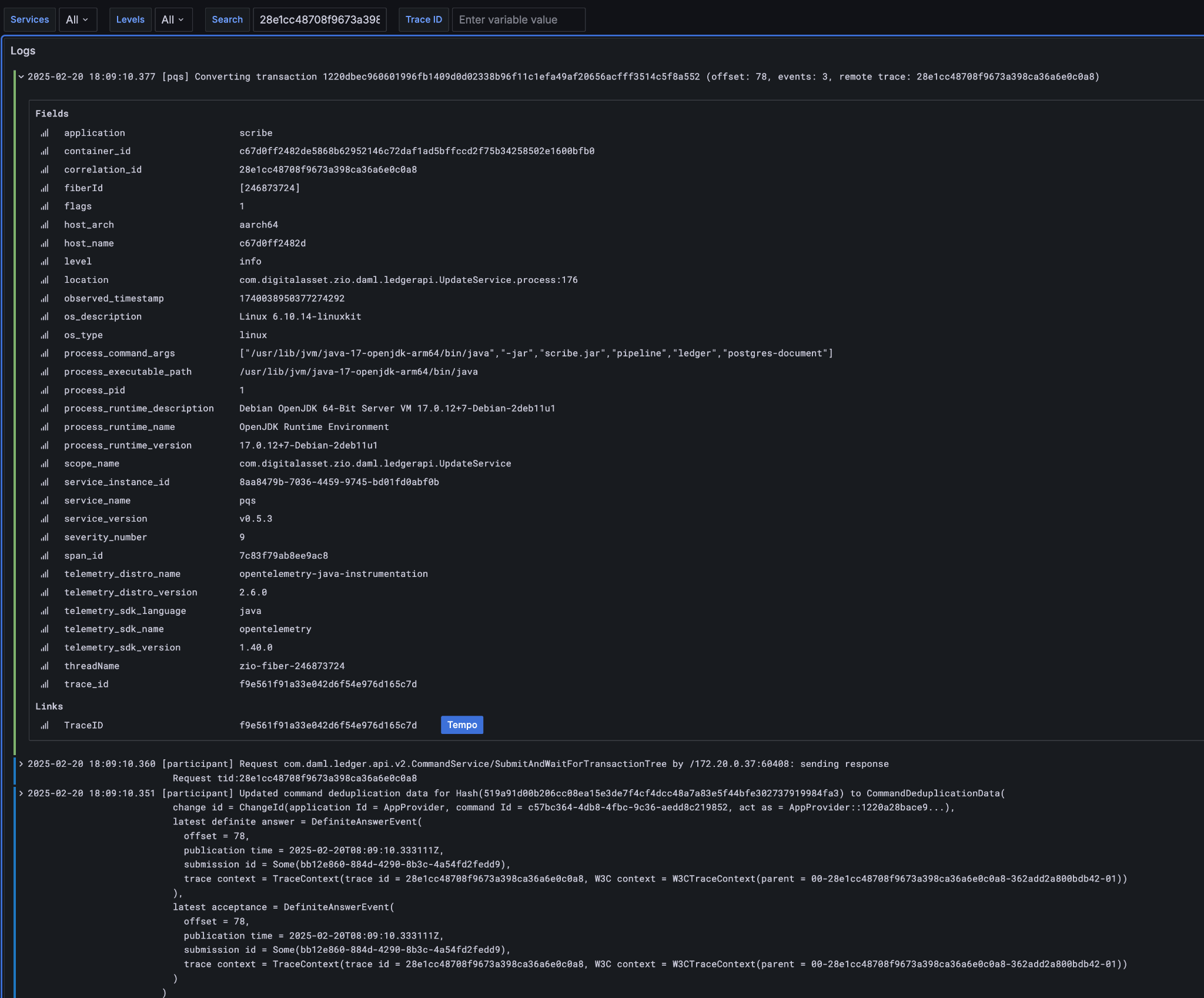
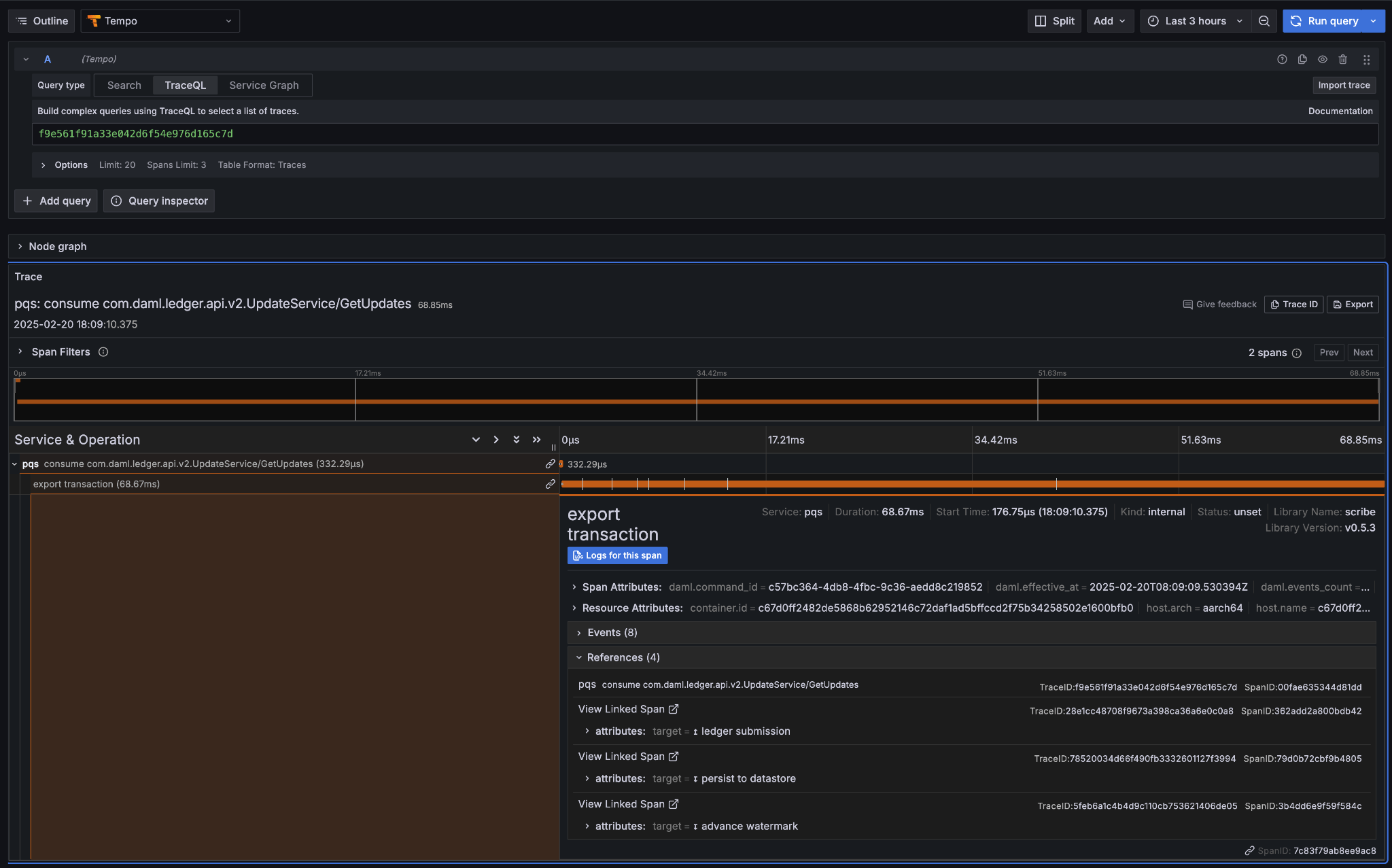
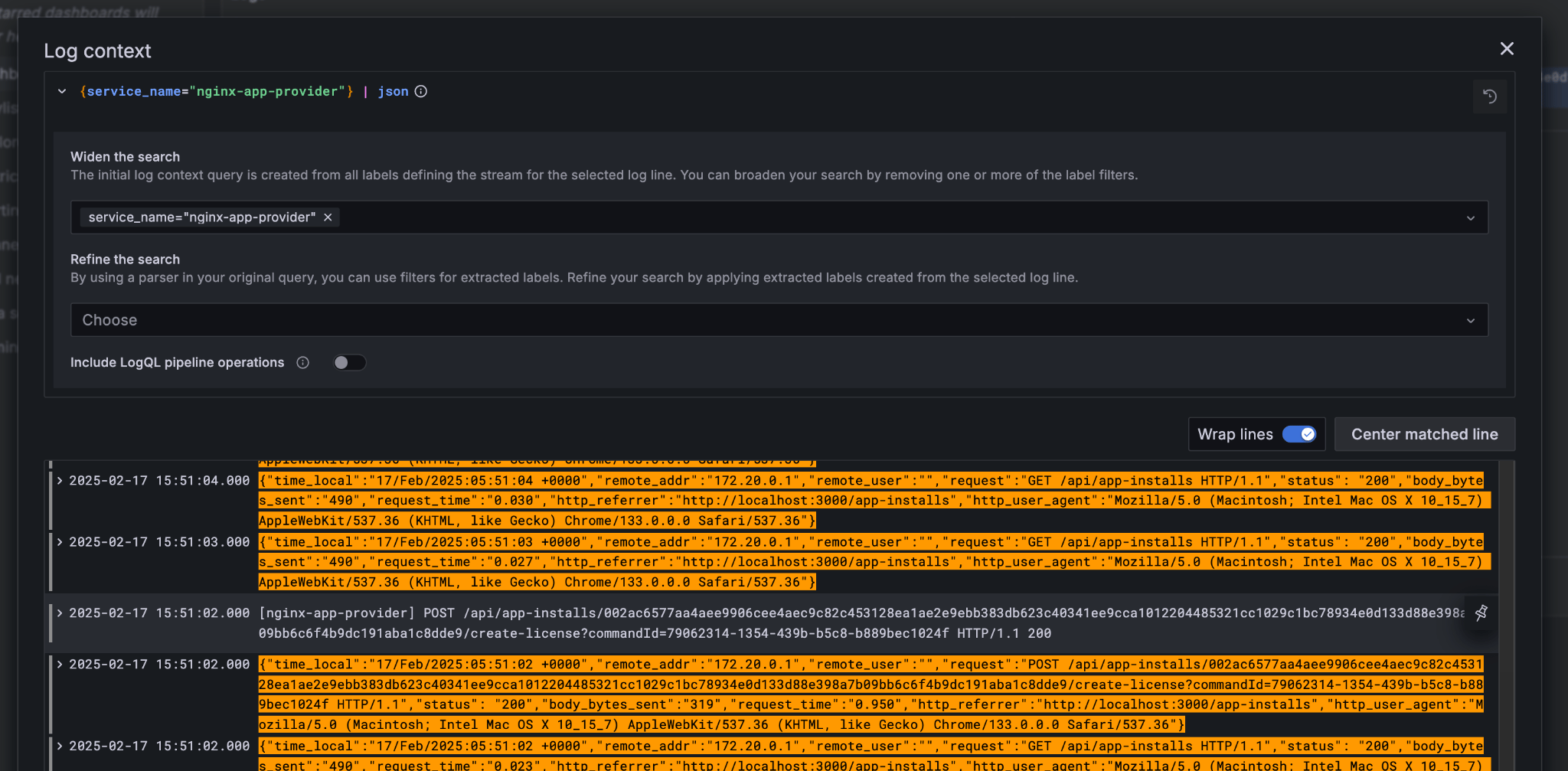
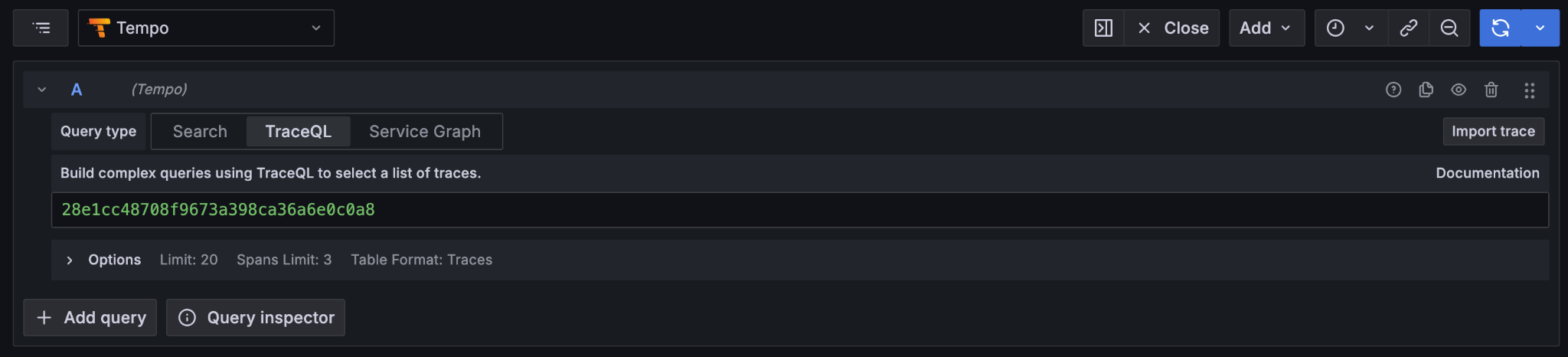
One very powerful aspect of the Grafana suite is the degree to which it integrates the various observability tools in the quickstart stack. We have already seen this with the link from the consolidated logs to Tempo; however, it also runs the other way. Expanding a span in Tempo provides a link to “Logs for this span”. Tempo span logs link These link to the logs for the specific component (backend-service, participant, sequencer, etc) correlated to this span. Using different correlation ids can allow us to navigate and explore the history of our distributed application. We have seen the transaction committed to the ACS within the participant node; however, PQS also logs identifiers associated with the transactions it indexes. The transactionId and the traceId can both be used to broaden our understanding of the create-license backend operation and what followed after. logs PQS ingestion is a distinct operation performed by a background process. The traceId for this log is therefore distinct; however it still links back to the trace and transaction identifiers associated with the ledger data it is ingesting. You can see this if you follow the Tempo link: PQS ingestion trace The expanded “references” section in the “export transaction” span include links to traces for related PQS processes and also, critically, the trace for command submission that resulted in the transaction. The link takes us directly to that trace, which in this case is the same one we just came from. Querying and navigating through correlated logs, traces, and spans makes understanding the multiple moving parts involved in a Canton Network Application much easier. Keep in mind that you can only navigate logs and traces that have been emitted; and, query identifiers that have been included or attached. Therefore we highly recommend you periodically take the time to look for opportunities to enrich and expand the logging within your application. One final thing that isn’t visible immediately, but is whenever you hover over any log line is the option to view the log context for that line: Grafana log context link This will pop up a window with a full unfiltered view of the component’s logs for that time, with the relevant line highlighted. In the case of the Nginix log line, this provides a single click view of the other traffic being served at the same time: Grafana log context view It is also worth keeping in mind that Grafana exposes access to the raw queries for Tempo and Loki, and also Prometheus (not shown). It is well worth the time to experiment with these and discover how to probe the unified metrics, traces, and logs available via the observability stack: Tempo TraceQL Loki query A starting point for finding documentation on these see:

Footnotes

  1. Specifically this sends a CreateCommand to the submit-and-wait service on the Application User’s participant node.
  2. See the Canton Network Quickstart Guide “Project Structure” for more details on this
  3. Daml shell has tab completion on most command arguments, including the Template Id argument to active and the Contract Id argument to contract.
  4. Further documentation is available at https://docs.daml.com/tools/daml-shell/index.html "Daml Shell command line interface"
  5. A key differentiator of Canton from all other level one blockchains is that it offers privacy. It does this by enforcing right-to-know. rather than via secrecy-via-obscurity and/or via pseudo-anonymity. Canton provides two privacy guarantees: Even in encrypted form (sub-)transactions are only transmitted to participant nodes with a right to be informed of them; and, participant nodes will be informed of every (sub-)transaction they have a right to be informed of. For details on how Canton defines “right” and other aspects of this see the Daml Ledger Privacy Model (https://docs.daml.com/concepts/ledger-model/ledger-privacy.html#privacy)
  6. Distributed tracing is essential to efficient debugging and diagnosis of any distributed application. While technically distinct identifiers Trace and Span Ids are closely linked. If unfamiliar with their use OpenTelemetry has a good primer (https://opentelemetry.io/docs/concepts/signals/traces/), Grafana has a reasonable demo (https://grafana.com/docs/tempo/latest/introduction/), and we demonstrate their use later in this guide.
  7. Equivalent to “blockheight” in other public blockchains that do not support privacy. As privacy dictates that each participant node sees a different projection of the global blockchain, the offset is not comparable across different Participant Nodes. It is commonly the preferred id when dealing with a single participant node due to being a simple, monotonic, total-order on ledger events witnessed by a Participant Node.
  8. By virtue of their role in the ledger model, all parties are (and the associated entity must be) capable of authorizing a (sub-)transaction or ledger event. See the Daml Ledger Authorization Model for details (https://docs.daml.com/concepts/ledger-model/ledger-integrity.html#authorization)
  9. Where loggers cannot be configured to emit structured logs directly, log parsers are used to convert raw log files in the usual manner. This is primarily done in the OTEL Collector configuration.
  10. This is an example of an important feature of the Canton Network. The participant node is only aware of the existence of this transaction because it is authorized to be informed of the transaction by the relevant Daml Smart Contracts and the privacy semantics of the Daml Ledger Model. Privacy is guaranteed, not because the contract data is obscured as cyphertext; but, because the ledger model ensures participants without a verified right to know do not receive the transaction in any form.