

- Introduce you to the importance and problems of multi-party applications.
- Provide a high-level overview of how Canton can help you build and run multi-party applications.
- Explain the different components of the Canton ecosystem and how they fit together.
- Show how the different products of Digital Asset allow you to join the Canton Network as a user or a provider of services.
Multi-party applications
Software applications are used every day to facilitate communication, share information, and support decision-making. But what happens when you need to collaborate with multiple parties on the same set of data? How do you ensure that everyone has access and can operate on the same information? Who controls the data? Who controls who can collaborate? When there’s trust and collaboration within the same organization, responsibility is often delegated to a central authority operating a centralised application, such as the IT department of our company or one of the large cloud providers. But what if you are not part of the same organization? What if you cannot agree on who should operate the application? What if you do not trust each other but still want to collaborate? Originally, these problems are solved by defining a common protocol and having each party implementing their own version of the application, exchanging messages to signal data changes. Such applications are very bilateral in nature and require a lot of coordination between the parties to keep the implementations and the data in sync. These technical challenges impact the efficiency and the business value, leading to high cost, low flexibility and long lead times. Well known examples of such applications can be found in the financial markets or in the health care sector, requiring large and well-funded organizations that can afford to build and maintain them. Technically, the problem can be stated as follows: how do you coordinate reads and writes across multiple databases of multiple, potentially unknown parties who do not trust each other nor a central authority, but with the strong guarantee that the data is always correct and consistent, and only accessed and modified according to the individually pre-agreed rules for the given data set? An application built with such a technology provides both: the individual control and data sovereignty of each party, while at the same time guaranteeing tight integration and collaboration between the parties. Such applications are called multi-party applications. Enabling such applications is the problem that Canton solves out of the box, creating a network of self-sovereign, tightly-coupled, multi-party applications built for seamless real-world business success: the Canton Network. Multi-party applications, and multi-party application networks such as the Canton Network, solve problems in a way that was impossible with the technologies and architectures that came before. Successfully building multi-party applications requires learning a few new concepts, including architectural principles and patterns. This document explains:- why multi-party applications matter
- what a multi-party application is
- important concepts in multi-party applications
- key architectural concepts in Daml
- a transfer example using Daml
Why do multi-party applications matter?
Have you ever wondered why bank transfers, stock purchases or healthcare claims take days to process? Given our technological advances, including the speed of networks, you might expect these transactions to take less than a second to complete. A protocol like email takes only a few seconds to send and receive, while these important business workflows take days or weeks. What delays these transactions? The processes in question all involve multiple organizations that each keep their own records, resulting in data silos. The processes to ensure consistency between those data silos are complex and slow. When inconsistencies arise, the correction processes (sometimes referred to as reconciliation) are expensive, time-consuming and often require human intervention to determine why two parties have differing views of the result of a business interaction. There are a myriad of reasons for these discrepancies, including differences in data models and error handling logic, inconsistent business process implementations and system faults. Here’s a deeper look at the problem via the example of a transfer of $100 from Alice’s account in Bank A to Bob’s account in Bank B. (Money is an easily understood example of an asset transferred between parties. The same problems occur in other industries with other assets, for example, healthcare claims, invoices, or orders.) Money cannot simply appear or disappear during a transfer. The banks need to ensure that at some point in time,t0, $100 are in Alice’s account, and at the next point in time, t1, those $100 are gone from Alice’s account and present in Bob’s account – but at no point are the $100 present in both accounts or in neither account.
In legacy systems, each bank keeps track of cash holdings independently of the other banks. Each bank stores data in its own private database. Each bank performs its own processes to validate, secure, modify, and regulate the workflows that transfer money. The coordination between multiple banks is highly complex. The banks have an obligation to limit their counterparty risk - the probability that the other party in the transaction may not fulfill its part of the deal and may default on the contractual obligations.
Today’s common, albeit highly inefficient and costly, solution for a bank account transfer involves the following steps:
- Bank A sends a message to Bank B via a messaging standard and provider like SWIFT or SEPA.
- Bank A and Bank B determine a settlement plan, possibly including several intermediaries. Gaining an agreement on the settlement plan is time-consuming and often incurs additional fees.
- The settlement process entails (i) debiting $100 from Alice’s account at Bank A, (ii) crediting the commercial account at Bank B, and (iii) once Bank B has the money, crediting Bob’s account at Bank B.
t0 and a point t1) banks discretize time into business days. On day t0 the instruction is made and a settlement plan is created. Outside of business hours between day t0 and day t1, the plan is executed through end of day netting and settlement processes. In a sense, banks agree to stop time outside of business hours.
If intermediaries are involved, the process is more complex. Cross-border payments or currency conversion add yet more complexity. The resulting process is costly and takes days. During this multi-day process the $100 is locked within the system where it is useless to both Alice and Bob. Delays are common, and if there are problems reconciliation is hugely expensive. Consolidating through centralized intermediaries introduces systemic risk, including the risk of unauthorized disclosure and privacy breaches - and with that risk comes increased latency. Banks insist on this approach, despite the downsides, to reduce counterparty risk and to comply with regulations. At every point in time, ownership of the money is completely clear. (To learn more about cash transfers in traditional banking systems, read this accessible writeup on international money transfers.)
Services like PayPal, Klarna, and credit cards, which provide an experience of instant payments internationally, do this by accepting the counterparty risk or acting as banks themselves. If a shop accepts credit cards and you pay with a credit card, both you and the shop have an account with the credit card company. When you purchase, the credit card company can instantly debit $100 from your account and credit $100 to the shop’s account because it is as if both Alice and Bob are using accounts at the same bank – the bank is certain that Alice has $100 in her account and can execute a simple transaction that deducts $100 from Alice’s account and adds $100 to Bob’s.
Wouldn’t it be great if a system existed that allowed multiple parties to transact with each other with the same immediacy and consistency guarantees a single organization can achieve on a database while each kept sovereignty and privacy of their data? That’s Canton!
Canton is a system for real-time multi-party systems, enabling organizations to deliver the experiences modern users expect without assuming counterparty risk or the expense of reconciliation. The sections below describe how Canton achieves this, including the architectural concepts and considerations necessary to build and deploy a solution with Canton effectively.
What is a multi-party application?
A multi-party application is one in which data, and the rules and workflows that govern the data, are shared between two or more parties without any party having to give up sovereignty or any single party (including the application provider) being able to control or override the agreed rules of the system. A party could be a company, a department within a company, an organization, an individual or a person. The specific definition of a party will be unique to the application and the domain of that application. A well-designed multi-party application provides several benefits:- a clean, consistent view of all data managed by the application across all parties
- consistent, connected, and efficient processes between all parties involved in the application
- privacy controls over portions of the shared data, such that each party sees only the data that it is explicitly entitled to view and/or modify
- individual party ownership of and responsibility for sensitive data
Important concepts in multi-party applications
For a multi-party application to fully deliver its value, the following conditions must be met:- Multiple involved parties have data sovereignty – that is, they keep their data within their own systems and require strong guarantees that no external party can access or modify that data outside of pre-agreed rules.
- Shared state and rules are codified into an executable schema that determines what data can move between parties, who can read that data, and how that data is manipulated.
- Processes happen in real time as there is no additional reconciliation or manual processing required between organizations.
- Integrate the application - Bank A must treat the multi-party infrastructure as the golden source of truth for payment information and integrate it as such with the rest of their infrastructure. Otherwise they are merely trading inter-bank reconciliation for intra-bank reconciliation.
- Utilize composability by building advanced systems that rely on the base-level multi-party agreements. For example, a healthcare claim application should be built using the payment solution. Integrating one multi-party application with another preserves all the properties of each across both applications. In this example, the patient privacy requirements of a health claims application are retained, as are the financial guarantees of the payment application. Without composability, multi-party applications become bigger silos and you end up reconciling the healthcare claims multi-party application with the payments multi-party application.
Important requirements for real-world multi-party infrastructure
Businesses operate in a complex environment with strong expectations imposed due to legal, regulatory and competitive requirements. At the same time, businesses run millions of transactions in parallel across the globe. Therefore, a multi-party infrastructure that support real-world multi-party applications must be able to address a number of key requirements simultaneously:- Data sovereignty: Each party must retain control over its own data, ensuring that no other party can access or modify it without explicit permission.
- Privacy: The system must be built around the principle of data minimization to ensure that parties can only see the data they are entitled to view, even when multiple parties are involved in a transaction.
- Horizontal Scalability: The system must be able to globally scale with any number of parties, transactions, and applications.
- Composability: The system must allow for the composition of multiple applications and workflows, enabling complex business processes to be built on top of each other
- Interconnectivity: Each party must retain control over its connectivity and be able to operate independently, without delegating to a central authority or an anonymous group of operators.
- Security: The system must provide strong security guarantees to protect against malicious actors and unauthorized access.
Key architectural concepts in the Canton Network
There are two layers necessary for building multi-party applications: expressing the data and update rules using the Daml smart contract language and synchronizing the ledger state using the Canton protocol. The Daml language is a smart contract language for multi-party applications. Conceptually, Daml is similar to the Structured Query Language (SQL) used in traditional database systems, describing the data schema and rules for manipulating the data. The Daml language:- defines the shared state between the parties, including process permissions and data ownership
- defines workflows, execution policies, and read/write permissions
- enables developers to build rich transactions that codify strict business rules
- defines the APIs through which multi-party applications can talk to each other and compose
Transfer example in the Canton Network
Consider the transfer example described above with Alice and Bob. Using Daml, the process looks like this:- Alice logs into her online banking at Bank A and enters a transfer to Bob at Bank B.
- The online banking backend creates a transaction that deducts $100 from Alice’s account and creates a transfer to Bob at Bank B.
- When Bank B accepts the transfer, Bank A credits $100 to Bank B’s account at Bank A and Bank B simultaneously credits Bob’s account by $100.
- Bob’s online banking interfaces with the Canton Ledger and can see the incoming funds in real time.
Ledger properties
In order to solve the problem of complex, real-world multi-party applications, Canton is designed to provide the following properties:- Privacy: The data is only visible to the parties that are allowed to see it. No one else can access it.
- Integrity: The data is always correct and consistent. No one can change it in a way that would violate the pre-agreed rules.
- App Composability: The applications can unilaterally be composed together to create new applications. This allows to build complex applications that are built on top of existing ones, but in a way that does not impact existing users.
- Network Composability and Horizontal Scalability: The network can be extended by adding new validators and synchronizers, such that the network can be extended unilaterally and scaled horizontally. It still remains a single network of networks.
- Regulatory Compliance: The data is shared, stored and operated by the parties owning it. This allows to comply with existing regulations of the jurisdictions where the parties operate.
Elements of the Canton Network
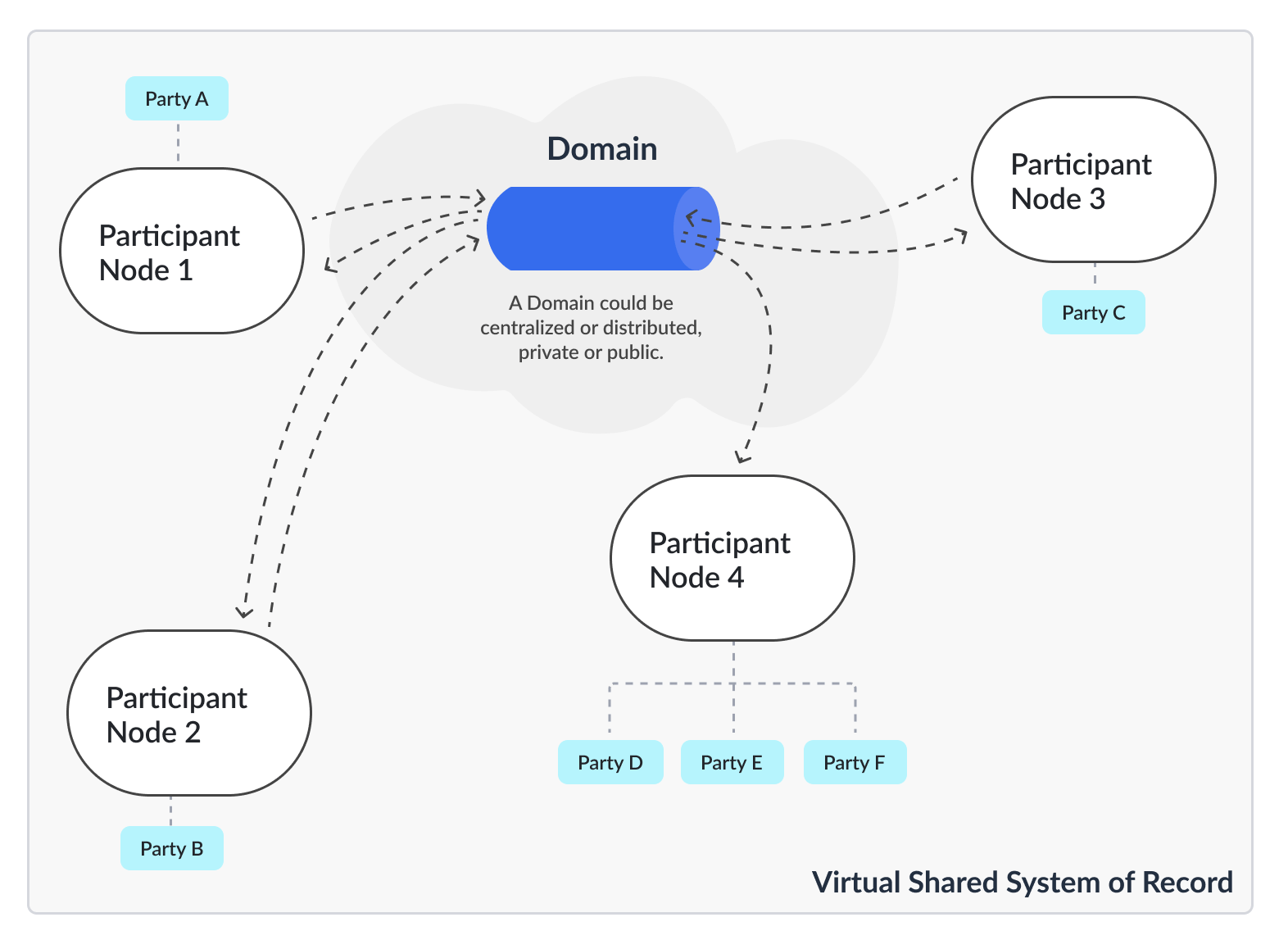
The Canton Network is the union of all applications and users that are built and operated using the software Canton, which connects individual instances through the Canton Protocol. The shared data items managed and synchronized by Canton are called contract instances. Every contract instance is associated with a template that defines the smart contract choices for the contract instance. These choices represent the possible update commands on the ledger, archiving a given set of contracts and creating new ones atomically. These rules are written in the Daml programming language and contain the business logic and authorization rules. The entirety of the contract instances and templates is called the Ledger. Each contract is owned by a group of stakeholders, called Parties. Each party participates in the network through their validator node. This validator node has only visibility into the subset of contracts of the parties associated. As validator nodes are able to connect to different networks, the entire network forms a single Virtual Global Ledger which is not controlled by any single entity. The software Canton has two infrastructure components: Synchronizers and Validators (formerly named participants). Validators process and validate transactions, managing the ledger state of their parties. Validators do not expose any public port, but instead connect to synchronizers to form a network with other validators. Each validator can connect to multiple synchronizers unilaterally, creating a network of networks. In order to transact with each other on a given transaction, validators need to find at least one synchronizer where they are all connected to. This synchronizer will then order, buffer and forward the encrypted messages to the respective validators without understanding what is being transacted on. There is one specific instance of a synchronizer that is called the Global Synchronizer (https://sync.global), serving as the global backbone of the network. Contracts are not tied to synchronizers. Synchronizers are not aware of each other. Instead, validators can use any suitable synchronizer for their transactions, creating an natively interoperable network of synchronizers and validators. This allows the Canton Network to scale horizontally by just adding more synchronizers and validators whenever needed. Continue diving into the elements of the Canton Network.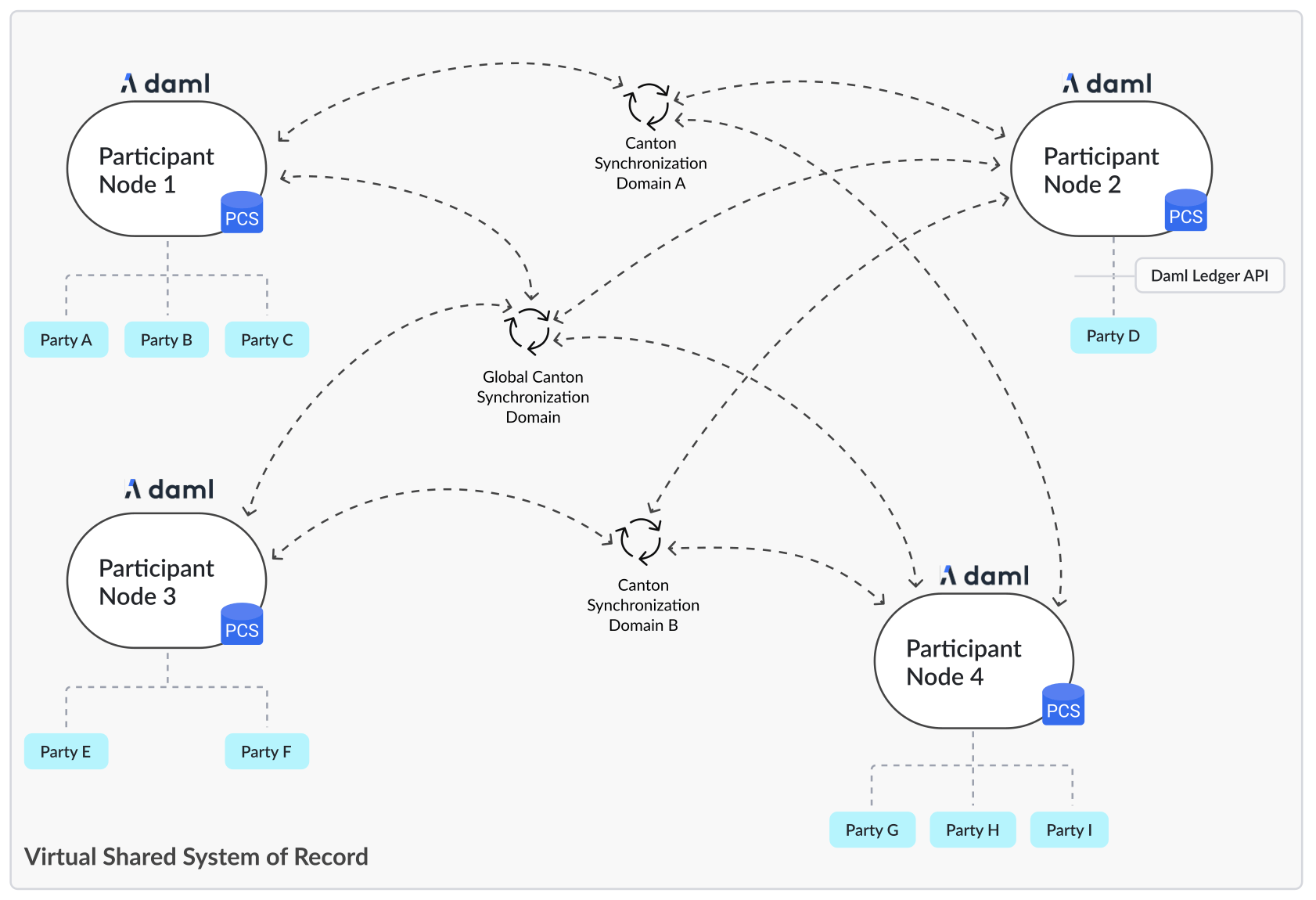
Ledger concepts expressed in database terms
The concepts can be related to databases: templates are table schemas, contract instances are table rows, choices are stored procedures performing a set of atomic delete and insert statements. But instead of running against a single database, different actors on the network now exchange which stored procedures they want to run through the Canton protocol. The protocol orders, validates, removes conflicts and distributes these requests to the affected parties such that they can apply it to their local data stores deterministically.Join the Canton Network
In the Canton Network, you can either be a user, an application provider, or an infrastructure operator. Digital Asset provides a set of products and services that allow you to join the Canton Network conveniently and easily.- Build your own applications using our SDK.
- Use our financial application building blocks to accelerate the development of your own applications.
- Run your own validator node as part of an existing network.
- Create your own sub-network by deploying your own synchronizer.
Daml Design Patterns for Multi-Party Composition
Real-world Daml applications involve multiple parties with different roles, permissions, and trust relationships. This deep dive covers the Daml design patterns that make complex multi-party workflows work — from simple two-party agreements to multi-step authorization chains spanning several organizations.The Propose-Accept Pattern
For the canonical walkthrough of propose-accept, see Module 2: Multi-Party Workflows. This deep dive focuses on the additional composition patterns that build on that foundation.Delegation
Delegation lets one party grant another party the authority to act on their behalf within a defined scope. Unlike the propose-accept pattern (which creates a shared agreement), delegation creates a one-directional trust relationship.Operate choice, but only for allowed operations. The owner can revoke the delegation by archiving the OperatorLicense.
Multi-Step Workflows
Many business processes require a sequence of actions by different parties. Model these as a chain of contracts, where each step’s output becomes the next step’s input:Atomic Composition
Daml transactions are atomic: either all the creates and archives in a transaction succeed, or none of them do. Use this property to implement complex operations that must happen together:Authorization Through Interfaces
Interfaces define abstract capabilities that templates can implement. Use them to create composable authorization patterns:Transferable gets the TransferTo choice. Your backend can work with the interface without knowing the specific template type, enabling generic transfer logic across different asset types.
Place interface definitions in standalone packages that contain only interfaces and no templates. An interface’s structure (methods and view type) cannot be modified after deployment. If changes are needed, introduce a new interface version in a new package.
Multi-Party Visibility Patterns
Canton’s privacy model means each party sees only the contracts where they are a stakeholder (signatory or observer). For workflows that need broader visibility without giving parties the ability to act, use the observer pattern:Design Considerations
When composing multi-party workflows:- Keep the signatory set minimal — each additional signatory adds coordination overhead
- Use observers for read-only access rather than making parties signatories
- Design templates so that each party’s choices are clear from the template declaration
- Avoid deep transaction trees (many nested exercises) as they increase transaction size and latency
- Consider whether a workflow step needs to be on-ledger or can happen off-ledger
Next Steps
- Decentralization — Strategies for decentralizing at each layer
- Multi-Hosting — Distributing parties across validators for resilience