Introduction
Distributed tracing is a technique used for troubleshooting performance issues in a microservices environment like Canton. Tracing in Canton has been described in a page dedicated to monitoring (Canton Monitoring / Tracing). This guide describes how to write Ledger API client applications so that distributed traces and spans can seamlessly continue between the client and Canton software components. To study a Ledger API client application with OpenTelemetry support in detail, see this example on GitHub. The example implements a variation of the already familiarPingPong application where every call to the Ledger API is decorated with an OpenTelemetry trace context and demonstrates how to retrieve the trace context from past transactions.
To familiarize yourself with the broader topic of open tracing, consult the official pages of the OpenTelemetry project. To find out more about open tracing in Java, the documentation on Java OpenTelemetry instrumentation is an excellent source of references and examples.
Set Up an OpenTelemetry Environment
To observe distributed tracing in action, you first need to start an OpenTelemetry backend server. Canton supports Jaeger, Zipkin, or OTLP formats. To start a Jaeger server you can use the following docker command: docker run —rm -it —name jaeger-p 16686:16686
-p 14250:14250
jaegertracing/all-in-one:1.22.0 You also have to start Canton with OpenTelemetry exporting enabled. You can achieve it by defining a new
jaeger.conf configuration file:
jaeger.conf into the configuration mix:
bin/canton -c examples/01-simple-topology/simple-topology.conf -c jaeger.conf
Add Project Dependencies
To use the OpenTelemetry libraries, add the following Maven dependencies to your project’spom.xml:
Replace the version number in each dependency with the version you want to use. To find available versions, check the Maven Central Repository.
Initialize
An application that wants to use OpenTelemetry must initialize a number of global controller objects that orchestrate different aspects of the distributed tracing process such as span creation, propagation, and export. The exact set of controllers needed may vary from application to application. You may draw some inspiration from the selection used in the example inside the OpenTelemetryUtil.createOpenTelemetry method. This is the minimum set required for a fully functional Jaeger trace reporting. The next step is to initialize the GRPCTelemetry controller, which is responsible for the propagation of the trace contexts inside the HTTP2 headers of the gRPC communication. The example wraps the necessary initialization steps in the constructor of the OpenTelemetryUtil class. All you have to do is call:withClientInterceptor that injects an interceptor at the channel builder level:
Start New Spans
Before making a gRPC call, you must generate a new span to cover the multi-component interaction that is about to be initiated. The example provides a useful combinator calledrunInNewSpan that wraps the execution of an arbitrary function in a newly generated span:
Continue Spans Across Different Applications
Sometimes you may wish to continue the same span across multiple Daml transactions forming a single workflow. This may be especially interesting when different client application instances interact through the ledger and yet their entire conversation should be seen as a single coherent succession of spans. In that case, it is possible to extract the trace context associated with the past transactions from the Transaction, TransactionTree, or Completion records that are returned from the following Ledger API calls:UpdateService.GetUpdatesUpdateService.GetUpdateTreesUpdateService.GetTransactionByOffsetUpdateService.GetTransactionByIdUpdateService.GetTransactionTreeByOffsetUpdateService.GetTransactionTreeByIdUpdateService.GetUpdateByOffsetUpdateService.GetUpdateByIdCommandCompletionService.CompletionStream
runInNewSpan method:
Put It All Together
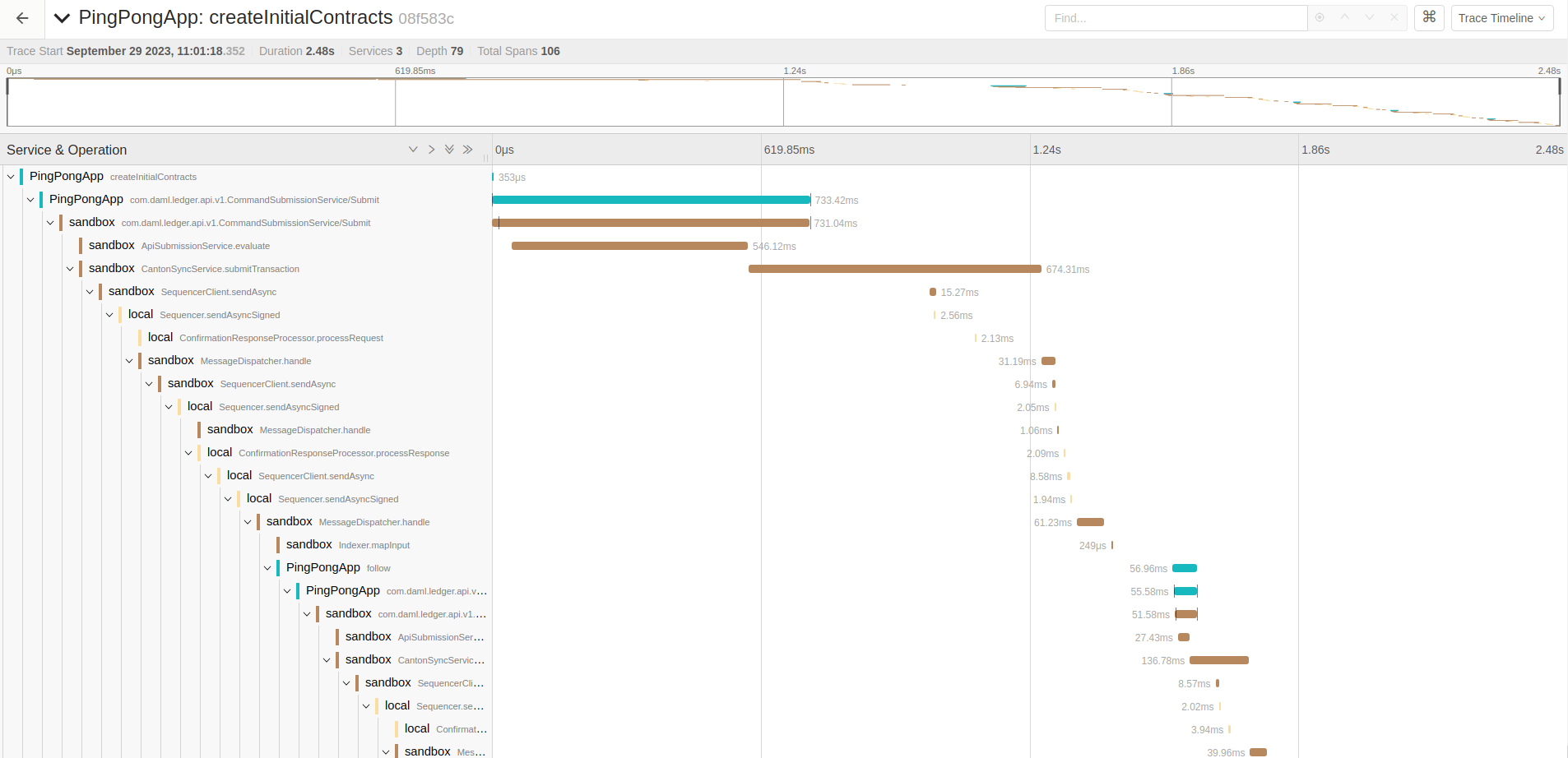
When the client applications follow the rules and pass the trace contexts without interruption, it becomes possible to witness the entire workflow as one long succession of spans in Jaeger UI. The span diagram collected while running the example application is shown below: