Documentation Index
Fetch the complete documentation index at: https://docs.canton.network/llms.txt
Use this file to discover all available pages before exploring further.
This section was copied from existing reviewed documentation.
Source: daml-shell:docs/user/component-howtos/daml-shell/index.rst
Reviewers: Skip this section. Remove markers after final approval.
Daml Shell
Daml Shell is a component that enables you to interactively query ledger data made available in the Participant Query Store (PQS) PostgreSQL database.
Overview
Daml Shell provides an interactive terminal session to examine the current and historical state of the ledger by querying ledger transactions and associated events (creates and exercises/archives) stored in a PostgreSQL database by an active PQS deployment.
With Daml Shell you can do the following:
- Find a specific contract and display it. For example, if you have a contract ID, you can use Daml Shell to inspect the corresponding contract using the
contract command.
- Find all events related to a transaction ID. A transaction is displayed as a series of ledger events (creates, archives, and exercises).
- Auto-completion for identifiers such as contract IDs, fully qualified names, and package names.
- List active, inactive, or all contracts for a template using a template FQN.
- Apply queries and filters to commands to manage the output.
- Use the
compare-contracts command to highlight the delta between two contract IDs for the same template.
- Query between a range of offset values.
The diagram below illustrates where Daml Shell sits within the overall architecture of a Canton ledger and how it interacts with PQS’s database:
flowchart LR
PQS —> Participant[“Canton<br>Participant”] PQS[“PQS”] —> PG Shell[“Daml Shell<br>(daml-shell.jar)”] -.-> PG[“PostgreSQL”]
Compatibility
Daml Shell is compatible with multiple versions of PQS:
| Dependency | Versions |
|---|
| PQS | >= 0.4.11 |
| postgres-document.schema | >= 014 |
Download
Daml Shell is only available to enterprise customers. Daml Shell is available as both a Java jar file and a Docker container image.
| Source | Location |
|---|
| Browse UI | https://console.cloud.google.com/artifacts/docker/da-images/europe/public/docker%2Fdaml-shell |
| Docker Registry | europe-docker.pkg.dev/da-images/public/docker/daml-shell |
Daml Shell ascertains its configuration from the following sources, in order of priority:
- HOCON configuration files (
--config argument)
- Command-line arguments
- Java system properties (
-D arguments to java command)
- Environment variables
- Interactively via
set command once running
While Daml Shell’s configuration is read at start up many of the values can be adjusted interactively. Please consult the build_daml_shell_interactive_configuration section.
Consult build_daml_shell_configuration_options for all available configuration options.
Secure
Daml Shell is a client to PostgreSQL database as such it needs to respect security settings mandated by those services - TLS and authentication:
TLS
Your server-side components (PostgreSQL) may require TLS to be used. Please refer to their documentation for instructions:
Once configured, use appropriate values for dedicated parameters:
$ ./daml-shell.jar \
--postgres-tls-cert /path/to/postgres.crt \
--postgres-tls-key /path/to/postgres.der \
--postgres-tls-cafile /path/to/postgres.crt \
--postgres-tls-mode VerifyFull
Operate
Pre-requisites
To run Daml Shell you need the following:
- PQS deployment with Populated PostgreSQL database
- Daml Shell application jar or Docker image
Run Daml Shell
Daml Shell is an interactive client and requires a PQS database.
Start Daml Shell with a downloaded jar file:
You will need to ensure you have a suitable Java Runtime Environment (17+) installed on your host to run the .jar artifact
Docker image considerations
Due to Daml Shell being an interactive terminal application please ensure your docker run command has the interactive (-i / --interactive) and TTY (-t / --tty) arguments set as a TTY is required.
$ docker run --interactive --tty \
europe-docker.pkg.dev/da-images/docker/daml-shell:<version-tag>
If using container orchestration tooling such as Docker Compose or Kubernetes, please consult the respective documentation for enabling TTY and interactivity for Daml Shell
Get help
Exploring configuration options is easiest via the --help argument:
$ ./daml-shell.jar --help
Usage: daml-shell [options]
-h, --help prints this usage text
--config <file> HOCON config file with settings as key-value pairs
-v, --version Print the version of Daml Shell
--wildcard-char <char> wildcard character used to abbreviate identifiers. Default: "…"
--identifier-hash-length <length>
Number of characters to render for hashes inside identifiers. Default: 20
--full-identifiers Disable identifier shortening.
--identifier-trim-location <leading|middle|trailing>
Where to trim long identifiers. Default: "trailing"
--completion-query-items <count>
How many completions to show unprompted. Default: 100
--disable-color Disable ANSI colored output.
--postgres-host <host> Postgres host to connect to. Implies --connect. Default: "localhost"
--postgres-port <port> Postgres port to connect to. Implies --connect. Default: 5432
--postgres-username <username>
Postgres username to connect with. Implies --connect. Default: "postgres"
--postgres-password <password>
Postgres password to connect with. Implies --connect. Default: none
--postgres-database <name>
Postgres database to connect to. Implies --connect. Default: "postgres"
--postgres-schema <schema>
Postgres schema to connect to. Implies --connect. Default: "public"
--postgres-tls-mode <Disable|VerifyCA|VerifyFull|Require>
TLS mode for Postgres connection. Implies --connect. Default: "Disable"
--postgres-tls-cafile <path>
Path to the TLS CA file for Postgres connection. Implies --connect. Default: none
--postgres-tls-cert <path>
Path to the TLS certificate file for Postgres connection. Implies --connect. Default: none
--postgres-tls-key <path>
Path to the TLS key file for Postgres connection. Implies --connect. Default: none
--connect Auto-connect to the database on startup.
Troubleshoot
Why don’t I see any archived contracts?
If you don’t see any archived contracts, PQS might be configured to seed the database from the latest available ACS, which does not include historical events.
To see pre-existing archived contracts, seed the database from the Transaction Stream or Transaction Tree Stream.
To ingest as much history as possible, set --pipeline-ledger-start to Genesis when running PQS for the first time, refer to the PQS documentation.
Why don’t I see any choices?
Choices are only visible on the Ledger API’s Transaction Tree Stream. Set --pipeline-datasource to TransactionTreeStream when running PQS, refer to the PQS documentation.
If you still don’t see choices, see build_daml_shell_no_archived_contracts
Why don’t I see any interface views?
Interfaces are only visible on the Ledger API’s Transaction Stream or ACS (not the Transaction Tree Stream).
Set --pipeline-datasource to TransactionStream when running PQS, refer to the PQS documentation.
Why do all contracts show the same ledger offset?
See build_daml_shell_no_archived_contracts
Contribute
Please, visit https://forum.canton.network/ to ask questions and raise feature requests.
References
Configuration options
./daml-shell.jar parameters
| Path to configuration overrides via an external HOCON file (optional) + Environment variable: DAML_SHELL_CONFIG. System property: config. |
| Wildcard character used to abbreviate identifiers (default: …). Environment variable: DAML_SHELL_WILDCARD_CHAR. System property: wildcard-char. |
| Number of characters to render for hashes inside identifiers. (default: 20). Environment variable: DAML_SHELL_IDENTIFIER_HASH_LENGTH. System property: identifier-hash-length. |
| Disable identifier shortening.. Environment variable: DAML_SHELL_FULL_INDENTIFIERS. System property: full-identifiers. |
| Where to trim long identifiers. (default: trailing). Environment variable: DAML_SHELL_IDENTIFIER_TRIM_LOCATION. System property: identifier-trim-location. Enumeration values: leading, middle, trailing. |
| How many completions to show unprompted. (default: 100). Environment variable: DAML_SHELL_COMPLETION_QUERY_ITEMS. System property: completion-query-items. |
| Disable ANSI colored output (optional). Environment variable: DAML_SHELL_DISABLE_COLOR. System property: disable-color. |
| Postgres host to connect to. Implies —connect. (default: localhost). Environment variable: DAML_SHELL_POSTGRES_HOST. System property: postgres-host. |
| Postgres port to connect to. Implies —connect. (default: 5432). Environment variable: DAML_SHELL_POSTGRES_PORT. System property: postgres-port. |
| Postgres username to connect with. Implies —connect. (default: postgres). Environment variable: DAML_SHELL_POSTGRES_USERNAME. System property: postgres-username. |
| Postgres password to connect with. Implies —connect. (default: none). Environment variable: DAML_SHELL_POSTGRES_PASSWORD. System property: postgres-password. |
| Postgres database to connect to. Implies —connect. (default: postgres). Environment variable: DAML_SHELL_POSTGRES_DATABASE. System property: postgres-database. |
| Postgres schema to connect to. Implies —connect. (default: public). Environment variable: DAML_SHELL_POSTGRES_SCHEMA. System property: postgres-schema. |
| TLS mode for Postgres connection. Implies —connect. (default: Disable). Environment variable: DAML_SHELL_POSTGRES_TLS_MODE. System property: postgres-tls-mode. Enumeration values: Disable, VerifyCA, VerifyFull, Require. |
| Path to the TLS CA file for Postgres connection. Implies —connect. (default: none). Environment variable: DAML_SHELL_POSTGRES_TLS_CAFILE. System property: postgres-tls-cafile. |
| Path to the TLS certificate file for Postgres connection. Implies —connect. (default: none). Environment variable: DAML_SHELL_POSTGRES_TLS_CERT. System property: postgres-tls-cert. |
| Path to the TLS key file for Postgres connection. Implies —connect. (default: none). Environment variable: DAML_SHELL_POSTGRES_TLS_KEY. System property: postgres-tls-key. |
| Auto-connect to the database on startup.. Environment variable: DAML_SHELL_CONNECT. System property: connect. |
Interactive configuration
You can set or adjust configuration values interactively using the set command once Daml Shell has been started.
Change the length of the identifier hash:
> set identifier-hash-length full
Disabled identifier shortening
Type help set or help set to learn more about specific settings:
> help set
NAME
set - configure application settings
SYNOPSIS
set [<command>]
DESCRIPTION
Available settings:
* postgres-database <database> - PostgreSQL database
* oldest <start|offset> - lower offset bound
* postgres-tls-key <path> - PostgreSQL TLS key file
* postgres-username <username> - PostgreSQL username
* postgres-port <port> - PostgreSQL port
* latest <end|previous|next|offset> - upper offset bound
* identifier-hash-length <length|full> - identifier length
* postgres-host <host> - PostgreSQL host
* disable-color - disable color output
* postgres-password <password> - PostgreSQL password
* postgres-tls-cafile <path> - PostgreSQL TLS CA file
* postgres-tls-cert <path> - PostgreSQL TLS cert file
* identifier-trim-location <leading|middle|trailing> - identifier trim location
* postgres-tls-mode <mode> - PostgreSQL TLS mode
* wildcard-char <char> - identifier wildcard
* enable-color - enable color output
* completion-query-items <count> - completion count
This section was copied from existing reviewed documentation.
Source: daml-shell:docs/user/sdlc-howtos/applications/develop/debug/daml-shell/index.rst
Reviewers: Skip this section. Remove markers after final approval.
How to inspect the ledger using Daml Shell
Connect to a PQS datastore
Daml Shell connects to the PostgreSQL database that is populated by a running Participant Query Store service via JDBC.
You can set connection parameters via configuration file, command line arguments and environment variables at run time or interactively using a JDBC URL.
$ ./daml-shell.jar --postgres-host <hostname> \
--postgres-port <port> \
--postgres-username <user> \
--postgres-password <password>
See build_daml_shell_configuration_options for available ways to configure Daml Shell.
To connect interactively, use the connect command and enter the JDBC URL of your PQS PostgreSQL database:

> connect jdbc:postgresql://localhost/postgres?user=postgres&password=postgres
The status bar shows the connected status, the session offset range, and the datastore offset range.
Query contract data
Daml Shell allows you to query ledger date in many different ways.
Query at offsets
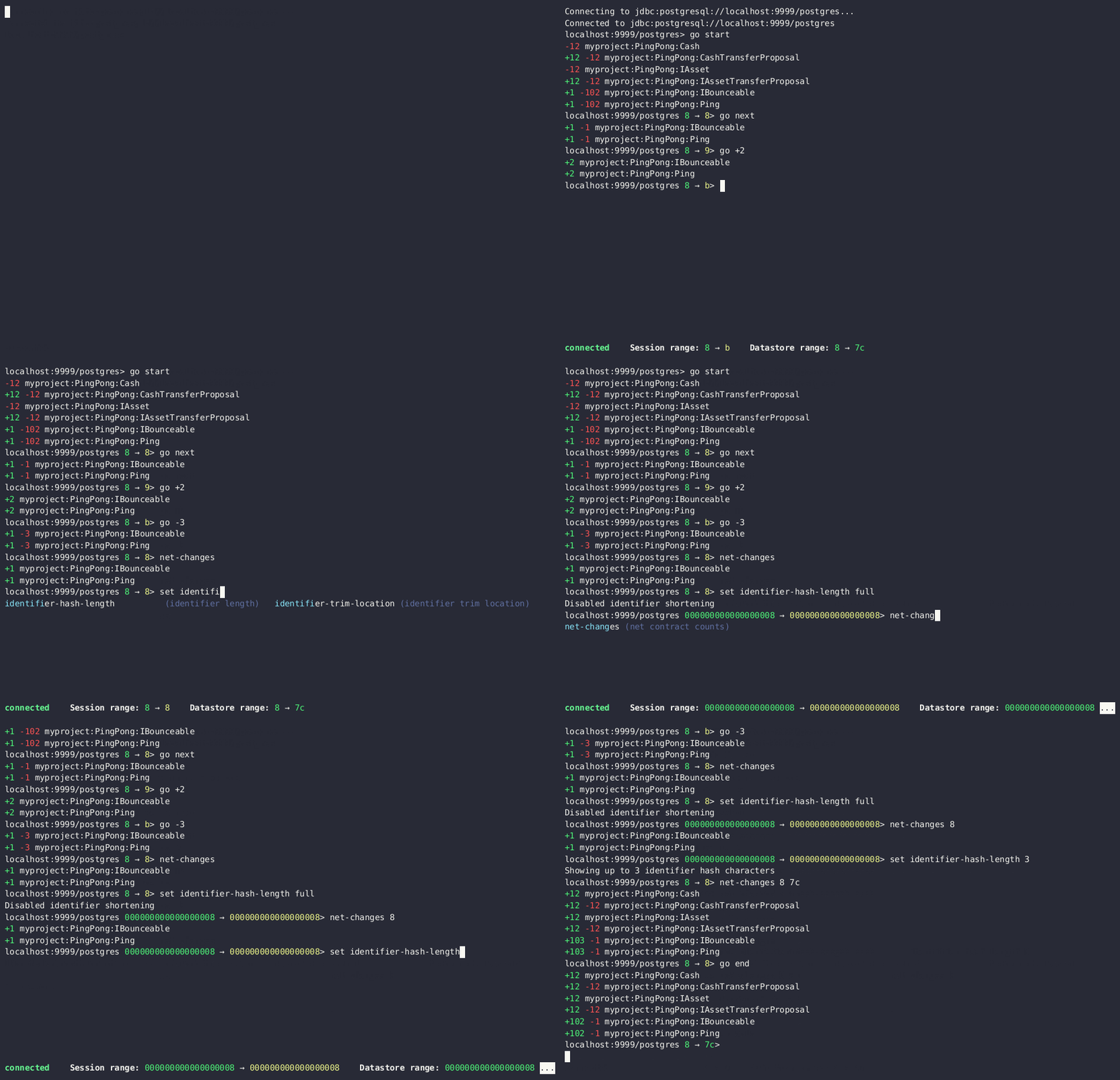
By default, offsets have leading zeroes removed. To see all identifiers in full, including contract ID hashes, run set identifier-hash-length full or set a custom length limit for hashes by running, for example, set identifier-hash-length 15.
Depending on the ledger implementation, offsets may be in hexadecimal format.
The available offset range from the datastore is specified in the Datastore range status field. The offset range for Daml Shell to use to display payload counts and summaries is specified in the Session range status field.
You can move to different offsets by using the go command, which is an alias for set latest. go -2 (go backward two offsets), go +2 (go forward two offsets), go forward (alias go next), go back (alias go backward), go start, and go end are all examples of valid commands.
The net-changes command summarizes the changes effected by the transaction at the current offset. The net-changes command also accepts a target offset argument, or two offset arguments to compare between (see help net-changes).
> net-changes
+6 myproject:PingPong:Cash
-6 myproject:PingPong:CashTransferProposal
+6 myproject:PingPong:IAsset
-6 myproject:PingPong:IAssetTransferProposal
Contract summaries
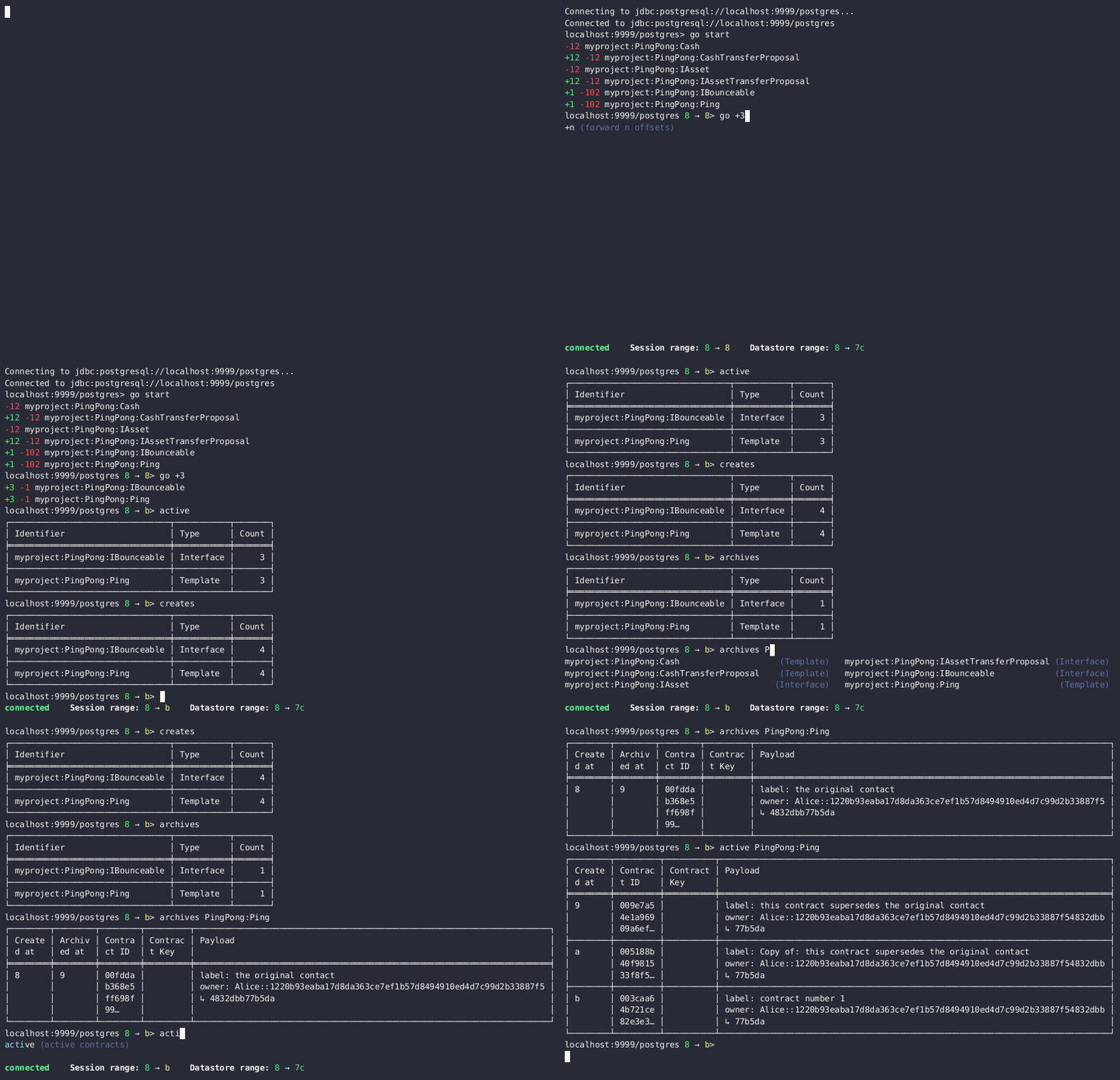
Commands such as active, archives, creates, and exercises can be used without argument to see payload counts by fully qualified identifier names. For details, run help.
> active
┌────────────────────────────────┬───────────┬───────┐
│ Identifier │ Type │ Count │
╞════════════════════════════════╪═══════════╪═══════╡
│ myproject:PingPong:Cash │ Template │ 12 │
├────────────────────────────────┼───────────┼───────┤
│ myproject:PingPong:IAsset │ Interface │ 12 │
├────────────────────────────────┼───────────┼───────┤
│ myproject:PingPong:IBounceable │ Interface │ 102 │
├────────────────────────────────┼───────────┼───────┤
│ myproject:PingPong:Ping │ Template │ 102 │
└────────────────────────────────┴───────────┴───────┘
Payloads by fully qualified name
Specify a fully qualified name (FQN) with the command active, archives, creates, or exercises to list all applicable payloads for that FQN.
To return payloads from a particular package only, include the package name in the FQN:
> active myproject:PingPong:Ping
If you omit the package name, payloads from all package names are returned, as long as they have the same name.
> active PingPong:Ping
┌────────────┬──────────────────┬──────────────┬────────────────────────────────────────────────────────────────────────────────────┐
│ Created at │ Contract ID │ Contract Key │ Payload │
╞════════════╪══════════════════╪══════════════╪════════════════════════════════════════════════════════════════════════════════════╡
│ 19 │ 0022e89289bda36… │ │ label: one │
│ │ │ │ owner: Alice::12209038d324bf70625c580267d5957cb4c4c03bb7bce294713b48151a4a088afd3b │
├────────────┼──────────────────┼──────────────┼────────────────────────────────────────────────────────────────────────────────────┤
│ 43 │ 0093dce322a08c8… │ │ label: one copy updated │
│ │ │ │ owner: Alice::12209038d324bf70625c580267d5957cb4c4c03bb7bce294713b48151a4a088afd3b │
└────────────┴──────────────────┴──────────────┴────────────────────────────────────────────────────────────────────────────────────┘
The auto-completion provides both FQN variants (with and without package name).
Look up a contract by ID
You can look up contracts by contract ID. Interface views are also displayed, if any.
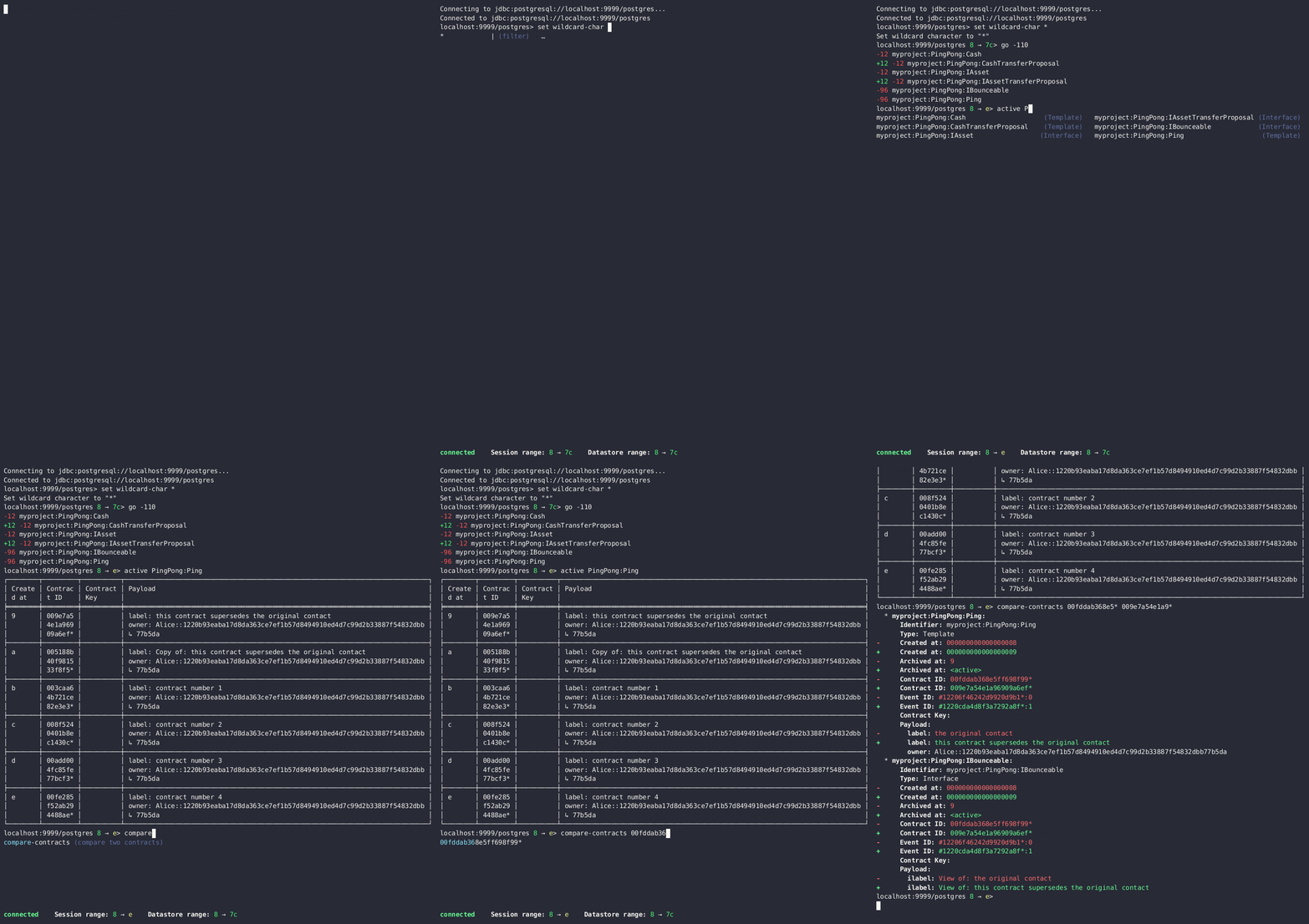
The contract ID can be copied with the wildcard character (here ”…”) included. The wildcard character will be expanded to any matching ID.
> contract 005188b40…
╓──────────────╥────────────────────────────────────────────────────────────────────────────────────╖
║ Identifier ║ myproject:PingPong:Ping ║
╟──────────────╫────────────────────────────────────────────────────────────────────────────────────╢
║ Type ║ Template ║
╟──────────────╫────────────────────────────────────────────────────────────────────────────────────╢
║ Created at ║ 31 ║
╟──────────────╫────────────────────────────────────────────────────────────────────────────────────╢
║ Archived at ║ <active> ║
╟──────────────╫────────────────────────────────────────────────────────────────────────────────────╢
║ Contract ID ║ 005188b40f981533f8f5… ║
╟──────────────╫────────────────────────────────────────────────────────────────────────────────────╢
║ Event ID ║ #31:0 ║
╟──────────────╫────────────────────────────────────────────────────────────────────────────────────╢
║ Contract Key ║ ║
╟──────────────╫────────────────────────────────────────────────────────────────────────────────────╢
║ Payload ║ label: Copy of: this contract supersedes the original contact ║
║ ║ owner: Alice::1220b93eaba17d8da363ce7ef1b57d8494910ed4d7c99d2b33887f54832dbb77b5da ║
╙──────────────╨────────────────────────────────────────────────────────────────────────────────────╜
╓──────────────╥─────────────────────────────────────────────────────────────────────────╖
║ Identifier ║ myproject:PingPong:IBounceable ║
╟──────────────╫─────────────────────────────────────────────────────────────────────────╢
║ Type ║ Interface ║
╟──────────────╫─────────────────────────────────────────────────────────────────────────╢
║ Created at ║ 31 ║
╟──────────────╫─────────────────────────────────────────────────────────────────────────╢
║ Archived at ║ <active> ║
╟──────────────╫─────────────────────────────────────────────────────────────────────────╢
║ Contract ID ║ 005188b40f981533f8f5… ║
╟──────────────╫─────────────────────────────────────────────────────────────────────────╢
║ Event ID ║ #31:0 ║
╟──────────────╫─────────────────────────────────────────────────────────────────────────╢
║ Contract Key ║ ║
╟──────────────╫─────────────────────────────────────────────────────────────────────────╢
║ Payload ║ ilabel: View of: Copy of: this contract supersedes the original contact ║
╙──────────────╨─────────────────────────────────────────────────────────────────────────╜
You can also compare two contracts in a diff-style output format using the compare-contracts <id1> <id2> command:
Look up a Transaction ID
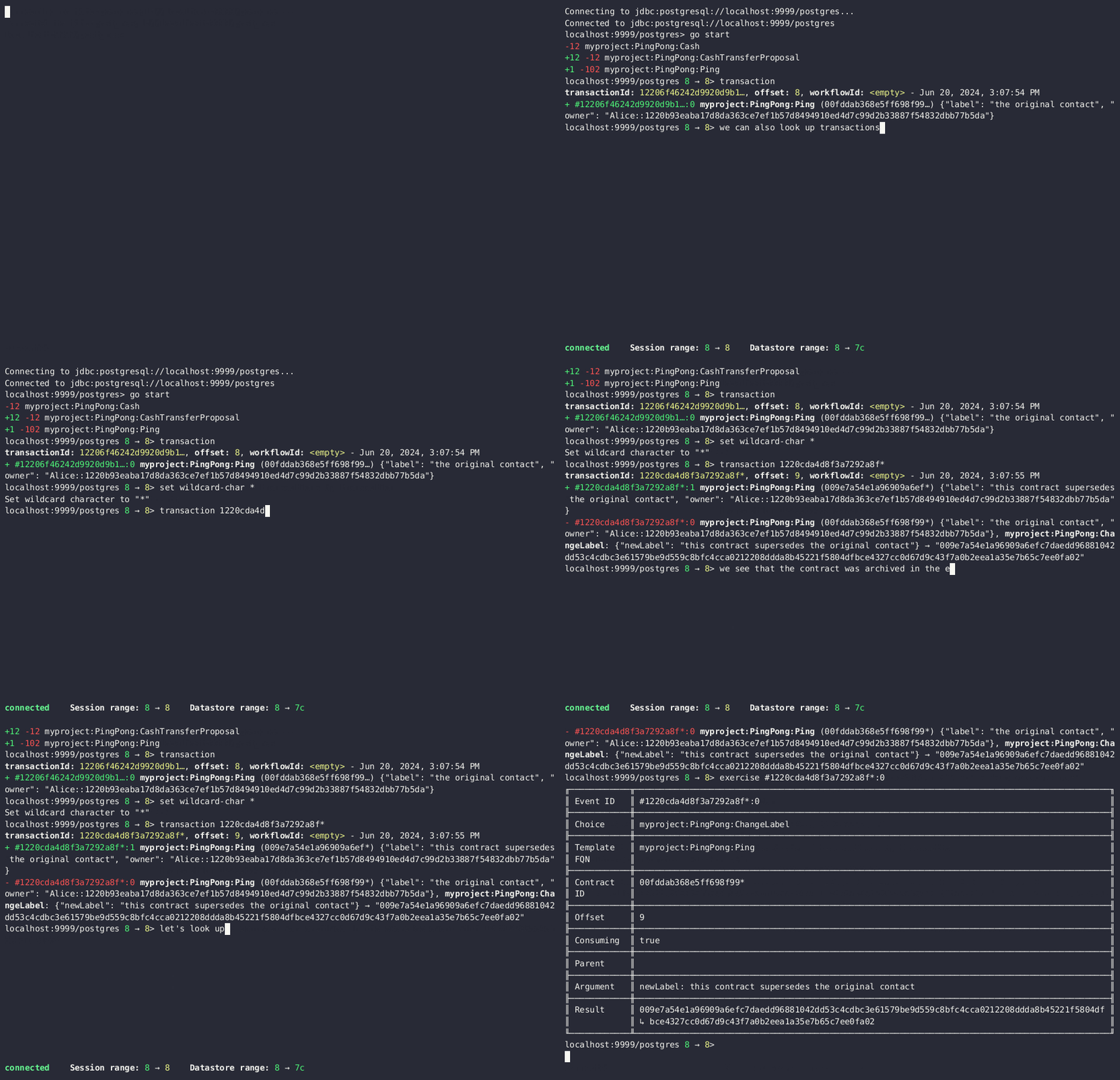
You can look up transactions by either transaction ID or offset, by running transaction or transaction at, respectively. Note the at syntax when looking up by offset.
To display the current transaction at the head of the session offset range, run transaction.
The transaction command shows which contracts were created, which were archived, and what choices were exercised. It also displays the event ID for each of those events, as well as contract IDs and package names.
Look up an exercise
Exercised choices can be looked up in the same manner as contracts, except that exercises are looked up by their event ID rather than by a contract ID. The commands for summaries and lookups mirror the functionality available for contracts.
For example, you can look up exercise counts by FQN:
> exercises
┌─────────────────────────────────────────────────┬───────────────┬───────┐
│ Identifier │ Type │ Count │
╞═════════════════════════════════════════════════╪═══════════════╪═══════╡
│ myproject:PingPong:AcceptIAssetTransferProposal │ Consuming │ 12 │
├─────────────────────────────────────────────────┼───────────────┼───────┤
│ myproject:PingPong:ChangeLabel │ Consuming │ 1 │
├─────────────────────────────────────────────────┼───────────────┼───────┤
│ myproject:PingPong:Copy │ Non-consuming │ 1 │
└─────────────────────────────────────────────────┴───────────────┴───────┘
You can look up exercises for a specific choice:
> exercises PingPong:AcceptIAssetTransferProposal
┌────────┬───────────────────────┬──────────┬────────────────────────────────────────────────────────────────────────────────────────────────────────────────────────────────────────────┐
│ Offset │ Contract ID │ Argument │ Result │
╞════════╪═══════════════════════╪══════════╪════════════════════════════════════════════════════════════════════════════════════════════════════════════════════════════════════════════╡
│ 31 │ 00604362bf43678ba849… │ │ 004ddbb65e00c8210d978fa13503d877e33d3d83dccc0addea759db1063c089412ca0212205b8a98e1b219436a3a6744eb314e20539b349d61dc09f5e23d880e95b2a1c199 │
├────────┼───────────────────────┼──────────┼────────────────────────────────────────────────────────────────────────────────────────────────────────────────────────────────────────────┤
│ 31 │ 00549232a251254b6115… │ │ 00b433b6cb4742f0040f9bab57b809dd478d6a73deeaf08ecdd3c30e2be77d98d1ca021220123f4cad1ba5121fa22e43b83ab4c80c0649f51e8a7e776e01b78bc27544cd02 │
├────────┼───────────────────────┼──────────┼────────────────────────────────────────────────────────────────────────────────────────────────────────────────────────────────────────────┤
│ 31 │ 0063bdaacd598bf2c02f… │ │ 005e908b45701072ed4d0dcf30b9b7b6b233278208078d803edf5fd4502872ce7bca0212201bfb6b375d7fa31a4019ade973a948db52c36ba2a5a239a2d909d12e2ef12968 │
├────────┼───────────────────────┼──────────┼────────────────────────────────────────────────────────────────────────────────────────────────────────────────────────────────────────────┤
│ 31 │ 00ed039a7747337ddb85… │ │ 005d921fd715007edbbb1b2dfffe56c7d37ba4b6698bdf1357b68749038b3817dcca021220dc08f48d759037f776289c06ae409955f4a2475b3cd0238c3fb5d74da5254e3e │
├────────┼───────────────────────┼──────────┼────────────────────────────────────────────────────────────────────────────────────────────────────────────────────────────────────────────┤
│ 31 │ 001207f682120f4798ce… │ │ 00dbe9c12a7ae28f8d12f334ddf9d09bea95a1d55d6a3816f5da5079c71ceb0450ca021220cee4ff410b0e4289301eedeecd82df9f1014796a68c1d4549b8bd72e18464220 │
├────────┼───────────────────────┼──────────┼────────────────────────────────────────────────────────────────────────────────────────────────────────────────────────────────────────────┤
│ 31 │ 00d5e4f15c3d07cb0785… │ │ 00df079f466b87b61e8b5a6702e6f5b05fecba05513a5559b1b400e4c89903f277ca02122000bcac7e924d0489d144b245c16ba1c95c20a9c293e59dd9290b94df77742a92 │
├────────┼───────────────────────┼──────────┼────────────────────────────────────────────────────────────────────────────────────────────────────────────────────────────────────────────┤
│ 32 │ 004dc3561fc426de4dad… │ │ 005e1f271e5f5d7a39e623f0774b11cc9295d59693fa53d9953aed726f40e03a81ca021220053c09a2f248902fc48c09492e7fd38c8cf25beacdb803f1ad51444af38bb51c │
├────────┼───────────────────────┼──────────┼────────────────────────────────────────────────────────────────────────────────────────────────────────────────────────────────────────────┤
│ 32 │ 00ae24d6c2286768a7b2… │ │ 0059352a66da47b5def7e0653f229dbbb797be70d0485792101fe9aad10f396e70ca021220343d49011f6038af41f3e99792fb318e17ce5ab3227660c932f8043aacfed2bf │
├────────┼───────────────────────┼──────────┼────────────────────────────────────────────────────────────────────────────────────────────────────────────────────────────────────────────┤
│ 32 │ 000f02cbb781f76c1877… │ │ 0089b90df5e7085ddb05110eccc9d684e86b96631ff74688ac3f6298cde5f92208ca021220e72fc065a90368000388e41dd8be0672a1078e3329346780e9afb353be100c31 │
├────────┼───────────────────────┼──────────┼────────────────────────────────────────────────────────────────────────────────────────────────────────────────────────────────────────────┤
│ 32 │ 00126b6f770fb951d666… │ │ 00e9e74240297251e4f9274519ec2cd421fb647af88c13d38bba5f67c67a0f90ffca021220ce3fb55a64f86094dc5fa32e509443ce903fc7f28b2a152a732471819eb56491 │
├────────┼───────────────────────┼──────────┼────────────────────────────────────────────────────────────────────────────────────────────────────────────────────────────────────────────┤
│ 32 │ 00ab4ff0b42c625d45c5… │ │ 001c00a896e1e66bdb1acbcdeda5f4e00d8a6131c6a86a672809d9831e857ea2e3ca02122001b6efc6e449a2116bc73e333575eaa4dfcaa69be0655ffd3f4eb5b2777960d2 │
├────────┼───────────────────────┼──────────┼────────────────────────────────────────────────────────────────────────────────────────────────────────────────────────────────────────────┤
│ 32 │ 0020ab2446d6cfc3f93f… │ │ 00a936fa54cc6fba294962b6fd6c639947f220ab4539c73b6c5c693522e5c5364aca021220104bc750d4800053c090d5b447a6c49d9a49911a4f654fa72c58650b3348e735 │
└────────┴───────────────────────┴──────────┴────────────────────────────────────────────────────────────────────────────────────────────────────────────────────────────────────────────┘
To look up individual exercises, use the event ID:
> exercise #43:0
╓──────────────╥────────────────────────────────────────────────────────────────────────────────────────────────────────────────────────────────────────────╖
║ Event ID ║ #43:0 ║
╟──────────────╫────────────────────────────────────────────────────────────────────────────────────────────────────────────────────────────────────────────╢
║ Choice ║ myproject:PingPong:AcceptIAssetTransferProposal ║
╟──────────────╫────────────────────────────────────────────────────────────────────────────────────────────────────────────────────────────────────────────╢
║ Template FQN ║ myproject:PingPong:IAssetTransferProposal ║
╟──────────────╫────────────────────────────────────────────────────────────────────────────────────────────────────────────────────────────────────────────╢
║ Contract ID ║ 00d5e4f15c3d07cb0785… ║
╟──────────────╫────────────────────────────────────────────────────────────────────────────────────────────────────────────────────────────────────────────╢
║ Offset ║ 43 ║
╟──────────────╫────────────────────────────────────────────────────────────────────────────────────────────────────────────────────────────────────────────╢
║ Consuming ║ true ║
╟──────────────╫────────────────────────────────────────────────────────────────────────────────────────────────────────────────────────────────────────────╢
║ Last ║ 3 ║
║ Descendant ║ ║
║ Node ID ║ ║
╟──────────────╫────────────────────────────────────────────────────────────────────────────────────────────────────────────────────────────────────────────╢
║ Argument ║ ║
╟──────────────╫────────────────────────────────────────────────────────────────────────────────────────────────────────────────────────────────────────────╢
║ Result ║ 00df079f466b87b61e8b5a6702e6f5b05fecba05513a5559b1b400e4c89903f277ca02122000bcac7e924d0489d144b245c16ba1c95c20a9c293e59dd9290b94df77742a92 ║
╙──────────────╨────────────────────────────────────────────────────────────────────────────────────────────────────────────────────────────────────────────╜
Refining and filtering your queries
Filtering with where clauses
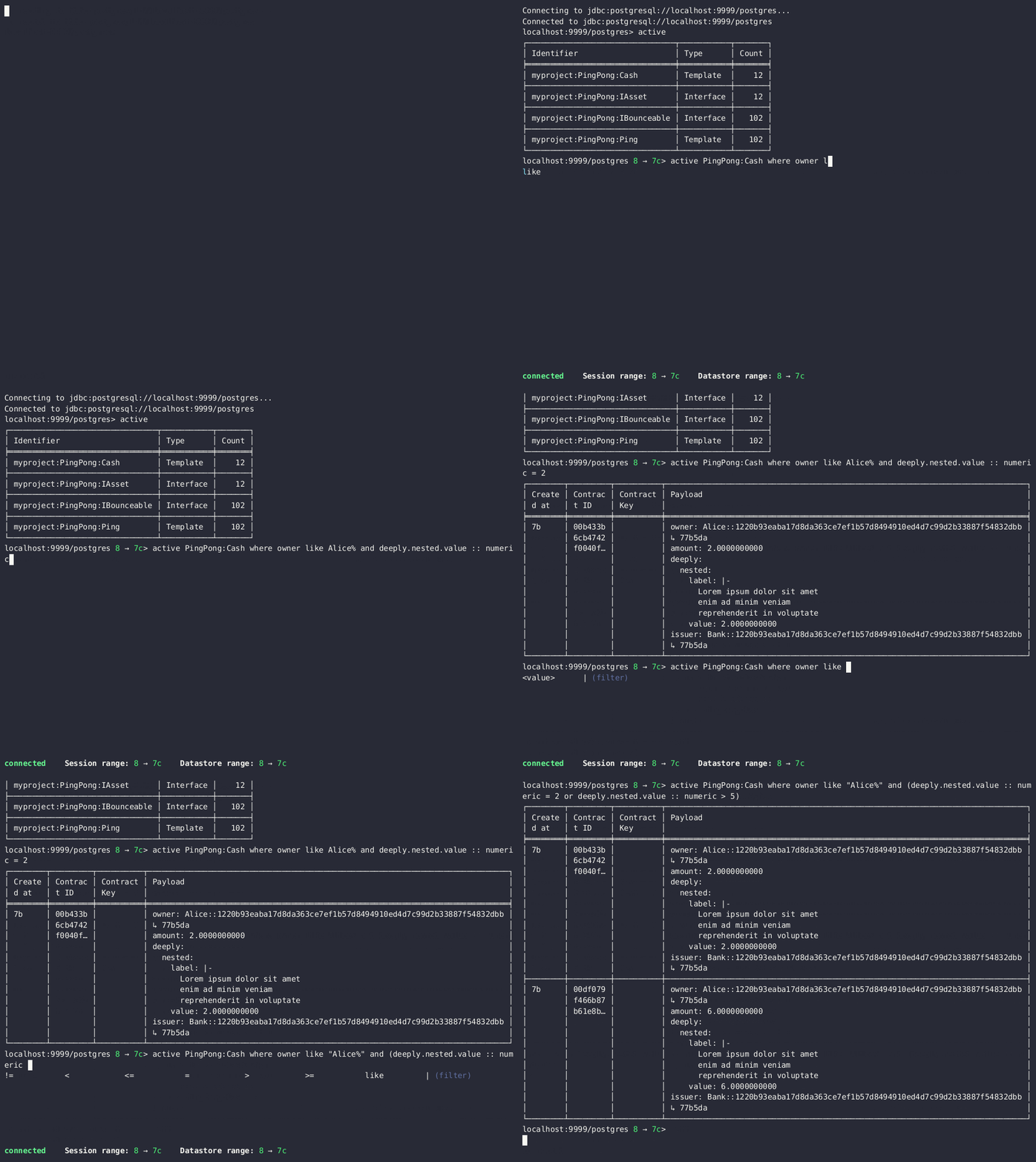
To refine your queries when listing contracts, you can use where clauses to filter on specific payload fields. The where clauses use a SQL-like syntax for conditionals and are supported for the active, creates, archives, and exercises commands.
To access nested fields, use dot notation: parent.child.value
Comparison operators
= Equal to
!= Not equal to
> Greater than
>= Greater than or equal to
< Less than
<= Less than or equal to
like Used for pattern matching, % serves as a wildcard character
Logical operators
and: Both conditions must be satisfied
or: Either condition may be satisfied
You can use parentheses to group conditions and direct the order of evaluation.
Type casting
To ensure proper comparison, you can optionally cast fields to a specific type using the :: operator. The available casting types are numeric, timestamp, and text.
Field values are sorted and compared lexicographically if no cast is specified.
where clause examples
Here are some examples of how to use where clauses in commands:
-
Filter by a string pattern:
> active where owner like Alice%
Lists contracts where the owner field starts with the string Alice.
-
Filter by a nested numeric field:
> active where deeply.nested.value :: numeric > 1000
Lists contracts where the nested field value is greater than 1000.
-
Filter with exact string match (note the use of double quotes):
> active where label = "loren ipsum"
Lists contracts where the label field is exactly loren ipsum. Use double quotes with values that contain whitespace characters.
-
Combine different conditions:
> active where (owner like Bob% or value :: numeric < 100) and myfield = myvalue
Lists contracts where the owner starts with Bob or the value is less than 100, and myfield is myvalue.
Setting offset bounds
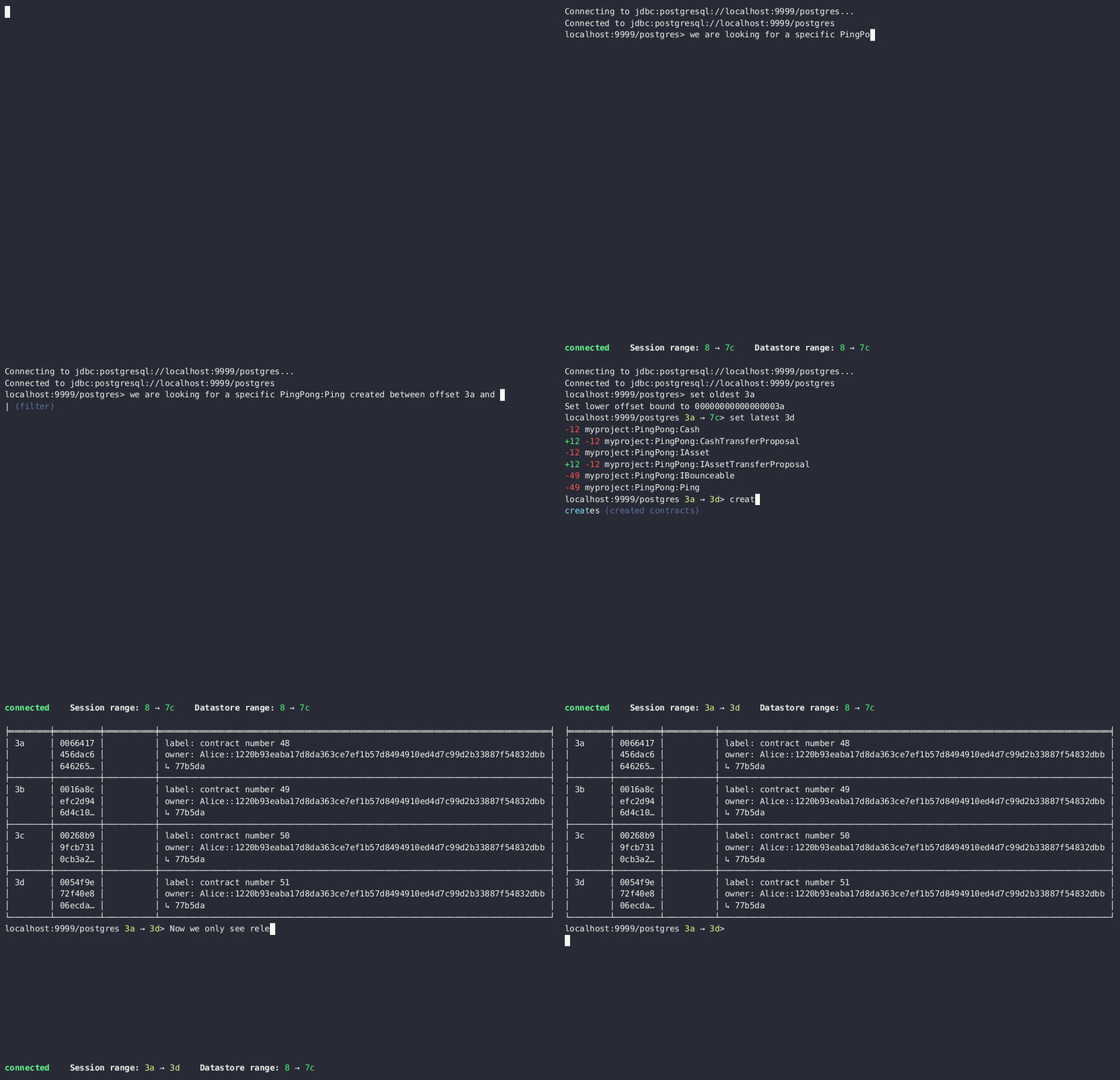
The output of creates [<fqn>] and archives [<fqn>] can be bounded by set oldest (for the lower bound) and set latest (for the upper bound). go is an alias for set latest.
Finding transactions that created or archived a contract
Once you know the offsets that a contract was created at (for example, by using the archives command), you can look up the relevant transactions using the transaction at command.
You can convert tabular output to CSV by piping it through the csv filter:
> active PingPong:Ping | csv
You can then write this output to a file by piping it through the export filter:
> active PingPong:Ping | csv | export ~/my_pings.csv
The export filter writes any command output to the specified file. You can use it without the csv filter.