Write and run test scripts for Daml smart contracts using Daml Script and dpm test.
Daml Script is the primary testing tool for Daml contracts. You write test scenarios as Script () values in Daml source files, then run them with dpm test. Scripts execute on a fresh, empty ledger and can allocate parties, submit commands, query state, and assert expected outcomes.For the complete function and type reference, see Daml.Script API Reference.
A Daml Script is a function that returns Script (). Place your scripts in a test package that depends on your contract package (keep templates and tests in separate packages for clean deployment).
module MyTests whereimport Daml.Scriptimport Licensing.LicensetestCreateAndTransfer : Script ()testCreateAndTransfer = do -- Allocate test parties alice <- allocateParty "Alice" bob <- allocateParty "Bob" -- Create a contract licenseCid <- submit alice do createCmd License with owner = alice issuer = alice description = "Test License" -- Exercise a choice newLicenseCid <- submit alice do exerciseCmd licenseCid Transfer with newOwner = bob -- Query and assert Some license <- queryContractId bob newLicenseCid assert (license.owner == bob) pure ()
The output shows each script’s result, the number of active contracts at the end, and the number of transactions executed. A summary at the end includes test coverage information:
Test SummaryMyTests.daml:testCreateAndTransfer: ok, 1 active contracts, 3 transactions.
If you have Daml Studio installed (dpm studio), a “Script results” lens appears above each script definition. Click it to run the script and see the results in a side panel. The panel shows two views:
Table view — Active contracts at the end of the script, with visibility per party
Transaction view — Every transaction and sub-transaction, useful for debugging authorization failures
alice <- allocateParty "Alice"bob <- allocateParty "Bob"
Creates test parties that exist only for the duration of the script. Party names are for display only and do not need to match production party identifiers.
-- Create a contractcid <- submit alice do createCmd MyTemplate with field1 = "value", field2 = alice-- Exercise a choiceresult <- submit alice do exerciseCmd cid MyChoice with choiceArg = 42
Use submitMustFail to assert that a command should be rejected (e.g., unauthorized access):
submitMustFail bob do
  exerciseCmd cid MyChoice with choiceArg = 42
-- Query all active contracts of a type visible to a partycontracts <- query @MyTemplate alice-- Query a specific contract by IDoptContract <- queryContractId alice cid
The tests/daml.yaml declares a dependency on the contracts package. Run dpm test from the tests/ directory, or dpm build --all and then dpm test from the project root.
In this section we test the Token model from contracts using the Daml Script integration in Daml Studio. This includes:
Script basics
Running scripts
Creating contracts
Testing for failure
Archiving contracts
Viewing the ledger and ledger history
Remember that you can load all the code for this section into a folder called intro-daml-scripts by running dpm new intro-daml-scripts --template daml-intro-daml-scripts
A Script is like a recipe for a test, letting you create a scenario where different parties submit a series of transactions to check that your templates behave as you expect. You can also script some external information like party identities and ledger time.Below is a basic script that creates a Token for a party called “Alice”:
token_test_1 = script do
  alice <- allocateParty "Alice"
  submit alice do
    createCmd Token with owner = alice
You declare a Script as a top-level variable and introduce it using script do. do always starts a block, so the rest of the script is indented.Before you can create any Token contracts, you need some parties on the test ledger. The above script uses the function allocateParty to put a party called “Alice” in a variable alice. There are two things of note there:
Use of <- instead of =.The reason for this is that allocateParty is an Action that can only be performed once the Script is run in the context of a ledger. <- means “run the action and bind the result”. It can only be run in that context because, depending on the ledger state, allocateParty gives you back a party with the name you specified or appends a suffix to that name if such a party has already been allocated. You can read more about Actions and do blocks in constraints.If that doesn’t quite make sense yet, for the time being you can think of this arrow as extracting the right-hand-side value from the ledger and storing it into the variable on the left.
The argument "Alice" to allocateParty does not have to be enclosed in brackets. Functions in Daml are called using the syntax fn arg1 arg2 arg3.
With a variable alice of type Party in hand, you can submit your first transaction using the submit function. submit takes two arguments: the Party and the Commands.Just like Script is a recipe for a test, Commands is a recipe for a transaction. createCmd Token with owner = alice is a Commands, which translates to a list of commands to be submitted to the ledger. These commands create a transaction which in turns creates a Token with owner Alice.You’ll learn all about the syntax Token with owner = alice in data.You could write this as submit alice (createCmd Token with owner = alice), but as with scripts, you can assemble commands using do blocks. A do block always takes the value of the last statement within it so the syntax shown in the commands above gives the same result, whilst being easier to read. Note, however, that the commands submitted as part of a transaction are not allowed to depend on each other.
In Daml Studio against a test ledger, providing visualizations of the resulting ledger.
Using the command line dpm test also against a test ledger, useful for continuous integration.
Against a real ledger. See the documentation for Daml Script for more information.
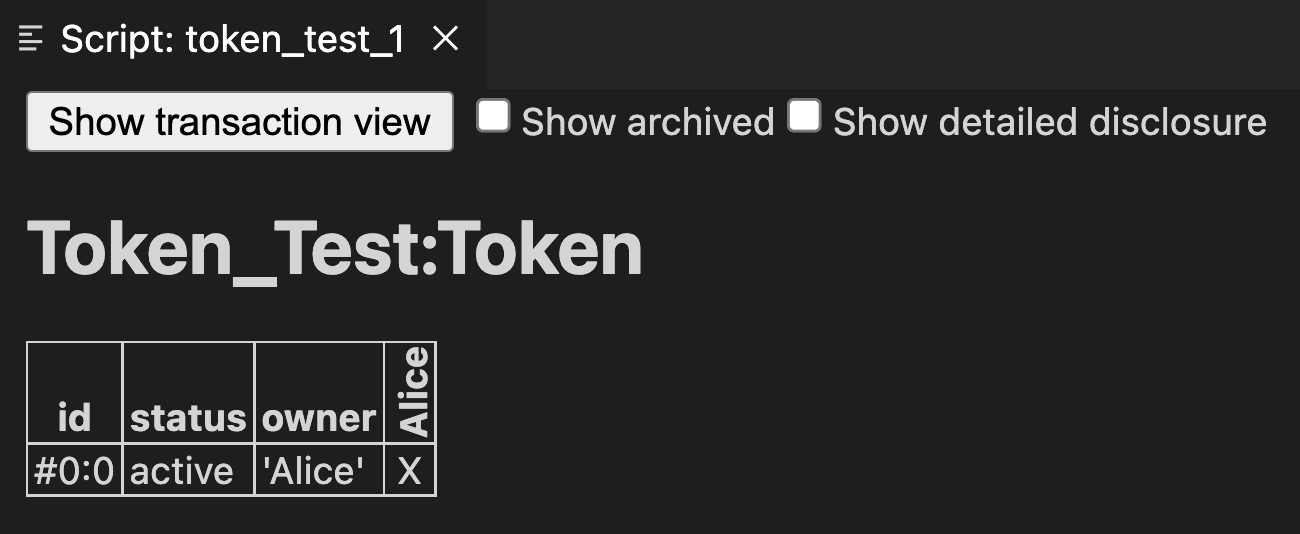
In Daml Studio, you should see the text “Script results” just above the line token_test_1 = do. Click on that text to display the outcome of the script.This opens the script view in a separate column in VS Code. The default view is a tabular representation of the final state of the ledger:What this display means:
The big title reading Token_Test:Token identifies the type of contract that’s listed below. Token_Test is the module name, Token is the template name.
The first column shows the ID of the contract. This will be explained later.
The second column shows the status of the contract, either active or archived.
The next section of columns show the contract arguments, with one column per field. As expected, here there is one field and thus one column: the field owner is 'Alice'. The single quotation marks indicate that Alice is a party.
The remaining columns, labelled vertically, show which parties know about which contracts. In this simple script, the sole party “Alice” knows about the contract she created.
To run the same test from the command line, save your module in a file Token_Test.daml and run dpm test --files Token_Test.daml. If your file contains more than one script, this runs all of them.
In contracts you learned that creating a Token requires the authority of its owner. In other words, it should not be possible for Alice to create a token for another party, e.g. Bob, or vice versa. A reasonable attempt to test that would be:
failing_test_1 = do
  alice <- allocateParty "Alice"
  bob <- allocateParty "Bob"
  submit alice do
    createCmd Token with owner = bob
  submit bob do
    createCmd Token with owner = alice
However, if you open the script view for that script, you see the following message:The script failed, as expected, but scripts abort at the first failure. This means that it only tested that Alice cannot create a token for Bob; the second submit statement was never reached.To test for failing submits and keep the script running thereafter, or fail if the submission succeeds, you can use the submitMustFail function:
token_test_2 = do
  alice <- allocateParty "Alice"
  bob <- allocateParty "Bob"

  submitMustFail alice do
    createCmd Token with owner = bob
  submitMustFail bob do
    createCmd Token with owner = alice

  submit alice do
    createCmd Token with owner = alice
  submit bob do
    createCmd Token with owner = bob
submitMustFail never has an impact on the ledger, so the resulting tabular script view only shows the two tokens resulting from the successful submit statements. Note the new column for Bob as well as the visibilities. Alice and Bob cannot see each others’ tokens.
Archiving contracts is the counterpart to creating contracts. Contracts are immutable, so whenever you want to update one (loosely: change its state) you must archive the current contract residing on the ledger and create a new one.To archive a contract, use archiveCmd instead of createCmd. Whereas createCmd takes an instance of a template, archiveCmd takes a reference to a created contract. Archiving requires authorization from controllers.Contracts are also archived whenever a consuming choice is exercised.
Archive choices are present on all templates and cannot be removed.
References to contracts have the type ContractId a, where a is a type parameter representing the template type of the contract that the id refers to. For example, a reference to a Token would be a ContractId Token.To archiveCmd the token Alice has created, you need the contract id. Retrieve the contract id from the ledger with the <- notation. How this works is discussed in constraints.This script first checks that Bob cannot archive Alice’s token. Then Alice successfully archives it:
token_test_3 = do
  alice <- allocateParty "Alice"
  bob <- allocateParty "Bob"

  alice_token <- submit alice do
    createCmd Token with owner = alice

  submitMustFail bob do
    archiveCmd alice_token

  submit alice do
    archiveCmd alice_token
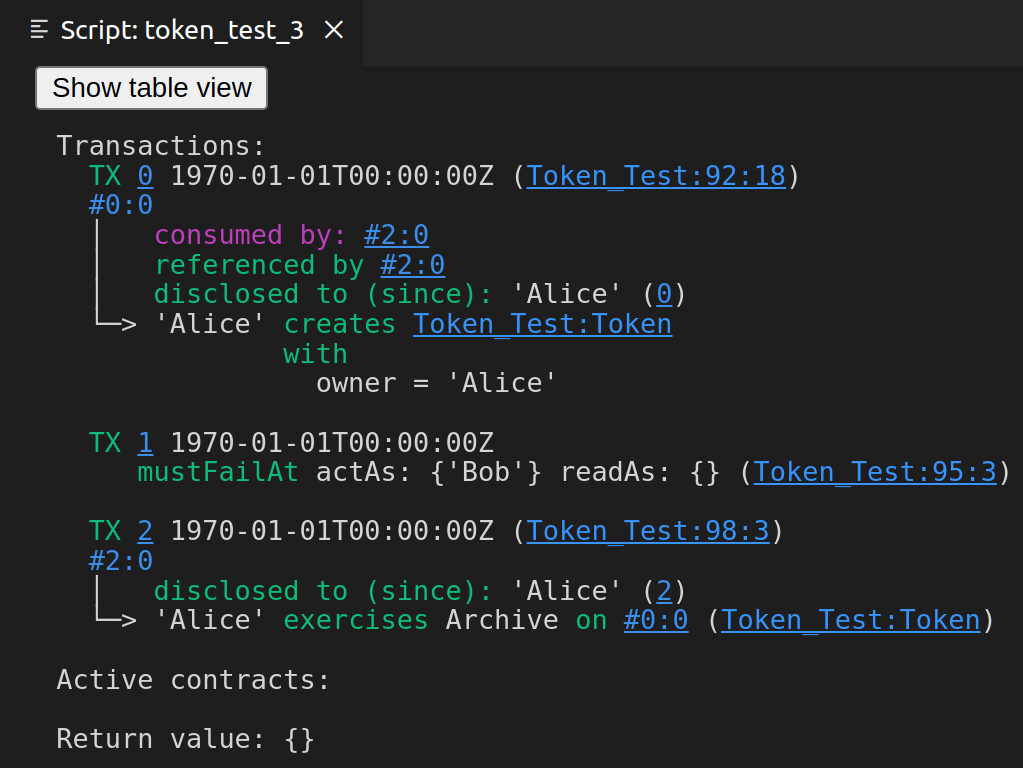
Once you archive the contract the resulting script view is empty; there are no contracts left on the ledger. If you want to see the history of the ledger, e.g. to see how you got to that state, tick the “Show archived” box at the top of the ledger view:You can see that there was a Token contract, which is now archived, indicated both by the “archived” value in the status column as well as by a strikethrough.Click on the adjacent “Show transaction view” button to see the entire transaction graph:In the Daml Studio script runner, committed transactions are numbered sequentially. In the image above, the lines starting with TX indicate that there are three committed transactions, with ids #0, #1, and #2. These correspond to the three submit and submitMustFail statements in the script.Transaction #0 has one sub-transaction#0:0, which the arrow indicates is a create of a Token. Identifiers #X:Y mean commit X, sub-transaction Y. All transactions have this format in the script runner. However, this format is a testing feature. In general, you should consider transaction and contract IDs to be opaque.The lines above and below create Token_Test:Token give additional information:
consumed by: #2:0 tells you that the contract is archived in sub-transaction 0 of commit 2.
referenced by #2:0 tells you that the contract was used in other transactions, and lists their IDs.
disclosed to (since): 'Alice' (#0) tells you who knows about the contract. The fact that 'Alice' appears in the list is equivalent to an x in the tabular view. The (#0) gives you the additional information that Alice learned about the contract in commit #0.
Everything following with shows the create arguments.
To get a better understanding of script, try the following exercises:
Write a template for a second type of token.
Write a script with two parties and two types of tokens, creating one token of each type for each party and archiving one token for each party, leaving one token of each type in the final ledger view.
In archiving you tested that Bob cannot archive Alice’s token. Can you guess why the submit fails? How can you find out why the submit fails?
Hint: Remember that in intro_2_failure we saw a proper error message for a failing submit.