| Parameter | Description |
|---|---|
|
Path to configuration overrides via an external HOCON file (optional) + Environment variable: DAML\_SHELL\_CONFIG. System property: config. |
|
Wildcard character used to abbreviate identifiers (default: …). Environment variable: DAML\_SHELL\_WILDCARD\_CHAR. System property: wildcard-char. |
|
Number of characters to render for hashes inside identifiers. (default: 20). Environment variable: DAML\_SHELL\_IDENTIFIER\_HASH\_LENGTH. System property: identifier-hash-length. |
|
Disable identifier shortening.. Environment variable: DAML\_SHELL\_FULL\_INDENTIFIERS. System property: full-identifiers. |
|
Where to trim long identifiers. (default: trailing). Environment variable: DAML\_SHELL\_IDENTIFIER\_TRIM\_LOCATION. System property: identifier-trim-location. Enumeration values: leading, middle, trailing. |
|
How many completions to show unprompted. (default: 100). Environment variable: DAML\_SHELL\_COMPLETION\_QUERY\_ITEMS. System property: completion-query-items. |
|
Disable ANSI colored output (optional). Environment variable: DAML\_SHELL\_DISABLE\_COLOR. System property: disable-color. |
|
Postgres host to connect to. Implies --connect. (default: localhost). Environment variable: DAML\_SHELL\_POSTGRES\_HOST. System property: postgres-host. |
|
Postgres port to connect to. Implies --connect. (default: 5432). Environment variable: DAML\_SHELL\_POSTGRES\_PORT. System property: postgres-port. |
|
Postgres username to connect with. Implies --connect. (default: postgres). Environment variable: DAML\_SHELL\_POSTGRES\_USERNAME. System property: postgres-username. |
|
Postgres password to connect with. Implies --connect. (default: none). Environment variable: DAML\_SHELL\_POSTGRES\_PASSWORD. System property: postgres-password. |
|
Postgres database to connect to. Implies --connect. (default: postgres). Environment variable: DAML\_SHELL\_POSTGRES\_DATABASE. System property: postgres-database. |
|
Postgres schema to connect to. Implies --connect. (default: public). Environment variable: DAML\_SHELL\_POSTGRES\_SCHEMA. System property: postgres-schema. |
|
TLS mode for Postgres connection. Implies --connect. (default: Disable). Environment variable: DAML\_SHELL\_POSTGRES\_TLS\_MODE. System property: postgres-tls-mode. Enumeration values: Disable, VerifyCA, VerifyFull, Require. |
|
Path to the TLS CA file for Postgres connection. Implies --connect. (default: none). Environment variable: DAML\_SHELL\_POSTGRES\_TLS\_CAFILE. System property: postgres-tls-cafile. |
|
Path to the TLS certificate file for Postgres connection. Implies --connect. (default: none). Environment variable: DAML\_SHELL\_POSTGRES\_TLS\_CERT. System property: postgres-tls-cert. |
|
Path to the TLS key file for Postgres connection. Implies --connect. (default: none). Environment variable: DAML\_SHELL\_POSTGRES\_TLS\_KEY. System property: postgres-tls-key. |
|
Auto-connect to the database on startup.. Environment variable: DAML\_SHELL\_CONNECT. System property: connect. |
 ## Query contract data
Daml Shell allows you to query ledger date in many different ways.
### Query at offsets
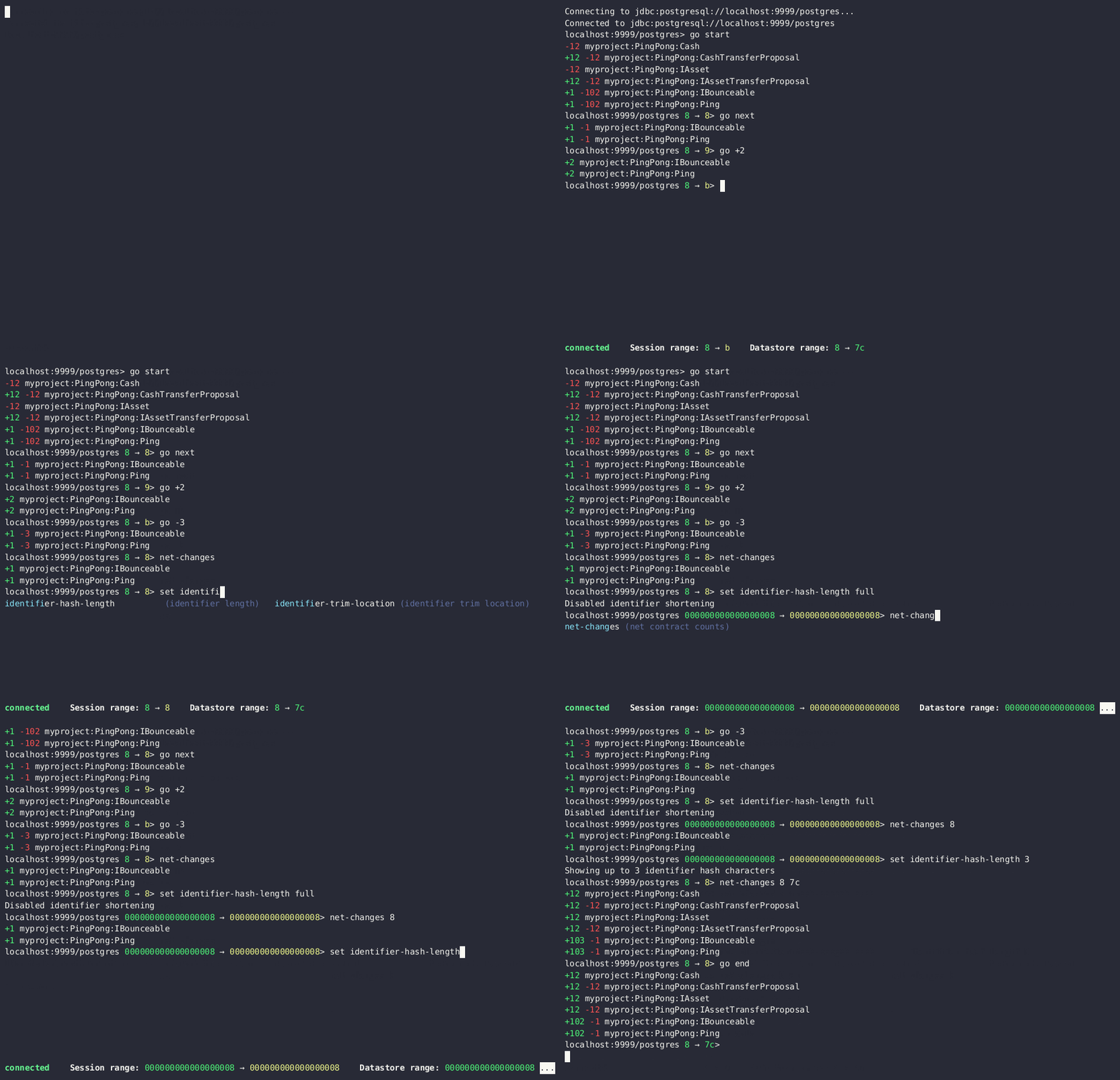
By default, offsets have leading zeroes removed. To see all identifiers in full, including contract ID hashes, run `set identifier-hash-length full` or set a custom length limit for hashes by running, for example, `set identifier-hash-length 15`.
Depending on the ledger implementation, offsets may be in hexadecimal format.
The available offset range from the datastore is specified in the `Datastore range` status field. The offset range for Daml Shell to use to display payload counts and summaries is specified in the `Session range` status field.
You can move to different offsets by using the `go` command, which is an alias for `set latest`. `go -2` (go backward two offsets), `go +2` (go forward two offsets), `go forward` (alias `go next`), `go back` (alias `go backward`), `go start`, and `go end` are all examples of valid commands.
The `net-changes` command summarizes the changes effected by the transaction at the current offset. The `net-changes` command also accepts a target `offset` argument, or two `offset` arguments to compare between (see `help net-changes`).
```text theme={"theme":{"light":"github-light","dark":"github-dark"}}
> net-changes
+6 myproject:PingPong:Cash
-6 myproject:PingPong:CashTransferProposal
+6 myproject:PingPong:IAsset
-6 myproject:PingPong:IAssetTransferProposal
```
## Query contract data
Daml Shell allows you to query ledger date in many different ways.
### Query at offsets
By default, offsets have leading zeroes removed. To see all identifiers in full, including contract ID hashes, run `set identifier-hash-length full` or set a custom length limit for hashes by running, for example, `set identifier-hash-length 15`.
Depending on the ledger implementation, offsets may be in hexadecimal format.
The available offset range from the datastore is specified in the `Datastore range` status field. The offset range for Daml Shell to use to display payload counts and summaries is specified in the `Session range` status field.
You can move to different offsets by using the `go` command, which is an alias for `set latest`. `go -2` (go backward two offsets), `go +2` (go forward two offsets), `go forward` (alias `go next`), `go back` (alias `go backward`), `go start`, and `go end` are all examples of valid commands.
The `net-changes` command summarizes the changes effected by the transaction at the current offset. The `net-changes` command also accepts a target `offset` argument, or two `offset` arguments to compare between (see `help net-changes`).
```text theme={"theme":{"light":"github-light","dark":"github-dark"}}
> net-changes
+6 myproject:PingPong:Cash
-6 myproject:PingPong:CashTransferProposal
+6 myproject:PingPong:IAsset
-6 myproject:PingPong:IAssetTransferProposal
```
 #### Contract summaries
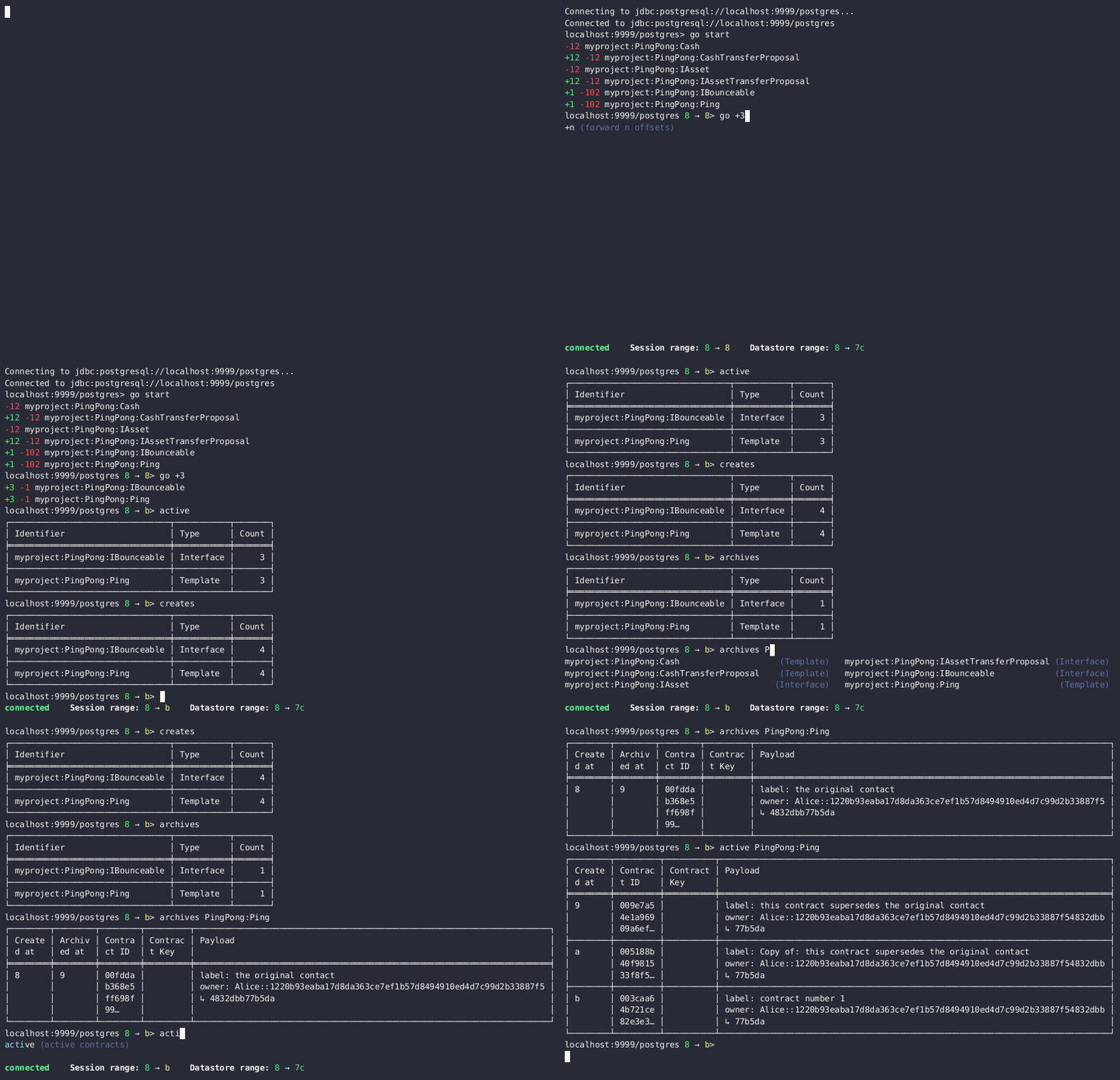
Commands such as `active`, `archives`, `creates`, and `exercises` can be used without argument to see payload counts by fully qualified identifier names. For details, run help.
```text theme={"theme":{"light":"github-light","dark":"github-dark"}}
> active
┌────────────────────────────────┬───────────┬───────┐
│ Identifier │ Type │ Count │
╞════════════════════════════════╪═══════════╪═══════╡
│ myproject:PingPong:Cash │ Template │ 12 │
├────────────────────────────────┼───────────┼───────┤
│ myproject:PingPong:IAsset │ Interface │ 12 │
├────────────────────────────────┼───────────┼───────┤
│ myproject:PingPong:IBounceable │ Interface │ 102 │
├────────────────────────────────┼───────────┼───────┤
│ myproject:PingPong:Ping │ Template │ 102 │
└────────────────────────────────┴───────────┴───────┘
```
#### Contract summaries
Commands such as `active`, `archives`, `creates`, and `exercises` can be used without argument to see payload counts by fully qualified identifier names. For details, run help.
```text theme={"theme":{"light":"github-light","dark":"github-dark"}}
> active
┌────────────────────────────────┬───────────┬───────┐
│ Identifier │ Type │ Count │
╞════════════════════════════════╪═══════════╪═══════╡
│ myproject:PingPong:Cash │ Template │ 12 │
├────────────────────────────────┼───────────┼───────┤
│ myproject:PingPong:IAsset │ Interface │ 12 │
├────────────────────────────────┼───────────┼───────┤
│ myproject:PingPong:IBounceable │ Interface │ 102 │
├────────────────────────────────┼───────────┼───────┤
│ myproject:PingPong:Ping │ Template │ 102 │
└────────────────────────────────┴───────────┴───────┘
```
 #### Payloads by fully qualified name
Specify a fully qualified name (FQN) with the command `active`, `archives`, `creates`, or `exercises` to list all applicable payloads for that FQN.
To return payloads from a particular package only, include the package name in the FQN:
```text theme={"theme":{"light":"github-light","dark":"github-dark"}}
> active myproject:PingPong:Ping
```
If you omit the package name, payloads from all package names are returned, as long as they have the same name.
```text theme={"theme":{"light":"github-light","dark":"github-dark"}}
> active PingPong:Ping
┌────────────┬──────────────────┬──────────────┬────────────────────────────────────────────────────────────────────────────────────┐
│ Created at │ Contract ID │ Contract Key │ Payload │
╞════════════╪══════════════════╪══════════════╪════════════════════════════════════════════════════════════════════════════════════╡
│ 19 │ 0022e89289bda36… │ │ label: one │
│ │ │ │ owner: Alice::12209038d324bf70625c580267d5957cb4c4c03bb7bce294713b48151a4a088afd3b │
├────────────┼──────────────────┼──────────────┼────────────────────────────────────────────────────────────────────────────────────┤
│ 43 │ 0093dce322a08c8… │ │ label: one copy updated │
│ │ │ │ owner: Alice::12209038d324bf70625c580267d5957cb4c4c03bb7bce294713b48151a4a088afd3b │
└────────────┴──────────────────┴──────────────┴────────────────────────────────────────────────────────────────────────────────────┘
```
The auto-completion provides both FQN variants (with and without package name).
#### Look up a contract by ID
You can look up contracts by contract ID. Interface views are also displayed, if any.
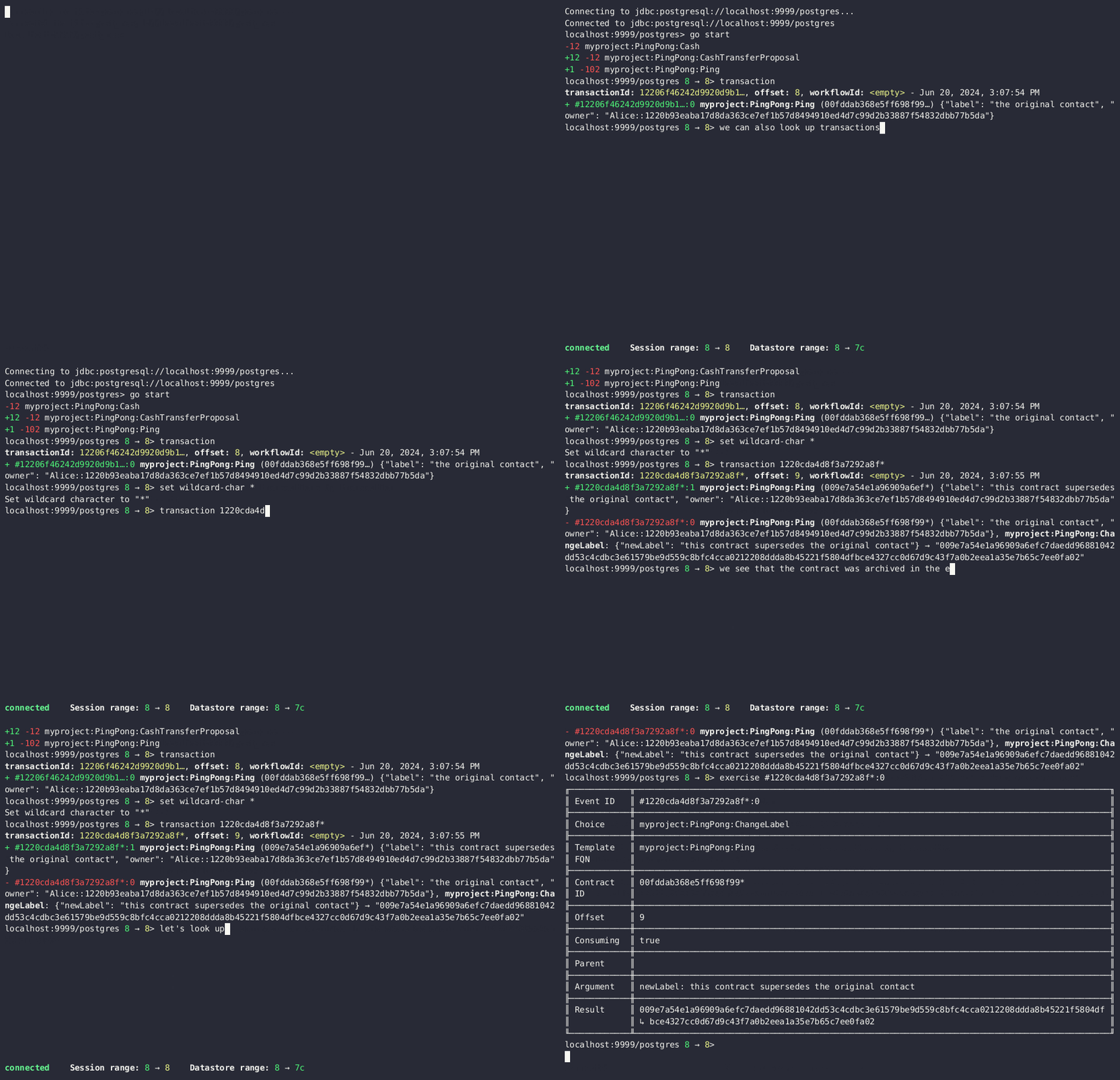
The contract ID can be copied with the wildcard character (here "…") included. The wildcard character will be expanded to any matching ID.
```text theme={"theme":{"light":"github-light","dark":"github-dark"}}
> contract 005188b40…
╓──────────────╥────────────────────────────────────────────────────────────────────────────────────╖
║ Identifier ║ myproject:PingPong:Ping ║
╟──────────────╫────────────────────────────────────────────────────────────────────────────────────╢
║ Type ║ Template ║
╟──────────────╫────────────────────────────────────────────────────────────────────────────────────╢
║ Created at ║ 31 ║
╟──────────────╫────────────────────────────────────────────────────────────────────────────────────╢
║ Archived at ║
#### Payloads by fully qualified name
Specify a fully qualified name (FQN) with the command `active`, `archives`, `creates`, or `exercises` to list all applicable payloads for that FQN.
To return payloads from a particular package only, include the package name in the FQN:
```text theme={"theme":{"light":"github-light","dark":"github-dark"}}
> active myproject:PingPong:Ping
```
If you omit the package name, payloads from all package names are returned, as long as they have the same name.
```text theme={"theme":{"light":"github-light","dark":"github-dark"}}
> active PingPong:Ping
┌────────────┬──────────────────┬──────────────┬────────────────────────────────────────────────────────────────────────────────────┐
│ Created at │ Contract ID │ Contract Key │ Payload │
╞════════════╪══════════════════╪══════════════╪════════════════════════════════════════════════════════════════════════════════════╡
│ 19 │ 0022e89289bda36… │ │ label: one │
│ │ │ │ owner: Alice::12209038d324bf70625c580267d5957cb4c4c03bb7bce294713b48151a4a088afd3b │
├────────────┼──────────────────┼──────────────┼────────────────────────────────────────────────────────────────────────────────────┤
│ 43 │ 0093dce322a08c8… │ │ label: one copy updated │
│ │ │ │ owner: Alice::12209038d324bf70625c580267d5957cb4c4c03bb7bce294713b48151a4a088afd3b │
└────────────┴──────────────────┴──────────────┴────────────────────────────────────────────────────────────────────────────────────┘
```
The auto-completion provides both FQN variants (with and without package name).
#### Look up a contract by ID
You can look up contracts by contract ID. Interface views are also displayed, if any.
The contract ID can be copied with the wildcard character (here "…") included. The wildcard character will be expanded to any matching ID.
```text theme={"theme":{"light":"github-light","dark":"github-dark"}}
> contract 005188b40…
╓──────────────╥────────────────────────────────────────────────────────────────────────────────────╖
║ Identifier ║ myproject:PingPong:Ping ║
╟──────────────╫────────────────────────────────────────────────────────────────────────────────────╢
║ Type ║ Template ║
╟──────────────╫────────────────────────────────────────────────────────────────────────────────────╢
║ Created at ║ 31 ║
╟──────────────╫────────────────────────────────────────────────────────────────────────────────────╢
║ Archived at ║  #### Look up a Transaction ID
You can look up transactions by either transaction ID or offset, by running transaction or transaction at, respectively. Note the `at` syntax when looking up by offset.
To display the current transaction at the head of the session offset range, run `transaction`.
The `transaction` command shows which contracts were created, which were archived, and what choices were exercised. It also displays the event ID for each of those events, as well as contract IDs and package names.
#### Look up a Transaction ID
You can look up transactions by either transaction ID or offset, by running transaction or transaction at, respectively. Note the `at` syntax when looking up by offset.
To display the current transaction at the head of the session offset range, run `transaction`.
The `transaction` command shows which contracts were created, which were archived, and what choices were exercised. It also displays the event ID for each of those events, as well as contract IDs and package names.
 #### Look up an exercise
Exercised choices can be looked up in the same manner as contracts, except that exercises are looked up by their event ID rather than by a contract ID. The commands for summaries and lookups mirror the functionality available for contracts.
For example, you can look up exercise counts by FQN:
```text theme={"theme":{"light":"github-light","dark":"github-dark"}}
> exercises
┌─────────────────────────────────────────────────┬───────────────┬───────┐
│ Identifier │ Type │ Count │
╞═════════════════════════════════════════════════╪═══════════════╪═══════╡
│ myproject:PingPong:AcceptIAssetTransferProposal │ Consuming │ 12 │
├─────────────────────────────────────────────────┼───────────────┼───────┤
│ myproject:PingPong:ChangeLabel │ Consuming │ 1 │
├─────────────────────────────────────────────────┼───────────────┼───────┤
│ myproject:PingPong:Copy │ Non-consuming │ 1 │
└─────────────────────────────────────────────────┴───────────────┴───────┘
```
You can look up exercises for a specific choice:
```text theme={"theme":{"light":"github-light","dark":"github-dark"}}
> exercises PingPong:AcceptIAssetTransferProposal
┌────────┬───────────────────────┬──────────┬────────────────────────────────────────────────────────────────────────────────────────────────────────────────────────────────────────────┐
│ Offset │ Contract ID │ Argument │ Result │
╞════════╪═══════════════════════╪══════════╪════════════════════════════════════════════════════════════════════════════════════════════════════════════════════════════════════════════╡
│ 31 │ 00604362bf43678ba849… │ │ 004ddbb65e00c8210d978fa13503d877e33d3d83dccc0addea759db1063c089412ca0212205b8a98e1b219436a3a6744eb314e20539b349d61dc09f5e23d880e95b2a1c199 │
├────────┼───────────────────────┼──────────┼────────────────────────────────────────────────────────────────────────────────────────────────────────────────────────────────────────────┤
│ 31 │ 00549232a251254b6115… │ │ 00b433b6cb4742f0040f9bab57b809dd478d6a73deeaf08ecdd3c30e2be77d98d1ca021220123f4cad1ba5121fa22e43b83ab4c80c0649f51e8a7e776e01b78bc27544cd02 │
├────────┼───────────────────────┼──────────┼────────────────────────────────────────────────────────────────────────────────────────────────────────────────────────────────────────────┤
│ 31 │ 0063bdaacd598bf2c02f… │ │ 005e908b45701072ed4d0dcf30b9b7b6b233278208078d803edf5fd4502872ce7bca0212201bfb6b375d7fa31a4019ade973a948db52c36ba2a5a239a2d909d12e2ef12968 │
├────────┼───────────────────────┼──────────┼────────────────────────────────────────────────────────────────────────────────────────────────────────────────────────────────────────────┤
│ 31 │ 00ed039a7747337ddb85… │ │ 005d921fd715007edbbb1b2dfffe56c7d37ba4b6698bdf1357b68749038b3817dcca021220dc08f48d759037f776289c06ae409955f4a2475b3cd0238c3fb5d74da5254e3e │
├────────┼───────────────────────┼──────────┼────────────────────────────────────────────────────────────────────────────────────────────────────────────────────────────────────────────┤
│ 31 │ 001207f682120f4798ce… │ │ 00dbe9c12a7ae28f8d12f334ddf9d09bea95a1d55d6a3816f5da5079c71ceb0450ca021220cee4ff410b0e4289301eedeecd82df9f1014796a68c1d4549b8bd72e18464220 │
├────────┼───────────────────────┼──────────┼────────────────────────────────────────────────────────────────────────────────────────────────────────────────────────────────────────────┤
│ 31 │ 00d5e4f15c3d07cb0785… │ │ 00df079f466b87b61e8b5a6702e6f5b05fecba05513a5559b1b400e4c89903f277ca02122000bcac7e924d0489d144b245c16ba1c95c20a9c293e59dd9290b94df77742a92 │
├────────┼───────────────────────┼──────────┼────────────────────────────────────────────────────────────────────────────────────────────────────────────────────────────────────────────┤
│ 32 │ 004dc3561fc426de4dad… │ │ 005e1f271e5f5d7a39e623f0774b11cc9295d59693fa53d9953aed726f40e03a81ca021220053c09a2f248902fc48c09492e7fd38c8cf25beacdb803f1ad51444af38bb51c │
├────────┼───────────────────────┼──────────┼────────────────────────────────────────────────────────────────────────────────────────────────────────────────────────────────────────────┤
│ 32 │ 00ae24d6c2286768a7b2… │ │ 0059352a66da47b5def7e0653f229dbbb797be70d0485792101fe9aad10f396e70ca021220343d49011f6038af41f3e99792fb318e17ce5ab3227660c932f8043aacfed2bf │
├────────┼───────────────────────┼──────────┼────────────────────────────────────────────────────────────────────────────────────────────────────────────────────────────────────────────┤
│ 32 │ 000f02cbb781f76c1877… │ │ 0089b90df5e7085ddb05110eccc9d684e86b96631ff74688ac3f6298cde5f92208ca021220e72fc065a90368000388e41dd8be0672a1078e3329346780e9afb353be100c31 │
├────────┼───────────────────────┼──────────┼────────────────────────────────────────────────────────────────────────────────────────────────────────────────────────────────────────────┤
│ 32 │ 00126b6f770fb951d666… │ │ 00e9e74240297251e4f9274519ec2cd421fb647af88c13d38bba5f67c67a0f90ffca021220ce3fb55a64f86094dc5fa32e509443ce903fc7f28b2a152a732471819eb56491 │
├────────┼───────────────────────┼──────────┼────────────────────────────────────────────────────────────────────────────────────────────────────────────────────────────────────────────┤
│ 32 │ 00ab4ff0b42c625d45c5… │ │ 001c00a896e1e66bdb1acbcdeda5f4e00d8a6131c6a86a672809d9831e857ea2e3ca02122001b6efc6e449a2116bc73e333575eaa4dfcaa69be0655ffd3f4eb5b2777960d2 │
├────────┼───────────────────────┼──────────┼────────────────────────────────────────────────────────────────────────────────────────────────────────────────────────────────────────────┤
│ 32 │ 0020ab2446d6cfc3f93f… │ │ 00a936fa54cc6fba294962b6fd6c639947f220ab4539c73b6c5c693522e5c5364aca021220104bc750d4800053c090d5b447a6c49d9a49911a4f654fa72c58650b3348e735 │
└────────┴───────────────────────┴──────────┴────────────────────────────────────────────────────────────────────────────────────────────────────────────────────────────────────────────┘
```
To look up individual exercises, use the event ID:
```text theme={"theme":{"light":"github-light","dark":"github-dark"}}
> exercise #43:0
╓──────────────╥────────────────────────────────────────────────────────────────────────────────────────────────────────────────────────────────────────────╖
║ Event ID ║ #43:0 ║
╟──────────────╫────────────────────────────────────────────────────────────────────────────────────────────────────────────────────────────────────────────╢
║ Choice ║ myproject:PingPong:AcceptIAssetTransferProposal ║
╟──────────────╫────────────────────────────────────────────────────────────────────────────────────────────────────────────────────────────────────────────╢
║ Template FQN ║ myproject:PingPong:IAssetTransferProposal ║
╟──────────────╫────────────────────────────────────────────────────────────────────────────────────────────────────────────────────────────────────────────╢
║ Contract ID ║ 00d5e4f15c3d07cb0785… ║
╟──────────────╫────────────────────────────────────────────────────────────────────────────────────────────────────────────────────────────────────────────╢
║ Offset ║ 43 ║
╟──────────────╫────────────────────────────────────────────────────────────────────────────────────────────────────────────────────────────────────────────╢
║ Consuming ║ true ║
╟──────────────╫────────────────────────────────────────────────────────────────────────────────────────────────────────────────────────────────────────────╢
║ Last ║ 3 ║
║ Descendant ║ ║
║ Node ID ║ ║
╟──────────────╫────────────────────────────────────────────────────────────────────────────────────────────────────────────────────────────────────────────╢
║ Argument ║ ║
╟──────────────╫────────────────────────────────────────────────────────────────────────────────────────────────────────────────────────────────────────────╢
║ Result ║ 00df079f466b87b61e8b5a6702e6f5b05fecba05513a5559b1b400e4c89903f277ca02122000bcac7e924d0489d144b245c16ba1c95c20a9c293e59dd9290b94df77742a92 ║
╙──────────────╨────────────────────────────────────────────────────────────────────────────────────────────────────────────────────────────────────────────╜
```
#### Refining and filtering your queries
### Filtering with `where` clauses
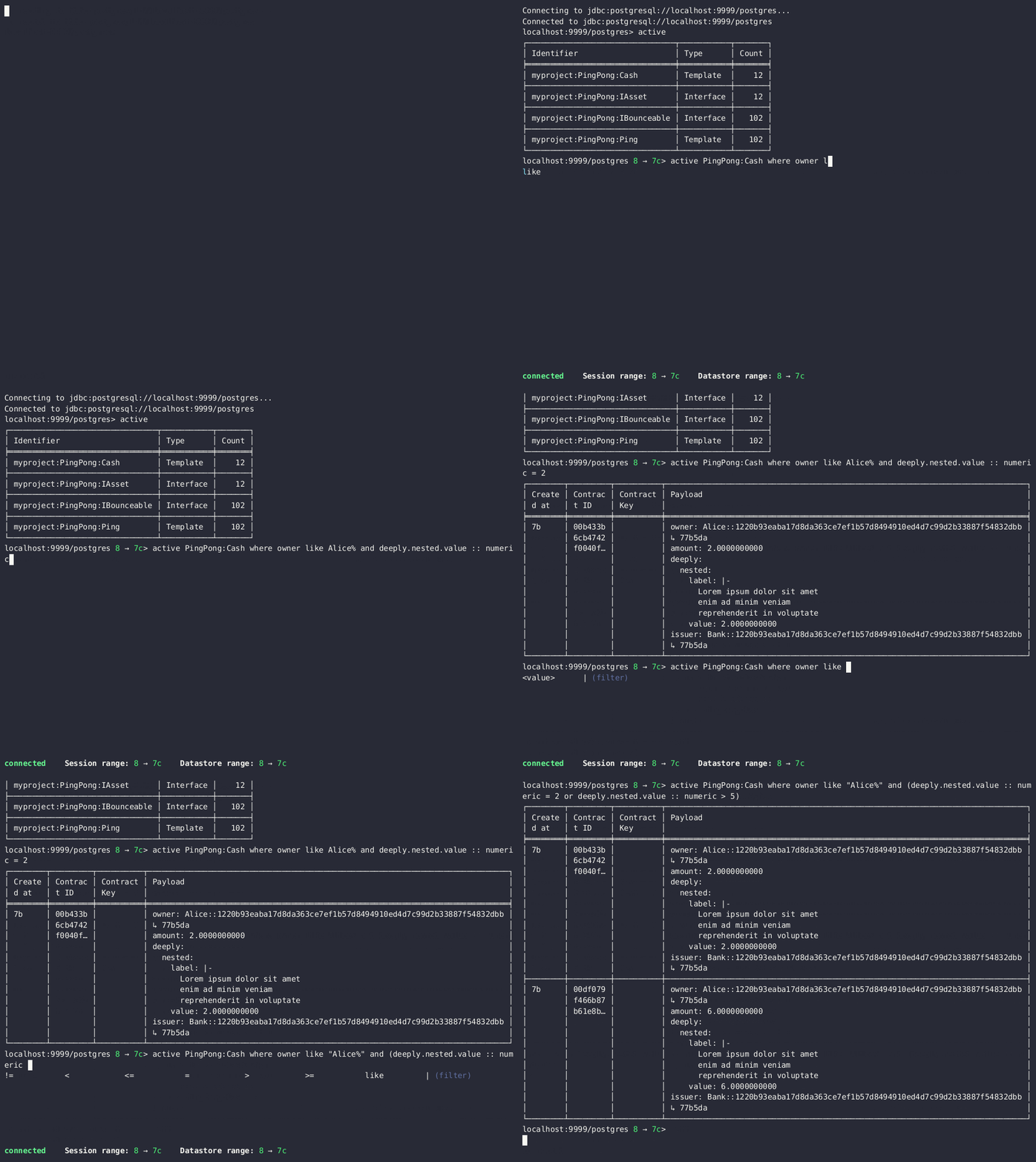
To refine your queries when listing contracts, you can use `where` clauses to filter on specific payload fields. The `where` clauses use a SQL-like syntax for conditionals and are supported for the `active`, `creates`, `archives`, and `exercises` commands.
To access nested fields, use dot notation: `parent.child.value`
#### Comparison operators
* `=` Equal to
* `!=` Not equal to
* `>` Greater than
* `>=` Greater than or equal to
* `<` Less than
* `<=` Less than or equal to
* `like` Used for pattern matching, `%` serves as a wildcard character
#### Logical operators
* `and`: Both conditions must be satisfied
* `or`: Either condition may be satisfied
You can use parentheses to group conditions and direct the order of evaluation.
#### Type casting
To ensure proper comparison, you can optionally cast fields to a specific type using the `::` operator. The available casting types are `numeric`, `timestamp`, and `text`.
Field values are sorted and compared lexicographically if no cast is specified.
#### `where` clause examples
Here are some examples of how to use `where` clauses in commands:
* Filter by a string pattern:
```text theme={"theme":{"light":"github-light","dark":"github-dark"}}
> active where owner like Alice%
```
Lists contracts where the `owner` field starts with the string `Alice`.
* Filter by a nested numeric field:
```text theme={"theme":{"light":"github-light","dark":"github-dark"}}
> active where deeply.nested.value :: numeric > 1000
```
Lists contracts where the nested field `value` is greater than `1000`.
* Filter with exact string match (note the use of double quotes):
```text theme={"theme":{"light":"github-light","dark":"github-dark"}}
> active where label = "loren ipsum"
```
Lists contracts where the label field is exactly `loren ipsum`. Use double quotes with values that contain whitespace characters.
* Combine different conditions:
```text theme={"theme":{"light":"github-light","dark":"github-dark"}}
> active where (owner like Bob% or value :: numeric < 100) and myfield = myvalue
```
Lists contracts where the `owner` starts with `Bob` or the `value` is less than `100`, and `myfield` is `myvalue`.
#### Look up an exercise
Exercised choices can be looked up in the same manner as contracts, except that exercises are looked up by their event ID rather than by a contract ID. The commands for summaries and lookups mirror the functionality available for contracts.
For example, you can look up exercise counts by FQN:
```text theme={"theme":{"light":"github-light","dark":"github-dark"}}
> exercises
┌─────────────────────────────────────────────────┬───────────────┬───────┐
│ Identifier │ Type │ Count │
╞═════════════════════════════════════════════════╪═══════════════╪═══════╡
│ myproject:PingPong:AcceptIAssetTransferProposal │ Consuming │ 12 │
├─────────────────────────────────────────────────┼───────────────┼───────┤
│ myproject:PingPong:ChangeLabel │ Consuming │ 1 │
├─────────────────────────────────────────────────┼───────────────┼───────┤
│ myproject:PingPong:Copy │ Non-consuming │ 1 │
└─────────────────────────────────────────────────┴───────────────┴───────┘
```
You can look up exercises for a specific choice:
```text theme={"theme":{"light":"github-light","dark":"github-dark"}}
> exercises PingPong:AcceptIAssetTransferProposal
┌────────┬───────────────────────┬──────────┬────────────────────────────────────────────────────────────────────────────────────────────────────────────────────────────────────────────┐
│ Offset │ Contract ID │ Argument │ Result │
╞════════╪═══════════════════════╪══════════╪════════════════════════════════════════════════════════════════════════════════════════════════════════════════════════════════════════════╡
│ 31 │ 00604362bf43678ba849… │ │ 004ddbb65e00c8210d978fa13503d877e33d3d83dccc0addea759db1063c089412ca0212205b8a98e1b219436a3a6744eb314e20539b349d61dc09f5e23d880e95b2a1c199 │
├────────┼───────────────────────┼──────────┼────────────────────────────────────────────────────────────────────────────────────────────────────────────────────────────────────────────┤
│ 31 │ 00549232a251254b6115… │ │ 00b433b6cb4742f0040f9bab57b809dd478d6a73deeaf08ecdd3c30e2be77d98d1ca021220123f4cad1ba5121fa22e43b83ab4c80c0649f51e8a7e776e01b78bc27544cd02 │
├────────┼───────────────────────┼──────────┼────────────────────────────────────────────────────────────────────────────────────────────────────────────────────────────────────────────┤
│ 31 │ 0063bdaacd598bf2c02f… │ │ 005e908b45701072ed4d0dcf30b9b7b6b233278208078d803edf5fd4502872ce7bca0212201bfb6b375d7fa31a4019ade973a948db52c36ba2a5a239a2d909d12e2ef12968 │
├────────┼───────────────────────┼──────────┼────────────────────────────────────────────────────────────────────────────────────────────────────────────────────────────────────────────┤
│ 31 │ 00ed039a7747337ddb85… │ │ 005d921fd715007edbbb1b2dfffe56c7d37ba4b6698bdf1357b68749038b3817dcca021220dc08f48d759037f776289c06ae409955f4a2475b3cd0238c3fb5d74da5254e3e │
├────────┼───────────────────────┼──────────┼────────────────────────────────────────────────────────────────────────────────────────────────────────────────────────────────────────────┤
│ 31 │ 001207f682120f4798ce… │ │ 00dbe9c12a7ae28f8d12f334ddf9d09bea95a1d55d6a3816f5da5079c71ceb0450ca021220cee4ff410b0e4289301eedeecd82df9f1014796a68c1d4549b8bd72e18464220 │
├────────┼───────────────────────┼──────────┼────────────────────────────────────────────────────────────────────────────────────────────────────────────────────────────────────────────┤
│ 31 │ 00d5e4f15c3d07cb0785… │ │ 00df079f466b87b61e8b5a6702e6f5b05fecba05513a5559b1b400e4c89903f277ca02122000bcac7e924d0489d144b245c16ba1c95c20a9c293e59dd9290b94df77742a92 │
├────────┼───────────────────────┼──────────┼────────────────────────────────────────────────────────────────────────────────────────────────────────────────────────────────────────────┤
│ 32 │ 004dc3561fc426de4dad… │ │ 005e1f271e5f5d7a39e623f0774b11cc9295d59693fa53d9953aed726f40e03a81ca021220053c09a2f248902fc48c09492e7fd38c8cf25beacdb803f1ad51444af38bb51c │
├────────┼───────────────────────┼──────────┼────────────────────────────────────────────────────────────────────────────────────────────────────────────────────────────────────────────┤
│ 32 │ 00ae24d6c2286768a7b2… │ │ 0059352a66da47b5def7e0653f229dbbb797be70d0485792101fe9aad10f396e70ca021220343d49011f6038af41f3e99792fb318e17ce5ab3227660c932f8043aacfed2bf │
├────────┼───────────────────────┼──────────┼────────────────────────────────────────────────────────────────────────────────────────────────────────────────────────────────────────────┤
│ 32 │ 000f02cbb781f76c1877… │ │ 0089b90df5e7085ddb05110eccc9d684e86b96631ff74688ac3f6298cde5f92208ca021220e72fc065a90368000388e41dd8be0672a1078e3329346780e9afb353be100c31 │
├────────┼───────────────────────┼──────────┼────────────────────────────────────────────────────────────────────────────────────────────────────────────────────────────────────────────┤
│ 32 │ 00126b6f770fb951d666… │ │ 00e9e74240297251e4f9274519ec2cd421fb647af88c13d38bba5f67c67a0f90ffca021220ce3fb55a64f86094dc5fa32e509443ce903fc7f28b2a152a732471819eb56491 │
├────────┼───────────────────────┼──────────┼────────────────────────────────────────────────────────────────────────────────────────────────────────────────────────────────────────────┤
│ 32 │ 00ab4ff0b42c625d45c5… │ │ 001c00a896e1e66bdb1acbcdeda5f4e00d8a6131c6a86a672809d9831e857ea2e3ca02122001b6efc6e449a2116bc73e333575eaa4dfcaa69be0655ffd3f4eb5b2777960d2 │
├────────┼───────────────────────┼──────────┼────────────────────────────────────────────────────────────────────────────────────────────────────────────────────────────────────────────┤
│ 32 │ 0020ab2446d6cfc3f93f… │ │ 00a936fa54cc6fba294962b6fd6c639947f220ab4539c73b6c5c693522e5c5364aca021220104bc750d4800053c090d5b447a6c49d9a49911a4f654fa72c58650b3348e735 │
└────────┴───────────────────────┴──────────┴────────────────────────────────────────────────────────────────────────────────────────────────────────────────────────────────────────────┘
```
To look up individual exercises, use the event ID:
```text theme={"theme":{"light":"github-light","dark":"github-dark"}}
> exercise #43:0
╓──────────────╥────────────────────────────────────────────────────────────────────────────────────────────────────────────────────────────────────────────╖
║ Event ID ║ #43:0 ║
╟──────────────╫────────────────────────────────────────────────────────────────────────────────────────────────────────────────────────────────────────────╢
║ Choice ║ myproject:PingPong:AcceptIAssetTransferProposal ║
╟──────────────╫────────────────────────────────────────────────────────────────────────────────────────────────────────────────────────────────────────────╢
║ Template FQN ║ myproject:PingPong:IAssetTransferProposal ║
╟──────────────╫────────────────────────────────────────────────────────────────────────────────────────────────────────────────────────────────────────────╢
║ Contract ID ║ 00d5e4f15c3d07cb0785… ║
╟──────────────╫────────────────────────────────────────────────────────────────────────────────────────────────────────────────────────────────────────────╢
║ Offset ║ 43 ║
╟──────────────╫────────────────────────────────────────────────────────────────────────────────────────────────────────────────────────────────────────────╢
║ Consuming ║ true ║
╟──────────────╫────────────────────────────────────────────────────────────────────────────────────────────────────────────────────────────────────────────╢
║ Last ║ 3 ║
║ Descendant ║ ║
║ Node ID ║ ║
╟──────────────╫────────────────────────────────────────────────────────────────────────────────────────────────────────────────────────────────────────────╢
║ Argument ║ ║
╟──────────────╫────────────────────────────────────────────────────────────────────────────────────────────────────────────────────────────────────────────╢
║ Result ║ 00df079f466b87b61e8b5a6702e6f5b05fecba05513a5559b1b400e4c89903f277ca02122000bcac7e924d0489d144b245c16ba1c95c20a9c293e59dd9290b94df77742a92 ║
╙──────────────╨────────────────────────────────────────────────────────────────────────────────────────────────────────────────────────────────────────────╜
```
#### Refining and filtering your queries
### Filtering with `where` clauses
To refine your queries when listing contracts, you can use `where` clauses to filter on specific payload fields. The `where` clauses use a SQL-like syntax for conditionals and are supported for the `active`, `creates`, `archives`, and `exercises` commands.
To access nested fields, use dot notation: `parent.child.value`
#### Comparison operators
* `=` Equal to
* `!=` Not equal to
* `>` Greater than
* `>=` Greater than or equal to
* `<` Less than
* `<=` Less than or equal to
* `like` Used for pattern matching, `%` serves as a wildcard character
#### Logical operators
* `and`: Both conditions must be satisfied
* `or`: Either condition may be satisfied
You can use parentheses to group conditions and direct the order of evaluation.
#### Type casting
To ensure proper comparison, you can optionally cast fields to a specific type using the `::` operator. The available casting types are `numeric`, `timestamp`, and `text`.
Field values are sorted and compared lexicographically if no cast is specified.
#### `where` clause examples
Here are some examples of how to use `where` clauses in commands:
* Filter by a string pattern:
```text theme={"theme":{"light":"github-light","dark":"github-dark"}}
> active where owner like Alice%
```
Lists contracts where the `owner` field starts with the string `Alice`.
* Filter by a nested numeric field:
```text theme={"theme":{"light":"github-light","dark":"github-dark"}}
> active where deeply.nested.value :: numeric > 1000
```
Lists contracts where the nested field `value` is greater than `1000`.
* Filter with exact string match (note the use of double quotes):
```text theme={"theme":{"light":"github-light","dark":"github-dark"}}
> active where label = "loren ipsum"
```
Lists contracts where the label field is exactly `loren ipsum`. Use double quotes with values that contain whitespace characters.
* Combine different conditions:
```text theme={"theme":{"light":"github-light","dark":"github-dark"}}
> active where (owner like Bob% or value :: numeric < 100) and myfield = myvalue
```
Lists contracts where the `owner` starts with `Bob` or the `value` is less than `100`, and `myfield` is `myvalue`.
 #### Setting offset bounds
The output of `creates [
#### Setting offset bounds
The output of `creates [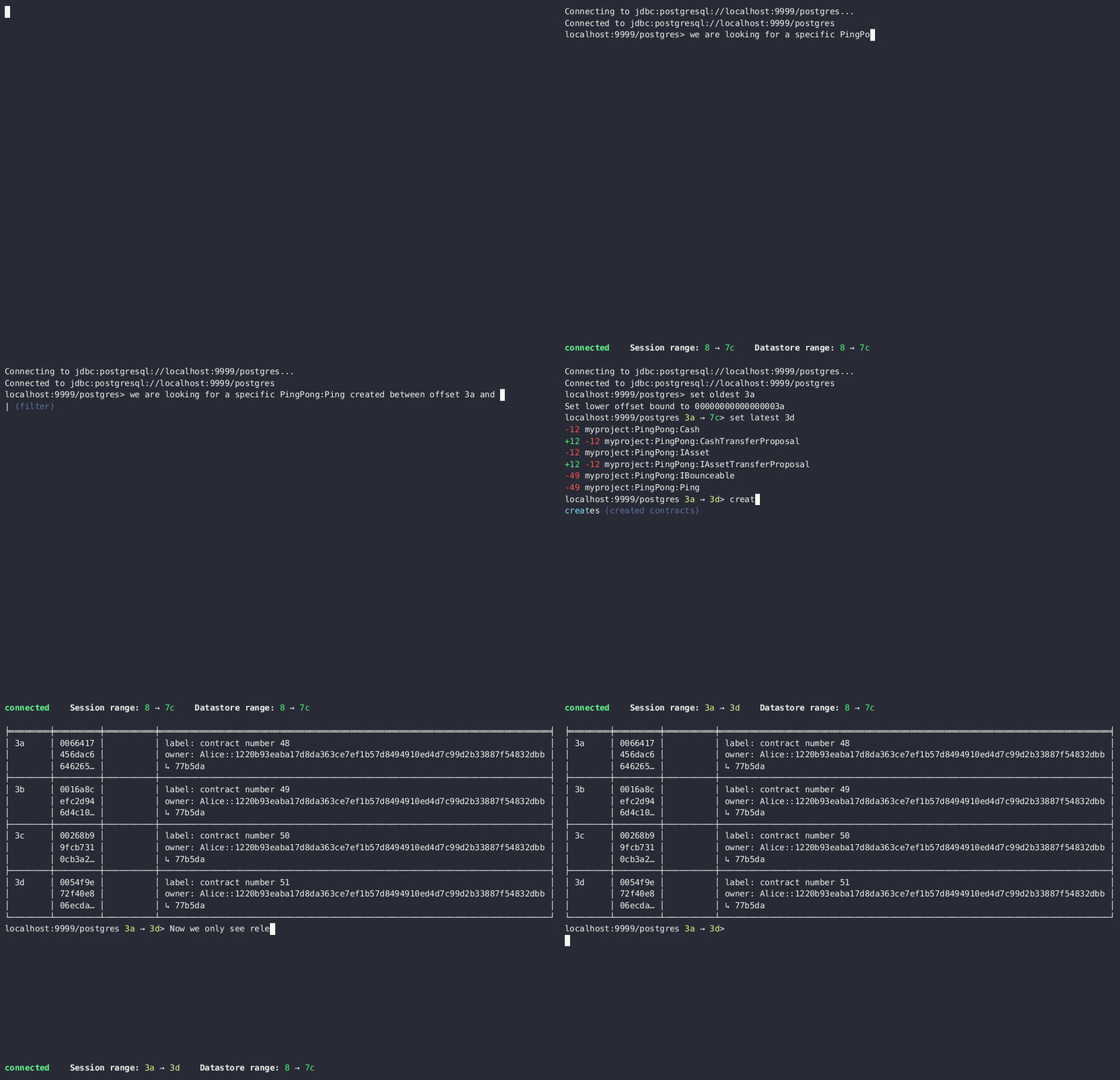 #### Finding transactions that created or archived a contract
Once you know the offsets that a contract was created at (for example, by using the `archives` command), you can look up the relevant transactions using the transaction at command.
#### Transforming and exporting query output
You can convert tabular output to CSV by piping it through the `csv` filter:
```text theme={"theme":{"light":"github-light","dark":"github-dark"}}
> active PingPong:Ping | csv
```
You can then write this output to a file by piping it through the `export` filter:
```text theme={"theme":{"light":"github-light","dark":"github-dark"}}
> active PingPong:Ping | csv | export ~/my_pings.csv
```
The `export` filter writes any command output to the specified file. You can use it without the `csv` filter.
#### Finding transactions that created or archived a contract
Once you know the offsets that a contract was created at (for example, by using the `archives` command), you can look up the relevant transactions using the transaction at command.
#### Transforming and exporting query output
You can convert tabular output to CSV by piping it through the `csv` filter:
```text theme={"theme":{"light":"github-light","dark":"github-dark"}}
> active PingPong:Ping | csv
```
You can then write this output to a file by piping it through the `export` filter:
```text theme={"theme":{"light":"github-light","dark":"github-dark"}}
> active PingPong:Ping | csv | export ~/my_pings.csv
```
The `export` filter writes any command output to the specified file. You can use it without the `csv` filter.