> ## Documentation Index
> Fetch the complete documentation index at: https://docs.canton.network/llms.txt
> Use this file to discover all available pages before exploring further.
# Splice HTTP APIs
> The HTTP REST APIs exposed by the Scan, Validator, and SV applications
There are two sets of HTTP APIs exposed by Splice applications, as can be seen in the diagram below:
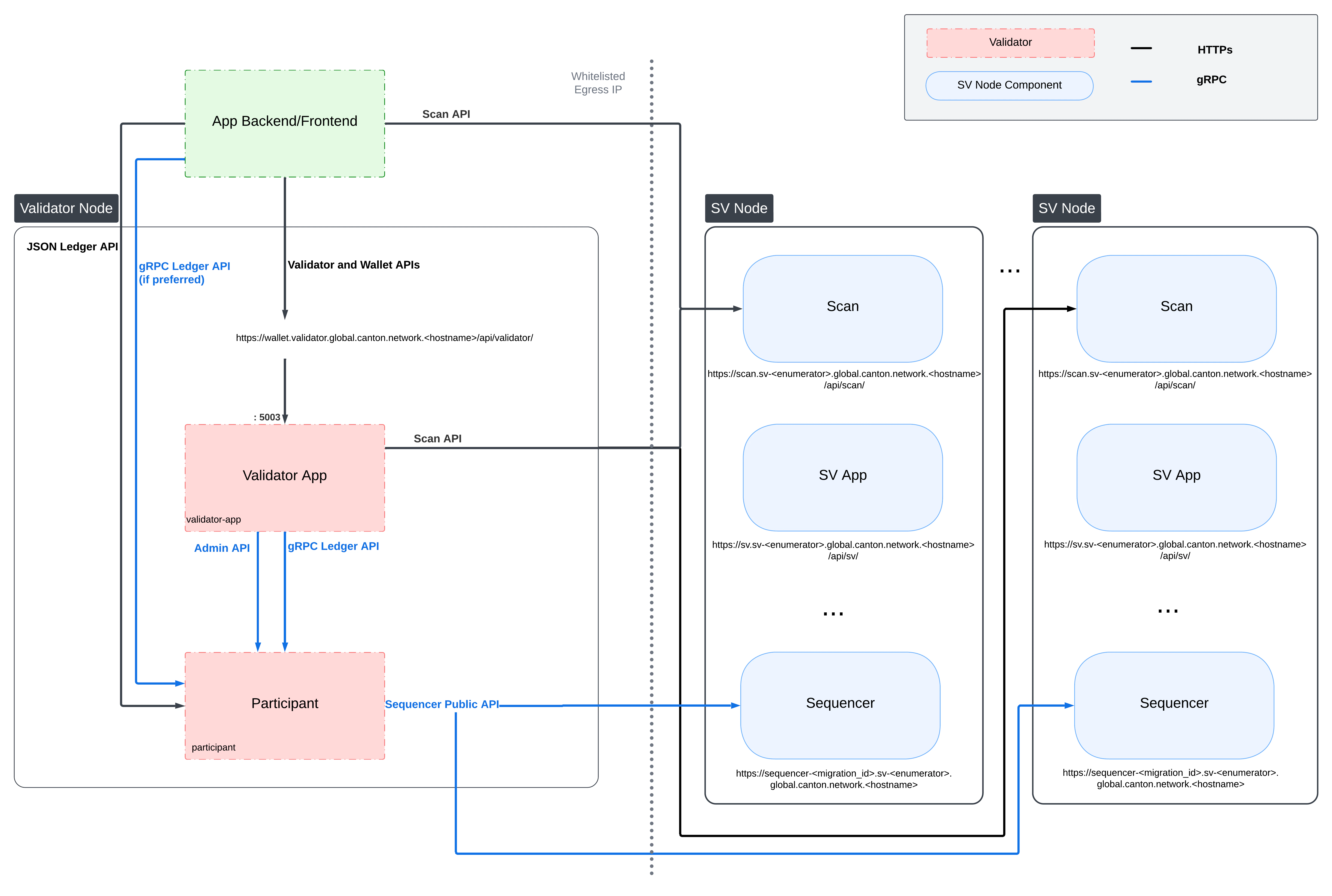 * The [app\_dev\_scan\_api](/sdks-tools/api-reference/splice-scan-api) are exposed by the Scan App of SV nodes and provides access to the view of the ledger and its infrastructure as seen by all SV Nodes. Use [https://sync.global/sv-network/](https://sync.global/sv-network/) to discover the Scan API URLs for DevNet, TestNet, and MainNet.
* The [app\_dev\_validator\_api](/sdks-tools/api-reference/splice-validator-api) are exposed by the Validator App of a Validator Node and serves to manage the Validator Node and the Splice Wallets of parties hosted locally on the Validator Node.
The Ledger API is not part of Splice, and thus not documented here. See `app_dev_ledger_api` for details on how to use the Ledger API.
Some of the Splice apps also define additional HTTP APIs that are considered internal and are subject to change without notice. If you do need some of them for your app, please create an issue on [https://github.com/canton-network/splice](https://github.com/canton-network/splice), so that you can align with the Splice team on the API, your needs, and the required stability guarantees.
## OpenAPI Conventions
The HTTP APIs of Splice apps are documented using [OpenAPI specifications](https://www.openapis.org/). You can download the OpenAPI specification for Splice's applications here: Download OpenAPI specs (DevNet 0.6.9).
The HTTP APIs of Splice apps are documented using [OpenAPI specifications](https://www.openapis.org/). You can download the OpenAPI specification for Splice's applications here: Download OpenAPI specs (TestNet 0.6.8).
The HTTP APIs of Splice apps are documented using [OpenAPI specifications](https://www.openapis.org/). You can download the OpenAPI specification for Splice's applications here: Download OpenAPI specs (MainNet 0.6.7).
### API Stability
Endpoints in the files named `APP-external` are intended for external consumption and are intended to stay backwards compatible across releases. At this point, there might be some cases where backwards compatibility is broken as we are still in early stages of development. Any breaking changes in `external` APIs will be documented in the release notes.
Endpoints in the files named `APP-internal` do not have any backwards compatibility guarantees.
### Contract Payload Encoding
The `Contract` schema defined in `common.yaml` includes the `payload` of the given contract. This payload is encoded using the same [schema used by the HTTP JSON API](/appdev/modules/m4-sdks-apis#json-api).
## Authentication
Accessing Splice App APIs requires a JWT of the form:
```json theme={"theme":{"light":"github-light","dark":"github-dark"}}
{
"sub": "ledgerApiUserId",
"aud": "audience-of-app"
}
```
The subject must be the ledger API user requests should be submitted at, e.g., if you want to operate as the validator operator this is the `ledger-api-user` configured in your validator config.
The audience must be the audience specified in the `auth` section of your app. The token must be signed with the specified algorithm and configuration.
E.g., for the config below the audience must be `https://example.com` and it must be signed with an RS256 key that is found at the given [JWKS URL](https://datatracker.ietf.org/doc/html/rfc7517).
```
canton {
validator-apps {
validator {
auth {
audience = "https://example.com"
algorithm = "rs-256"
jwks-url = "https://example.com/.well-known/jwks.json"
}
...
}
}
}
```
The token must be passed as an [OAuth2 Bearer token](https://datatracker.ietf.org/doc/html/rfc6750#section-2.1), i.e., in an Authorization header of the form:
```
Authorization: Bearer yourtoken
```
Requests always operate on the primary party of the user specified as the subject in the token.
## Port Configuration
All Splice apps expose HTTP APIs, which are typically served by a reverse proxy on a well-known URL.
In case you do need to access them directly, their port is configured under `admin-api.port`, e.g., this config file would expose the validator API on port 5003:
```
canton {
validator-apps {
validator {
admin-api.port = 5003
...
}
}
}
```
* The [app\_dev\_scan\_api](/sdks-tools/api-reference/splice-scan-api) are exposed by the Scan App of SV nodes and provides access to the view of the ledger and its infrastructure as seen by all SV Nodes. Use [https://sync.global/sv-network/](https://sync.global/sv-network/) to discover the Scan API URLs for DevNet, TestNet, and MainNet.
* The [app\_dev\_validator\_api](/sdks-tools/api-reference/splice-validator-api) are exposed by the Validator App of a Validator Node and serves to manage the Validator Node and the Splice Wallets of parties hosted locally on the Validator Node.
The Ledger API is not part of Splice, and thus not documented here. See `app_dev_ledger_api` for details on how to use the Ledger API.
Some of the Splice apps also define additional HTTP APIs that are considered internal and are subject to change without notice. If you do need some of them for your app, please create an issue on [https://github.com/canton-network/splice](https://github.com/canton-network/splice), so that you can align with the Splice team on the API, your needs, and the required stability guarantees.
## OpenAPI Conventions
The HTTP APIs of Splice apps are documented using [OpenAPI specifications](https://www.openapis.org/). You can download the OpenAPI specification for Splice's applications here: Download OpenAPI specs (DevNet 0.6.9).
The HTTP APIs of Splice apps are documented using [OpenAPI specifications](https://www.openapis.org/). You can download the OpenAPI specification for Splice's applications here: Download OpenAPI specs (TestNet 0.6.8).
The HTTP APIs of Splice apps are documented using [OpenAPI specifications](https://www.openapis.org/). You can download the OpenAPI specification for Splice's applications here: Download OpenAPI specs (MainNet 0.6.7).
### API Stability
Endpoints in the files named `APP-external` are intended for external consumption and are intended to stay backwards compatible across releases. At this point, there might be some cases where backwards compatibility is broken as we are still in early stages of development. Any breaking changes in `external` APIs will be documented in the release notes.
Endpoints in the files named `APP-internal` do not have any backwards compatibility guarantees.
### Contract Payload Encoding
The `Contract` schema defined in `common.yaml` includes the `payload` of the given contract. This payload is encoded using the same [schema used by the HTTP JSON API](/appdev/modules/m4-sdks-apis#json-api).
## Authentication
Accessing Splice App APIs requires a JWT of the form:
```json theme={"theme":{"light":"github-light","dark":"github-dark"}}
{
"sub": "ledgerApiUserId",
"aud": "audience-of-app"
}
```
The subject must be the ledger API user requests should be submitted at, e.g., if you want to operate as the validator operator this is the `ledger-api-user` configured in your validator config.
The audience must be the audience specified in the `auth` section of your app. The token must be signed with the specified algorithm and configuration.
E.g., for the config below the audience must be `https://example.com` and it must be signed with an RS256 key that is found at the given [JWKS URL](https://datatracker.ietf.org/doc/html/rfc7517).
```
canton {
validator-apps {
validator {
auth {
audience = "https://example.com"
algorithm = "rs-256"
jwks-url = "https://example.com/.well-known/jwks.json"
}
...
}
}
}
```
The token must be passed as an [OAuth2 Bearer token](https://datatracker.ietf.org/doc/html/rfc6750#section-2.1), i.e., in an Authorization header of the form:
```
Authorization: Bearer yourtoken
```
Requests always operate on the primary party of the user specified as the subject in the token.
## Port Configuration
All Splice apps expose HTTP APIs, which are typically served by a reverse proxy on a well-known URL.
In case you do need to access them directly, their port is configured under `admin-api.port`, e.g., this config file would expose the validator API on port 5003:
```
canton {
validator-apps {
validator {
admin-api.port = 5003
...
}
}
}
```